


Inspiring
October 11, 2023
Answered

Selection tool to drag the square up no longer moves view of your video tracks upwards

  • October 11, 2023
  • 3 replies
  • 1181 views

(TLDR; watch the attached video file for an easier understanding of my problem)

In Premiere 2020 which I have been using because of this "bug" or removed feature, you were able to click and hold on the timeline with your selection tool to "draw" a square selection.


I edit with over 7 video tracks, and not all of them are visible because I have so many; so what the selection tool used to do when "drawing" a square upwards (and out of the view) is that it would essentially do the same that it does if you scroll up on the track (so it'd make V1, V2, V3 which were in view, go out of view and show V4, V5, V6 for example)

In the video I have attached, I'm trying to show you what I mean. Please tell me this is a bug or that I am missing some settings to allow it 😞 Why would this only work on the audio track and no longer the video track????
This topic has been closed for replies.
Correct answer andrèk80831531

I'm still having the issue 1 year later. So my @$$ if they're going to "try fix it as soon as possible".
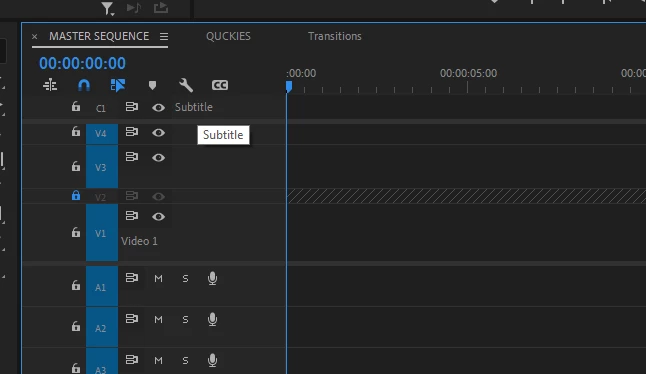
The only crappy workaround is adding a subtitle track to your sequence (see picture)

It's unbelievable that it's still not fixed 1 year after..

3 replies

Participant
October 26, 2024

Same exact problem. Driving me nuts.


andrèk80831531AuthorCorrect answer
Inspiring
October 26, 2024

I'm still having the issue 1 year later. So my @$$ if they're going to "try fix it as soon as possible".
The only crappy workaround is adding a subtitle track to your sequence (see picture)

It's unbelievable that it's still not fixed 1 year after..

Inspiring
October 26, 2024

I meant "Captions Track". You add it by going to Window->Workspaces->Captions and Tracks
And then on the new window that opens, click "Captions" and then "Create new captions track"


(This is the crappy workaround to fix the issue)

Community Manager
October 12, 2023

Hi andrèk80831531,


Sorry about the poor experience. We're able to reproduce this at our end & will try our best to get this addressed as soon as possible.

Thanks for bringing this to our notice.


-Sumeet

Inspiring
October 12, 2023

Can't wait for a fix, it has been bothering me a lot more than it should.
Looking forward to finally being able to use newer versions and not sticking with a 2020 version of Premiere.

Inspiring
November 16, 2023

2 updates or so later, still not fixed :(...

Inspiring
October 11, 2023

And here I am doing the same thing in Premiere 2020, where you can see that it works the way I want.
Premiere 2023/2024 does not work, like shown in the main post video.

I want it to work like it did in 2020 because of how much easier it is to use while editing for me.