Inspiring
June 22, 2022
Answered

Autonumber "start at 1" works Online, but not always with PDF output

  • June 22, 2022
  • 4 replies
  • 563 views

I am using the "autonumber" feature (in RH 2020.7.46) which works nicely for the web/online version (Frameless Studio). Numbering starts at 1, or (a) in this case ....
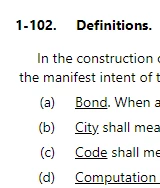
 

However, the PDF output is hit-and-miss.  For example, the above portion in PDF output looks like this...
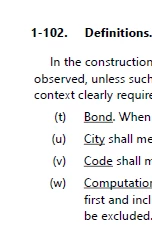
It's picking up from a previous autonumber list (in a different topic and section, that ended in (s) ).  Sometimes PDF autonumbering "start at 1" works properly, but not always as you can see above.

Am I missing something? or is this probably an error that Adobe needs to fix?



    This topic has been closed for replies.
    Correct answer Peter Grainge

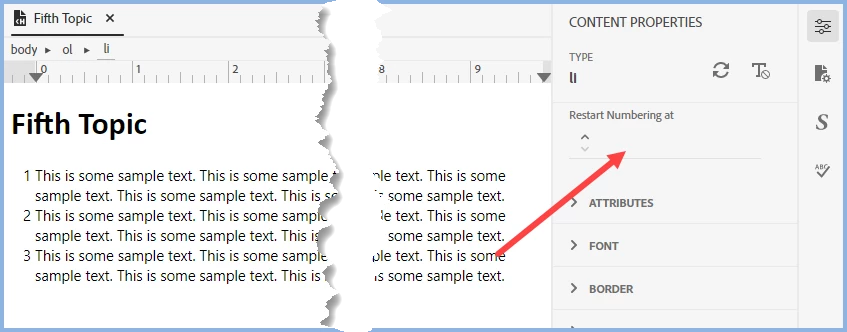
    As you can see, this list starts at 1. What I am suggesting is you enter 1 where shown. I am hoping it will force the numbering in PDF output.


    ________________________________________________________

    My site www.grainge.org includes many free Authoring and RoboHelp resources that may be of help.


    4 replies

    Peter Grainge
    Community Expert
    Peter GraingeCommunity ExpertCorrect answer
    Community Expert
    June 23, 2022

    As you can see, this list starts at 1. What I am suggesting is you enter 1 where shown. I am hoping it will force the numbering in PDF output.


    ________________________________________________________

    My site www.grainge.org includes many free Authoring and RoboHelp resources that may be of help.


    Use the menu (bottom right) to mark the Best Answer or Highlight particularly useful replies. Found the answer elsewhere? Share it here.
    Inspiring
    June 23, 2022

    That seems to be working!  I hadn't noticed the manual autonumber setting there before.  Thanks Peter!

    Peter Grainge
    Community Expert
    Community Expert
    June 23, 2022

    Presumably in the first list in a topic you do not set it to start at 1 as it shows as 1 and that works in online outputs.


    Try settting a first list to 1 in a topic and see what happens.

    ________________________________________________________

    My site www.grainge.org includes many free Authoring and RoboHelp resources that may be of help.


    Use the menu (bottom right) to mark the Best Answer or Highlight particularly useful replies. Found the answer elsewhere? Share it here.
    Inspiring
    June 23, 2022

    All of my autonumber lists use the same CSS style (where I set each list to start with 1).  

    This correctly shows up in my content authoring view, and in the Online output.  It only fails in the PDF output.

    I'm not sure what you mean by "Try settting a first list to 1 in a topic" since the CSS style already is telling it to start with 1. 


    Peter Grainge
    Community Expert
    Community Expert
    June 23, 2022

    Do you mean sometimes your example works and sometimes not or some instances work and others do not?

    ________________________________________________________

    My site www.grainge.org includes many free Authoring and RoboHelp resources that may be of help.


    Use the menu (bottom right) to mark the Best Answer or Highlight particularly useful replies. Found the answer elsewhere? Share it here.
    Inspiring
    June 23, 2022

    Looking through the PDF output, I see this consistent problem...

    The FIRST autonumber list in each TOPIC does not start at 1.  Instead, the first list continues numbering from the last autonumber list in the previous topic. All subsequent autonumber lists in that topic correctly start at 1.

    (And, it does not matter if the previous topic is in the same folder or in the previous folder.)


    Community Expert
    June 23, 2022

    I feel like I remember a thread on here about some problems with numbering in PDF output, but I can't currently find it. It might be worth doing a search to see if you have more luck.


    Peter knows more about autonumbering than me so he might have some suggestions when he's next available (I think he's away right now).