


Inside Borders in Tables are Disappearing (RH10)
So... I created a table style (_FIELD_Defs) - twice now.... and it looks fine the first go 'round. However, if I insert a new table and apply that same style, the inside borders disappear. What am I doing wrong? This is the first time I have seen this happening with this table. Pleeeze HELP!
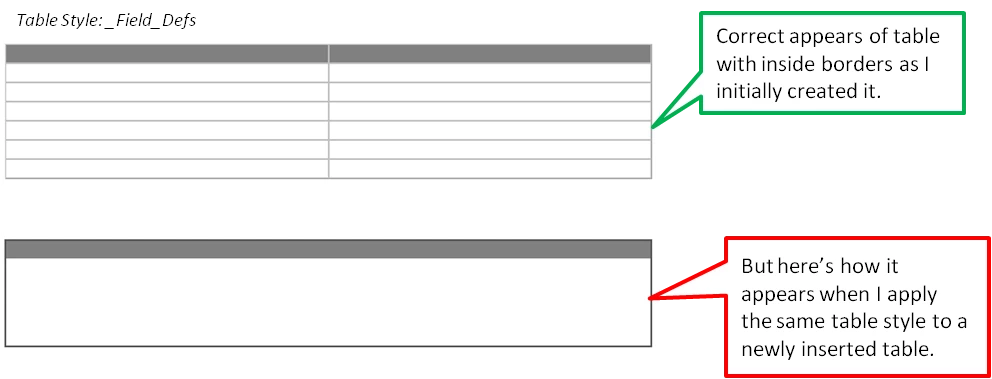
table.Field_Defs td.t1st {
border-left-style: Solid;
border-left-width: 1px;
border-right-style: Solid;
border-right-width: 1px;
border-top-style: Solid;
border-top-width: 1px;
border-bottom-style: Solid;
border-bottom-width: 1px;
}
table._FIELD_Defs {
x-1st-row: 1;
x-1st-row-name: t1st;
border-left-style: Solid;
border-right-style: Solid;
border-top-style: Solid;
border-bottom-style: Solid;
border-left-width: 1px;
border-right-width: 1px;
border-top-width: 1px;
border-bottom-width: 1px;
border-left-color: #565656;
border-right-color: #565656;
border-top-color: #565656;
border-bottom-color: #565656;
x-1st-col: 1;
x-1st-col-name: t1st;
x-last-col: 1;
x-last-col-name: last;
x-border-spacing: 0px;
}
table._FIELD_Defs tr.t1st td {
font-family: Arial;
font-size: 10pt;
background-color: #808080;
color: #ffffff;
font-weight: bold;
font-style: italic;
}
table._FIELD_Defs td.t1st {
font-family: Arial;
font-size: 10pt;
border-right-style: ;
border-right-width: .5px;
border-right-color: #808080;
}
table._FIELD_Defs td.last {
font-family: Arial;
font-size: 10pt;
border-left-style: ;
border-left-width: ;
border-left-color: #808080;
}
table._FIELD_Defs td {
padding-left: 3px;
padding-right: 3px;
padding-top: 2px;
padding-bottom: 0px;
 AdChoices