Jared Hess
Legend
October 7, 2011
解決済み

Post RH 9 Upgrade - Dropdown Links (dropspots) Broken in Output Htms & Footer Missing

  • October 7, 2011
  • 返信数 1.
  • 1013 ビュー

We upgraded to RH 9 a couple of of months ago. I've noticed that the drop down links in my generated output do not work in our core project (largest and most problematic). Outputs are currently HtmlHelp and WebHelp.

I understand why it's not working, I'm not not sure what's causing RH to do it on this project or how to fix it. It doesn't seem to be happening in other smaller projects we have.

Here's a code view on Notepad++ showing what's happening. On the left is the output code, on the right is RH's code:
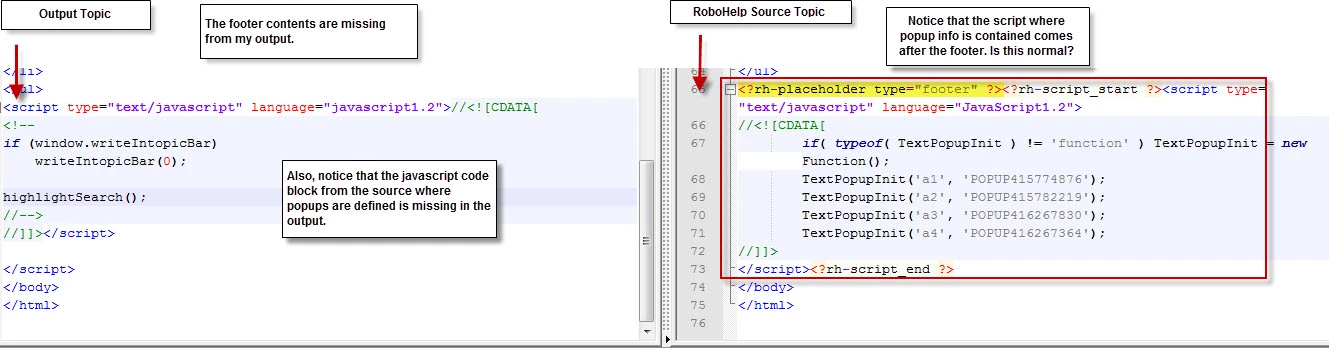
Footer info is also missing from my ouptut htms.

When I preview the topic (CTRL + W) inside RH, everything works fine (which is why I didn't notice this at first).

Any ideas on getting RH to include my footer and drop-down links again?

Many thanks!

    このトピックへの返信は締め切られました。
    解決に役立った回答 Jared Hess

    I think I found the culprit. Turns out my master page in my Core project appears to be causing this.

    I removed my master page/template (Standard.htt) so that there's no footer, and after recompiling the drop-down links worked as expected.

    I'm currently troubleshooting to locate why the same template worked fine inside of my CoreTest project.


    I fixed the problem.

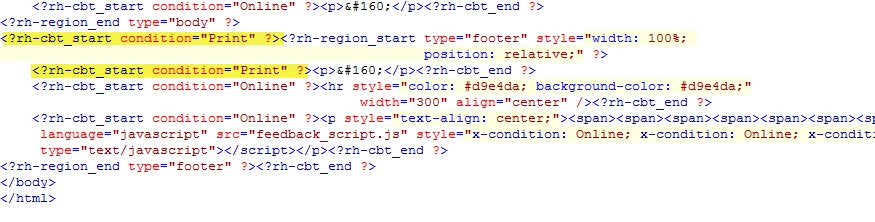
    It turns out some rogue conditional print build tags somehow ended up in the footer of the master page. Our master page should only have Online conditional tags. I didn't notice it in the preview window nor in my test project because I wasn't applying any conditional build tags at all in those cases.

    I removed these tags and now things are working as usual. *whew*

    返信数 1

    Peter Grainge
    Community Expert
    Community Expert
    October 8, 2011

    Try Tools > Update DHTML Effects.


    See www.grainge.org for RoboHelp and Authoring tips

    @petergrainge

    Use the menu (bottom right) to mark the Best Answer or Highlight particularly useful replies. Found the answer elsewhere? Share it here.
    Jared Hess
    Jared Hess作成者
    Legend
    October 11, 2011

    Hi Peter. I tried that, but that didn't seem to do anything. Does anyone have any other suggestions?

    Peter Grainge
    Community Expert
    Community Expert
    October 12, 2011

    Have you tried Convert RoboHelp Edited Topics to HTML? Tools > Options.


    See www.grainge.org for RoboHelp and Authoring tips

    @petergrainge

    Use the menu (bottom right) to mark the Best Answer or Highlight particularly useful replies. Found the answer elsewhere? Share it here.