


Known Participant
August 30, 2012
解決済み

RH 9 - Printed documentation: Table of contents is not being generated?

  • August 30, 2012
  • 返信数 1.
  • 908 ビュー

While trying to generate a PDF manual of the chm.project, I adher to the general steps. double click on Printed documentation and in the dialog make sure under Content to select Table of contnets (same as is used in the chm.project). however when i generate the PDF all is swell beside the missing Table of contents??  Same is true for a Word generated one. What am I missing?
このトピックへの返信は締め切られました。
解決に役立った回答 RoboColum_n_

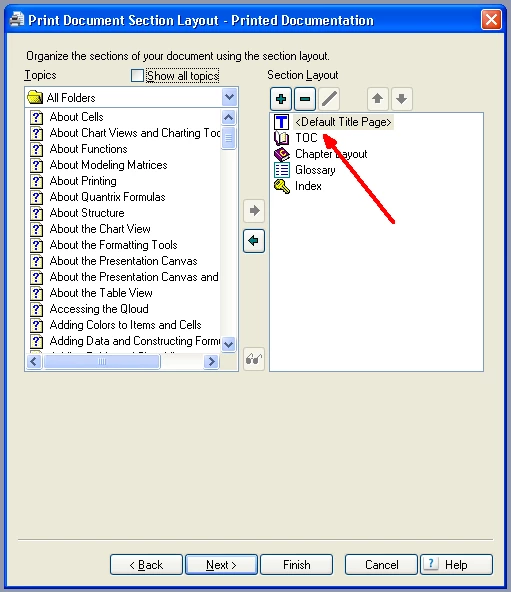
Have you got the TOC in the Section Layout section of your Printed Docs SSL:

返信数 1

RoboColum_n_
RoboColum_n_解決!
Legend
August 30, 2012

Have you got the TOC in the Section Layout section of your Printed Docs SSL:

ErikLykke作成者
Known Participant
August 31, 2012

Heureka! You are abssolutely correct - it was missing. Embarrassing

However a new issue arose. I expected the TOC to provide me with a table of content similar to the one in the project. That is not the case? How do I controll what is displaied?

Peter Grainge
Community Expert
Community Expert
August 31, 2012

Take a look at Printed Documentation on my site, it's all explained there.


See www.grainge.org for RoboHelp and Authoring tips

@petergrainge

Use the menu (bottom right) to mark the Best Answer or Highlight particularly useful replies. Found the answer elsewhere? Share it here.