
Known Participant
December 7, 2020
質問

Upgrade from RoboHelp 10 to RoboHelp 2020 results in broken links in more than half of toppics

  • December 7, 2020
  • 返信数 15.
  • 762 ビュー

I have for many years worked with RoboHelp 10 in one company. We have now been taken over by another company and have finally invested in a newer version: RoboHelp 2020. 


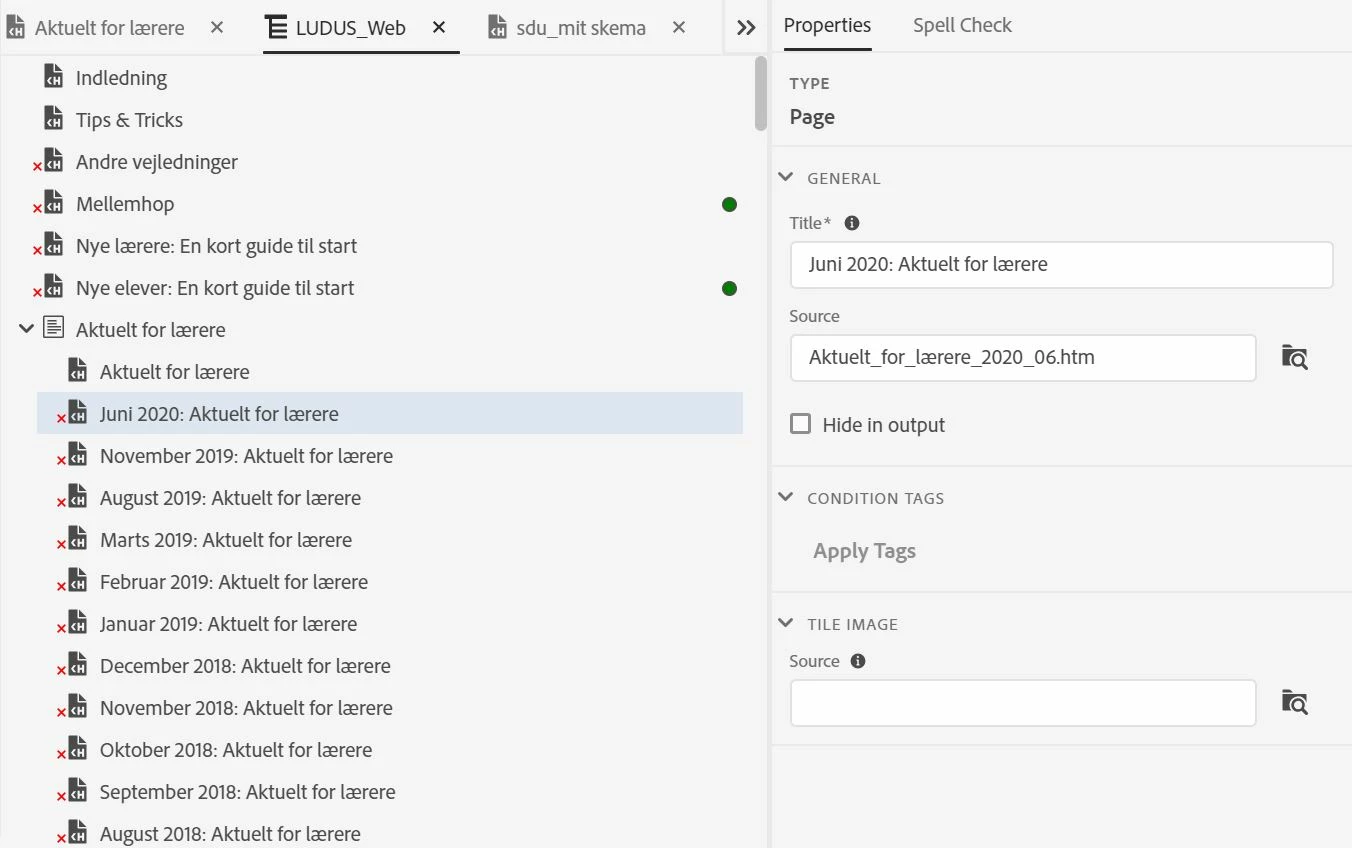
Unfortunately upgrading the project has resulted in extremely many broken topic links. Actually only a few of them have been converted properly. There are about 800 topics needing to get their link fixed and there just MUST be a better way than starting over from scratch. There were no broken links in the project before upgrading. It is only used for online help, not for print.


What can have gone wrong? What can I try to do better?
 

    このトピックへの返信は締め切られました。

    返信数 15

    Peter Grainge
    Community Expert
    Community Expert
    December 9, 2020

    When you import the first topic with links you will see some broken links reported as the target will not have been imported. That is going to continue as you import each topic but it will also fix some links. What I am getting at is I can't see the advantage of your approach.


    I think I would take a screenshot of the TOC or make a copy of the TOC file so that you have something to work from. Then I would trash the TOC and the presets. I think those two things will remove a lot of broken links. Then judge the best way forward.

    ________________________________________________________
    See www.grainge.org for free Authoring and RoboHelp Information

    Use the menu (bottom right) to mark the Best Answer or Highlight particularly useful replies. Found the answer elsewhere? Share it here.
    Known Participant
    December 9, 2020

    I have now decided to start over. The soultion will be to import all of the topic files and recreating the TOC and the conditions manually. Monotonous work, but better than chasing strange errors.

    Thanks to those who tried to help.

    Known Participant
    December 9, 2020

    I am now working my way through importing the files shown in the Broken Link report.

    Unfortunately there are two issues with this procedure (so far):

    1. The report only shows a couple of hundred files at a time. After I add these files, the report shows another set of broken links, and I then continue adding those. So far I have repeated this procedure five times, and the number of red crosses in the TOC is not overwhelming anymore. It seems like the original files are all there now (five of them still appear as broken links, though they are actually present). I intend to fix the TOC by moving the imported topics to the books where they are missing (old language - I have not yet worked with the new user interface.
    2. The Broken Link report shows an increasing number of files from the upgraded project. Is that a problem?
    Community Expert
    December 8, 2020

    You could also try replacing just the root.fpj with a copy from before the corruption. In theory only topics added or deleted since the date of that root.fpj would need to be resolved, but that might involve manually editing the fpj and you might not be comfortable with that.

    Community Expert
    December 8, 2020

    You could try to use the VSS version history to get a working copy from before the root.fpj file was corrupted. Although any changes made after that version would need to be redone (easy enough to get the content using source control, but time consuming to verify which topics need to be updated). So if the corruption happened some time ago, it might be easier just to import the topics and recreate the TOC, Index, etc in a brand new project, as Peter suggested.


    (Also, for anyone following along later, you can remove the source control link from a copy of the project by clicking the Wayback Machine link at the bottom of this thread, then following the instructions to edit the .xpj file. This will remove the link to source control from the copy of the project.
    https://community.adobe.com/t5/robohelp/remove-a-robohelp-project-from-source-control-without-opening-rh/td-p/6330103?page=1


    Don't forget to delete the cpd file before opening the project after making the changes.)

    Peter Grainge
    Community Expert
    Community Expert
    December 8, 2020

    Just to add after opening the project you sent in 2019 Classic and the upgrading to 2020, all topics are missing. That reinforces the issue is the root.fpj file. It would seem importing the missing topics is the only solution although I guess you could try creating folders in RoboHelp 10 and then upgrade. It might be worth a try.

    ________________________________________________________
    See www.grainge.org for free Authoring and RoboHelp Information

    Use the menu (bottom right) to mark the Best Answer or Highlight particularly useful replies. Found the answer elsewhere? Share it here.
    Peter Grainge
    Community Expert
    Community Expert
    December 8, 2020

    The above is not the full reply I posted. Please ignore for now while I edit the reply.


    It has now been edited.

    ________________________________________________________
    See www.grainge.org for free Authoring and RoboHelp Information

    Use the menu (bottom right) to mark the Best Answer or Highlight particularly useful replies. Found the answer elsewhere? Share it here.
    Peter Grainge
    Community Expert
    Community Expert
    December 8, 2020

    I think the problem here is that all your topics and images in Classic are in the root folder. That has never been good practice and is behind the problem here.


    You reported "I have tried upgrading to RoboHelp 2019 Classic. This upgrading process tells that there is a problem with the file root.fpj (actually VSS has reported not being able to check this file in and out)".  That file is a listing of all the files in the project so without that present I expect you got the same problem that I did in Classic, it is showing no files when I tried to open the project in Classic 2019.


    It would seem that the core of the problem is this root.fpj file. What I have found though is if you import the topics that didn't make it through the upgrade process, they are OK in the new version. The Broken Links report lists them for you.


    Importing them will be easier than you are expecting as you can multi-select the files. 


    I suspect the reason behind this working in RoboHelp 10 for you and not upgrading to 2019 Classic for me is somehow linked to source control. When I opened the project you sent in 2019 Classic I got the same root.fpj dialog and I had no option but to tell RoboHelp to stop trying as I could not of course access that. I think if you disconnected a copy from source control you would see the same problem.


    On upgrade the process is I believe looking at the root.fpj file and I suspect that is corrupt. Thus while I see the topics in File Explorer when I extract your zip file and can import them, opening the project in 2019 Classic does not see any of them. I haven't tried upgrading after opening the project in 2019 Classic but I suspect that would be a complete fail.


    Sorry it's not better news.

    ________________________________________________________
    See www.grainge.org for free Authoring and RoboHelp Information

    Use the menu (bottom right) to mark the Best Answer or Highlight particularly useful replies. Found the answer elsewhere? Share it here.
    Peter Grainge
    Community Expert
    Community Expert
    December 8, 2020

    If the topics are missing in the contents panel then the upgrade process is failing somehow. Broken links can occur and we have seen that but I wholesale topics missing is not a known issue.


    What you are upgrading from source control is the project in Classic format, correct?


    Can you share the Classic project?

    • If you can, then see the Contact page on my site and send the project as instructed there. Do make sure you include a link to this thread and please do not email the project direct.
    • If not then I think on this one you will need to try Adobe Support.


    See https://helpx.adobe.com/contact/enterprise-support.other.html#robohelp for your support contact options. If you do go to Support, please post back what the problem was as that will help anyone else who may encounter this. My gut feel is this is somehow related to source control but I don't know how.

    ________________________________________________________
    See www.grainge.org for free Authoring and RoboHelp Information


    Use the menu (bottom right) to mark the Best Answer or Highlight particularly useful replies. Found the answer elsewhere? Share it here.
    Peter Grainge
    Community Expert
    Community Expert
    December 8, 2020

    Output presets.


    Your image of the TOC shows the topics as missing. My last question in my last post was whether the topics are also missing in the contents panel and you haven't answered that. They could show as missing in the TOC but be present in the contents panel if somehow the link got broken.


    I suspect the topics are actually missing and whilst you say the upgrade process changed the write protection, I am doubtful that worked.


    Check out the whole project and then run the upgrade process.

    ________________________________________________________
    See www.grainge.org for free Authoring and RoboHelp Information


    Use the menu (bottom right) to mark the Best Answer or Highlight particularly useful replies. Found the answer elsewhere? Share it here.
    Known Participant
    December 8, 2020

    The topics are missing in the contents panel, too. 

    Checking out everything before copying and ugrading changes nothing.