


Participant
July 6, 2018
質問

When I embed fonts in a PDF, they are still not showing on computers which don't have the fonts installed - please help!

  • July 6, 2018
  • 返信数 3.
  • 1670 ビュー

I am trying to create editable PDFs for my online shop. I need fonts I use in my designs to be embedded for my customers to be able to edit at their leisure.

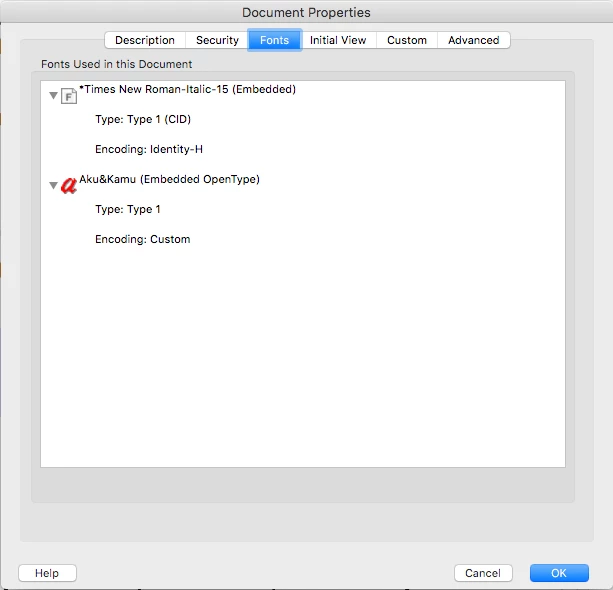
When I embed fonts in a PDF (and making sure they are embedded in preflight and document properties), they are still not showing on computers which don't have the fonts installed - please help!

I have attached screenshot(s) of both proof of the fonts being embedded, and the way they display on my friend's computer (who doesn't have the fonts installed).

このトピックへの返信は締め切られました。

返信数 3

Legend
July 6, 2018

I think you did post that one but we still have only one screen shot. Is that the good or bad screen? And what does the other one look like?

Legend
July 6, 2018

Form fields should work fine, so it would be good to see that screen shot you didn't include.

KayTeh24作成者
Participant
July 6, 2018

Thanks guys!

Sorry about the original photo - I think it was blocked because it contained a cuss word (perhaps?)

Ca you see it on this post? I have scribbled out the cuss word, so hopefully it appears

Karl Heinz  Kremer
Community Expert
Community Expert
July 6, 2018

You have to rethink your approach: This will not work. In order to edit text in a PDF file, you will need the font to be locally installed. Having the font embedded is not sufficient. This is a common misconception, and what you are seeing is exactly what is supposed to happen.

KayTeh24作成者
Participant
July 6, 2018

Is there any specific way you recommend me to go forward with this?
To distribute the design, would I have to package the font to send along with the file to install?

Is this the only way I could do this?

Legend
July 6, 2018

You would need a license from the font maker to do that. Fonts are strictly controlled like software. You would usually have to pay for each copy you packaged. What you describe is just not done.

This assumes you mean actually editing, not form filling. Editing also needs paid-for Acrobat, not the free Reader. You didn't seem to include the "bad" screen shot so we can't know what your friend's computer shows.