Inspiring
June 4, 2018
解決済み

Loss of quality when I Recognize Text in my file

  • June 4, 2018
  • 返信数 2.
  • 9391 ビュー

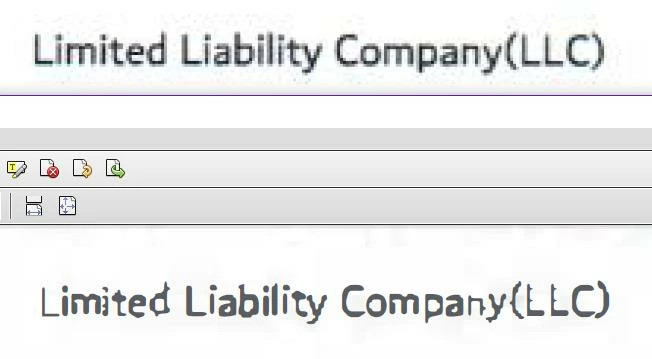
Whenever I Recognize Text in my file, I lose quality and the text becomes jagged and pixelated. See the below screenshot, which depicts the original text (top) and the pixelated OCR text (bottom). How can I prevent quality loss when I Recognize Text?

I have already tried changing the settings (downsample to 600 DPI, clearscan, etc.), but it did not help.

このトピックへの返信は締め切られました。
解決に役立った回答 Karl Heinz Kremer

Based on the original (the top image you've provided), I would say that it's not the best quality image, and that may be the reason why you end up with this low quality output.

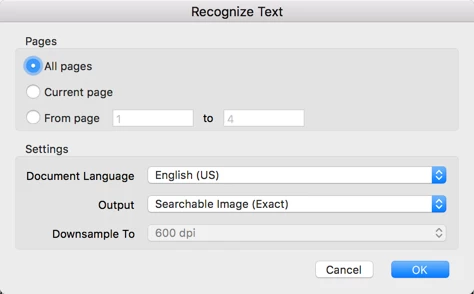
When you apply OCR, there are two or three different output formats (depending on from where you start OCR, either as part of the scan process, or later). The big difference between the two is that one will replace the original image with characters, it extracted out of your document (that is the "ClearScan" or "Editable Text and Images" - based on your version of Acrobat - option), the other one will leave the original image in place, and will place the recognized text behind the image ("Searchable image"). To get the best possible output, just use Searchable Image. There are other options that may change your image. The most important one is the compression method. If you select "Small Size", you will end up with a lower image quality than if you select "High Quality". You may also want to stay away completely from lossy compression formats and use ZIP or CCITTG4 (for color and black&white respectively). You may also want to turn all the filters off:
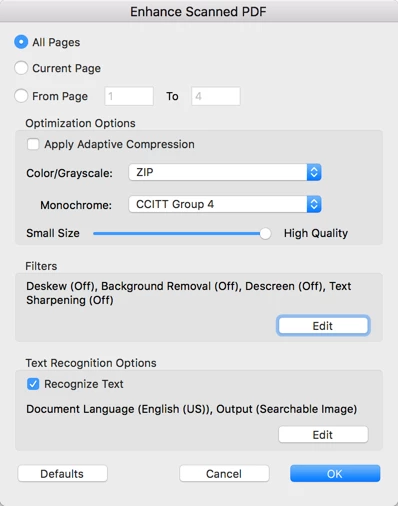
Or if you are just using OCR, and not the "Enhance Scanned PDF" function:

返信数 2

Karl Heinz  Kremer
Community Expert
Community Expert
June 4, 2018

Based on the original (the top image you've provided), I would say that it's not the best quality image, and that may be the reason why you end up with this low quality output.

When you apply OCR, there are two or three different output formats (depending on from where you start OCR, either as part of the scan process, or later). The big difference between the two is that one will replace the original image with characters, it extracted out of your document (that is the "ClearScan" or "Editable Text and Images" - based on your version of Acrobat - option), the other one will leave the original image in place, and will place the recognized text behind the image ("Searchable image"). To get the best possible output, just use Searchable Image. There are other options that may change your image. The most important one is the compression method. If you select "Small Size", you will end up with a lower image quality than if you select "High Quality". You may also want to stay away completely from lossy compression formats and use ZIP or CCITTG4 (for color and black&white respectively). You may also want to turn all the filters off:

Or if you are just using OCR, and not the "Enhance Scanned PDF" function:

Participant
June 4, 2018

i have same problem