


"Do you trust the source of this file and want to convert it" pop-up for network drive
Hi, community
I have a user who upon running a convert on any word document in Acrobat DC specifically located on a network drive gets the "Do you trust the source of this file and want to convert it" pop-up for each page which takes a long time.
We looked through all the trust and postscript preferences and tried reinstalling but get the same issue.
Another user does the same thing with the same software but does not get the pop-up. Their settings are almost set up identically except the working user has the name of our network drive in her list of web sites in Manage Internet Access. The network drive name is the same as our company and is also cloud storage. See below. I tried adding the name of my company as it shows below but it requires a top-level domain suffix (company.com vs company).
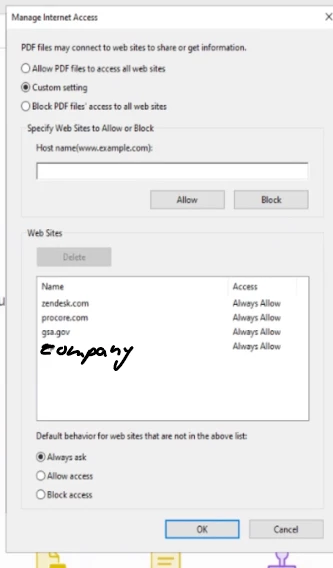
Is there a way to suppress these for the one network drive we're using ?
https://helpx.adobe.com/acrobat/kb/security-warning-postscript-pdf.html
 AdChoices