

Participant
February 14, 2022
解決済み

Où trouver la fonction "Prendre un instantané" (capture de l'écran) ?

  • February 14, 2022
  • 返信数 3.
  • 28378 ビュー

Où trouver la fonction "Prendre un instantané" (capture de l'écran) ?

解決に役立った回答 Amal.

Hi there


The option lies in the right-click context menu, when you open the PDF in Adobe Acrobat.
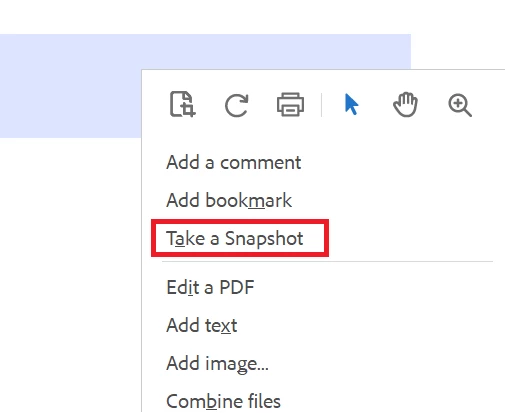


Regards

Amal

返信数 3

Participant
January 30, 2024

Même problème depuis la dernière version ! Où est "Prendre un instantané" ?


Participant
March 18, 2024

Même problème ! 
avez vous trouvez la solution.  ?

merci par avance ! 

Amal.
Amal.解決!
Legend
March 20, 2024

Hi there


The option lies in the right-click context menu, when you open the PDF in Adobe Acrobat.


Regards

Amal

Amal.
Legend
February 19, 2022

Hi Philippe


Hope you are doing well and sorry to keep you waiting.


Please go to Edit  > More > Take a Screenshot and see if that helps.


Regards

Amal

B i r n o u
Legend
February 19, 2022

is this fonction only in Acrobat but not in reader... ?

I think that in Reader, it is like Lena mentioned, on first level...

I also add some trouble after update, that this menu disappear... I think that it was during the p^hase where Adobe merge Reader, adn Acrobat in the same installer

try67
Community Expert
Community Expert
February 20, 2022

It's in both applications, but it was moved by Adobe recently to the More sub-menu.

Community Expert
February 14, 2022

Elle se trouve dans le menu Edition. Si vous ne la trouvez pas là, il se peut que votre version de Reader soit corrompue.

Si tel est le cas, je crains qu'il ne vous faille soit :