

Exit
  • Global community
    • Language:
      • Deutsch
      • English
      • Español
      • Français
      • Português
  • 日本語コミュニティ
  • 한국 커뮤니티
0

Placing Sender Signature on a Template

New Here ,
Mar 19, 2018 Mar 19, 2018

This seems so basic I must be missing it. How do you place a field for the sender's signature on a template?  You can place a signature just fine - but sender is not an option for the assigned to drop down. 

4.7K
Translate
Report
Community guidelines
Be kind and respectful, give credit to the original source of content, and search for duplicates before posting. Learn more
community guidelines

correct answers 1 Correct answer

Adobe Employee , Mar 21, 2018 Mar 21, 2018

Hi Kens,

As you are adding signature fields on the template, there you cannot assign the fields to a particular signer.

You can assign the form fields as the number of participants (like participant 1, participant 2, etc.)

When you add the email address on "Send" page to send the document, it will automatically assign the signature field in the order you enter the signers.

You may also, change the assigned fields in the preview page, before sending the document.

Fo that, make sure you check the box

...
Translate
Adobe Employee ,
Mar 21, 2018 Mar 21, 2018

Hi Kens,

As you are adding signature fields on the template, there you cannot assign the fields to a particular signer.

You can assign the form fields as the number of participants (like participant 1, participant 2, etc.)

When you add the email address on "Send" page to send the document, it will automatically assign the signature field in the order you enter the signers.

You may also, change the assigned fields in the preview page, before sending the document.

Fo that, make sure you check the box for "Preview & Add Signature Fields" on Send page.
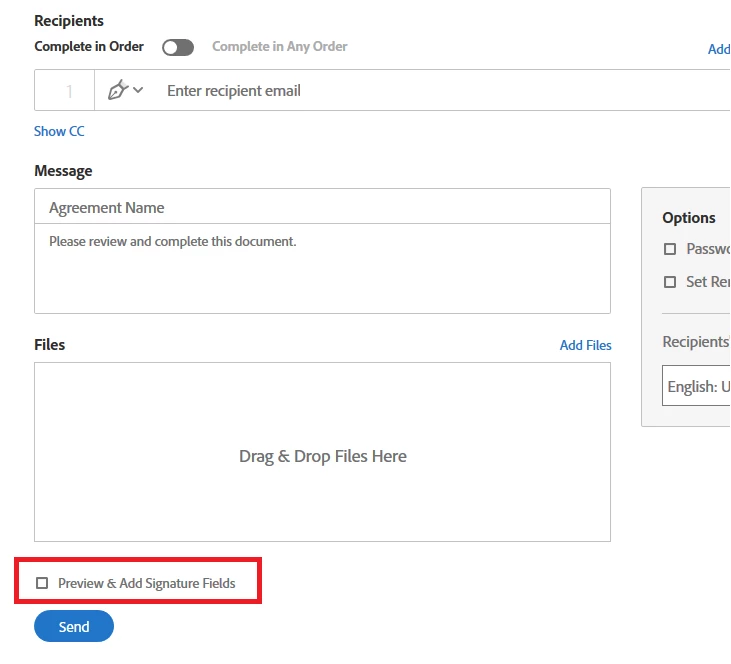
preview.PNG

Check if that answers your query.

Let us know if you are referring to something else.

Regards,

Meenakshi

Translate
Report
Community guidelines
Be kind and respectful, give credit to the original source of content, and search for duplicates before posting. Learn more
community guidelines
New Here ,
Sep 13, 2019 Sep 13, 2019
I am having the same issue! The above mentioned supposed 'correct answer' is not working for me! I am not able to sign my own contracts. As the others have mentioned, there is no way to add a signature field for the sender; not even when you use the above tips from Adobe employee! Does anyone have the solution? What am I doing wrong?
Translate
Report
Community guidelines
Be kind and respectful, give credit to the original source of content, and search for duplicates before posting. Learn more
community guidelines
New Here ,
Oct 17, 2020 Oct 17, 2020

Hi,

I have the same problem, has anyone come up with an answer? 

Translate
Report
Community guidelines
Be kind and respectful, give credit to the original source of content, and search for duplicates before posting. Learn more
community guidelines
New Here ,
Oct 17, 2020 Oct 17, 2020

HI There,

How do you place the area for senders signiture?


I must be missing something.

Cheers,

Nick

Translate
Report
Community guidelines
Be kind and respectful, give credit to the original source of content, and search for duplicates before posting. Learn more
community guidelines
Community Beginner ,
Nov 01, 2020 Nov 01, 2020

I think I get it but this is a BAD UX. Nothing about this is obvisious. Go back to the drawing board.

Translate
Report
Community guidelines
Be kind and respectful, give credit to the original source of content, and search for duplicates before posting. Learn more
community guidelines
Community Beginner ,
Nov 01, 2020 Nov 01, 2020

Steps
In Template
1) Make yourself (Participant 1)
2) Make person you want to sign (Participant 2)
Sending
3) Click "Add Me" link top right Reciepients area
4) Add email for signer - Participant 2
Preview
5) You will automatically be assigned to Participant 1 - Verify
Sign and Send

6) Click Sign and Send - You can then fill Participant 1 fields

Translate
Report
Community guidelines
Be kind and respectful, give credit to the original source of content, and search for duplicates before posting. Learn more
community guidelines
New Here ,
Dec 22, 2024 Dec 22, 2024

There is no Add Me link in the top right.  What a terrible UX Adobe has for this, I expect better from them!!

Translate
Report
Community guidelines
Be kind and respectful, give credit to the original source of content, and search for duplicates before posting. Learn more
community guidelines
Adobe Employee ,
Dec 27, 2024 Dec 27, 2024
LATEST

Hi Gerald38846429e9ea,


Thank you for reaching out.


Please let us know how you are trying to send the document for signature. Share the screenshot of the window where you are looking for Add me link.

It would be helpful if you could share more information about the workflow you use. This will help us to understand the issue and provide the correct information.


Thanks,

Meenakshi


Translate
Report
Community guidelines
Be kind and respectful, give credit to the original source of content, and search for duplicates before posting. Learn more
community guidelines