




質問
Feature Focus: Redesigned Composition Panel Toolbar and New 3D Ground Plane button
Greetings!
We’d like to introduce you to two new features in After Effects Beta, available today in version 18.0.0.20 and later:
- Redesigned Composition Panel Toolbar: The row of buttons at the bottom of the Composition panel has been streamlined and re-organized to show only the most used features. 3D options are now contextual and won’t get in your way when you don’t have 3D layers in your comp. Settings that are no longer accessible via the toolbar, such as pixel aspect ratio correction, can still be controlled via the Composition window menu.

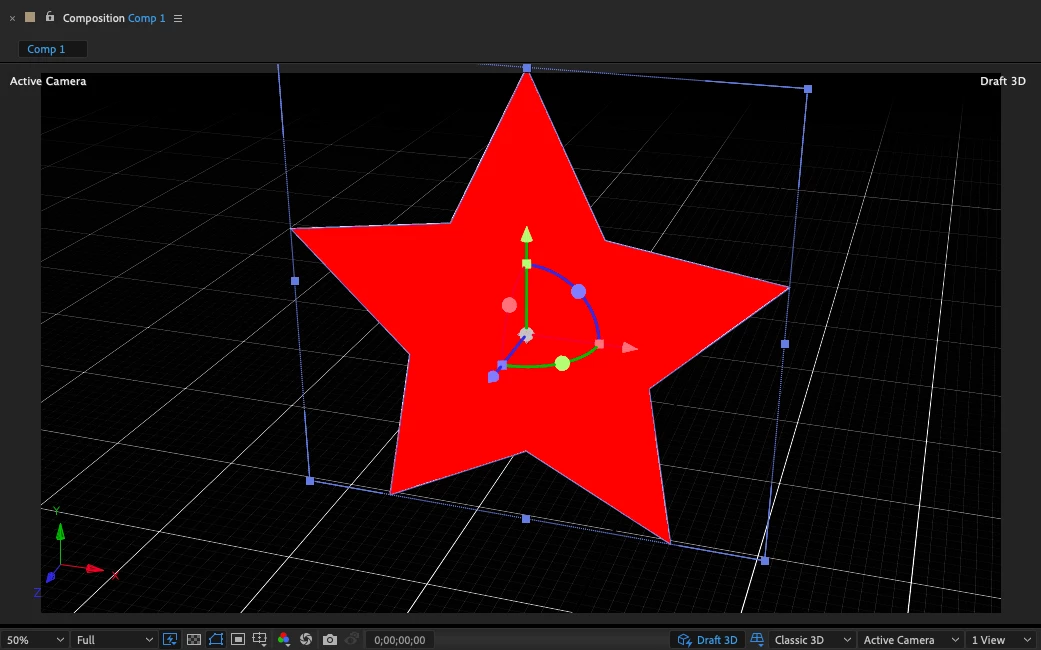
- 3D Ground Plane button: When Draft 3D is enabled, a new button in the toolbar at the bottom of the Composition panel allows you enable or disable a ground plane in the comp’s 3D space.

What We Want to Know
We want your feedback on these features. Primarily:
- Does the redesigned Composition panel toolbar improve your workflow? What would you change?
- How does the 3D ground plane feel? Is it helpful when working in 3D comps?
What’s New
Changes to the Composition panel toolbar and related functionality include:
- The most used controls have been reorganized and moved to the left side of the toolbar.
- 3D controls have been moved to the right side of the toolbar and only appear when there is at least one 3D layer in the comp.
- The new Draft 3D button enables or disables the new real-time draft 3D renderer introduced to After Effects Beta last October. This feature was previously enabled by changing the Fast Previews mode to Fast Draft. Please note the real-time draft 3D renderer is different from the Timeline panel “Draft 3D” control, which has been removed.
- The new 3D Ground Plane button enables or disables the 3D ground plane when Draft 3D is enabled. The 3D ground plane was also introduced last October, but could not be disabled. Improvements and bug fixes have also been made to the 3D ground plane.
- The new 3D Renderer menu allows you to switch between composition 3D renderers without opening the Composition Settings dialog.
- 3D Reference Axes are now enabled by default. (This was added to After Effects 17.7, also released today.) They can be disabled via the Grids and Guides Options menu, on the left side of the toolbar.
- The Select View Layout menu has been streamlined.
- The Fast Previews menu has been streamlined. Fast Draft is now known as Draft 3D and is controlled by the button on the right side of the toolbar. Draft mode has been removed; it is no longer applicable. The Renderer Options command is now in the 3D Renderer menu on the right side of the toolbar.
- Controls that don’t need to be within easy reach have been moved to commands in the Composition panel’s menu (the three-bar menu button on the panel’s tab): Always Preview This View, Primary Viewer, and Pixel Aspect Ratio Correction.
- Pixel Aspect Ratio correction is now enabled by default.
- Controls with low usage have been removed: Adobe Immersive Environment, Show Timeline, and Show Composition Flowchart. (The Timeline and Flowchart panels can still be opened from the Window menu, if not currently open in your workspace.)
Known issues:
The Exposure value (for previewing HDR overbright values) can’t be adjusted; the Adjust Exposure hottext is missing.This has been fixed as of After Effects 18.0.0.21.- The 3D ground plane is not always positioned at the center of the comp.
- The Composition panel toolbar has a gradient between the controls on the left and the 3D controls on the right.
- There is a dark line above the Composition panel toolbar.
Thank you! We’re looking forward to your feedback.
(Use this Beta forum thread to discuss this feature and share your feedback with the After Effects team and other Beta users. If you encounter a bug while using this feature, let us know by posting a reply here or choosing "Report a bug" from the "Provide feedback" icon in the top-right corner of the app.)
 AdChoices