



Thiago Guimarães
Participating Frequently
June 18, 2024

After Effects Freezes after some time with error: "Direct2D Drawbot Error. HRESULT:-2005270523"

I can't say for sure, but after two or three more recent versions of AE Beta I started to get a random error, after working for a few minutes the whole computer crashes and then this Direct2D Drawbot Error box. HRESULT:-2005270523 appears, but I can't close it, it keeps reopening endlessly and then I have to force close the program.


I've been using AE Beta since they redid the interface, it's just become another program! It's very fluid and enjoyable. I'm not using to use the retail version because he not received the interface update., but I can say that the problem is in the beta, because when i use the reail version there is no issue i don't have any errors or freezes.


Here's a picture of the error I get when I close.
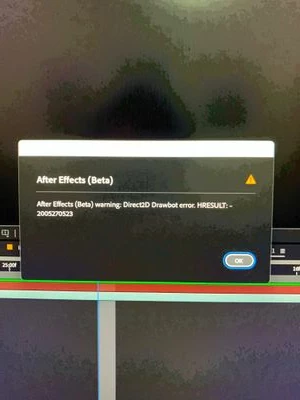


AE Beta V24.6.0 b23

Windows 11, i7 9750H, GTX 1660TI 6GB, 32gb de RAM, 512gb SSD.

Driver Nvidea Studio  555.99.


返信数 159

Participating Frequently
December 30, 2024

Switched to the 2024 version and it's still happening, just without the Error code. The machine just freezes and then restarts, in the same cases as before (Usually has to do with switching focus from AE to my browser or explorer).


I am literally unable to do huge parts of my job (The one I need to keep doing to put food on the table and in my son's belly) and I'm still paying. This is outrageous. Fix it or start compensating us.

Spikey Sonic
Participating Frequently
December 22, 2024

Same issue has popped up.

Dried 2D Drawbot HERESULT 2005705023 whilest rendering


Participant
December 20, 2024

Something working for me is that I was able to File > save a copy as 24.x and have it working ok with previous lts version 24.
Some may not be as lucky if they were using some exclusively v.25 features, but this has got me unstuck for the time being. Hopefully this helps others. Thanks for the update.

Community Manager
December 19, 2024

Hello,

As an update, we are actively investigating solutions, but understand that for those affected that they need an option today. If you are experiencing this issue, we recommend trying previous releases of AE, first going to version 25.0.1, and if the issue still persists, going to 24.6.4.

For instructions on installing previous versions see: Install previous versions of your Creative Cloud apps
I have included a partial image of what the version list looks like today for AE.


Hopefully this helps bring some relief from the situation as we investigate. Thank you for reporting this issue and including information about your systems and how you encountered this error.

If you go the route of using a version other than 25.1 and continue to experience this issue, it would still be valuable to let us know your AE version and system details in helping us investigate additional potential causes beyond what we currently are investigating. 

We will continue to update this thread as we investigate further.

All the best,Jessica McMillan - AE Engineering
Participant
December 19, 2024

I've joined the party.

Got the same error message.

All screens go black, come back on, I control-alt-delete and end task on After Effects and whole system frozen. Had to hit the power button.
This is recurring constantly.
Not sustainable for a University Lecturer. 


Adobe After Effects Creative Cloud Version 25.1


Processor AMD Ryzen Threadripper 1950X 16-Core Processor 3.40 GHz
Installed RAM 128 GB (128 GB usable)
Device ID 9FC0D37E-F402-4733-87FD-FA5793791779
Product ID 00330-80000-00000-AA287
System type 64-bit operating system, x64-based processor
Pen and touch Pen and touch support with 10 touch points
Edition Windows 11 Pro
Version 23H2
Installed on ‎12/‎2/‎2023
OS build 22631.4602
Experience Windows Feature Experience Pack 1000.22700.1055.0

NVIDIA Quadro RTX 8000

Driver Version: 31.0.15.5335
Driver Date: 11/13/2024

Participating Frequently
December 19, 2024
LOL Not sustainable for a motion artist trying to make a living...
Anyone else get the "beeps" while screen is black? No other program does
this to my machine.. not even 3D Max (and it's notorious for crashing)
_
*Kevin Airgid*
Known Participant
December 17, 2024

Same here

Direkt2D Drawbot error: HRESULT:-2005270523

The entire PC freezes.

Windows 11

GPU: 2080 Super

Latest nvidia Studio Drivers

Participating Frequently
December 17, 2024
welcome to the party...
_
*Kevin Airgid*
Participating Frequently
December 17, 2024

Look its CLEARLY not limited to exotic GPUs (RTX 2080 here) or the driver (yes the latest driver). It's been like this for months. The software is quite literally unusable. 

Participant
December 17, 2024

Direkt2D Drawbot error: HRESULT:-2005270523


updatet GPU and all drivers, error still there ???? please help

Participating Frequently
December 16, 2024

@Mateusz372823907j79 


I opened AE 2025 then saved it as AE 2024 file.. then installed AE 2024 from Creative Cloud...  Hre is how to install an older version: https://helpx.adobe.com/ca/download-install/using/install-previous-version.html

Participating Frequently
December 16, 2024

@airgid-old how did u get back to 2024 ver of AE?