



3D rotation to 90 degrees
Here's the issue: I've got a set of six panels, each converted to a 3D layer, which I'm rotating 90 degrees along hinges on the right-hand edges - pretty simple, right? And it works: I've looked at in top-down view, and they're all lining up perfectly parallel. However, the effect I'm looking for (all 6 panels end up edge-on and are no longer visible) simply isn't happening. Here's what it looks like in-comp:
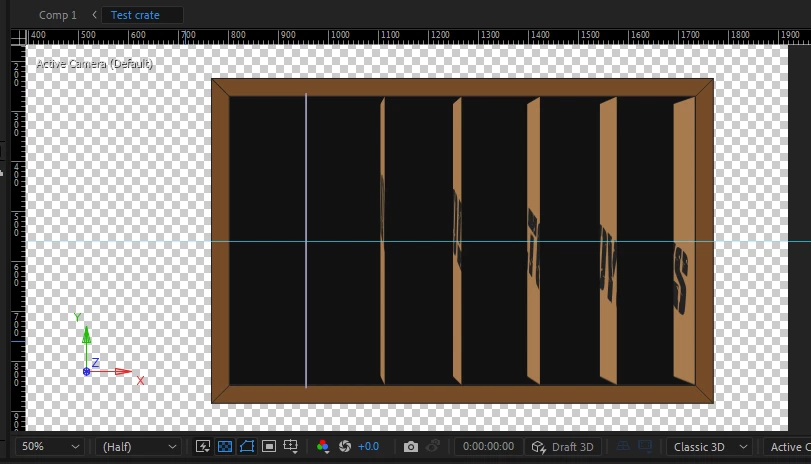 The one on the far left looks the way I want, as far as I can tell, but - perhaps due to the way the 3D output works - the others are visible at a more and more slanted angle; which rather has the effect of ruining what I'm going for. How exactly do I get all 6 to conform to a consistent visual perspective? I also want to link panels 1 thru 3 and 4 thru 6 and do a split-down-the-middle-concertina-fold in a seperate animation, but if they don't also go properly edge-on (and compress into a single vertical line) when folded up, then it's not going to look right, either....
 AdChoices