
Participant
March 15, 2022
Question

After Effects (22.2.1) Windows 11 crash on launch

  • March 15, 2022
  • 2 replies
  • 1381 views

I'm working on Windows 11 / AMD Ryzen 5 / Gefore RTX2060 / 16GB RAM / ASUS TUF Laptop
After Effects newest Verion

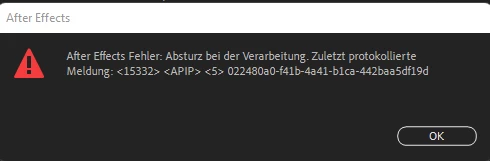
Had no problem working with AE last week, now I'm getting slightly different but similar crashes at every launch. I can't even send a report. See image attached.


I reinstalled Graphic Drivers, AMD Drivers, disabled GPU-Hardware support on Windows level, started AE as an Admin, reinstalled it, installed previous versions, restarted my Computer. I even detached the power supply of my computer out of perplexity.


Besides AE all Adobeprograms run just fine.
This topic has been closed for replies.

2 replies

Participant
March 17, 2022

Help is still needed - is there no fix? I had to change to my other PC which is running an older Version of AE, but that can't be it, does it???

nishu_kush
Community Manager
Community Manager
March 22, 2022

Thanks for sharing the details and sorry for the delay.

Please check if After Effects is generating any crash logs. Here's how: https://community.adobe.com/t5/after-effects-discussions/faq-how-to-find-after-effects-crash-logs-on-your-computer/td-p/10333124 

If it does, share them with us so that we can get them translated. Also, go to the following location and remove all files and folders (except dummy.txt) if there are any: C:\Program Files\Adobe\Common\Plug-ins\7.0\MediaCore

The MediaCore folder contains third-party plug-ins that you install for After Effects and Premiere Pro and they often cause such issues (I understand you said you are not using any third-party plug-ins but I'd appreciate if you could try this just to be sure).

Let us know how it goes.


Thanks,

Nishu

nishu_kush
Community Manager
Community Manager
March 16, 2022

Hi P.B_Samstag,


Sorry for the crash.

Are you using any third-party plug-ins? Do you see the splash screen? What's the last loading module on the splash screen?

Please try resetting the preferences of After Effects and see if that brings any change: https://community.adobe.com/t5/after-effects-discussions/faq-how-to-reset-trash-preferences-in-after-effects/td-p/10634342

Let us know how it goes.


Thanks,

Nishu

Participant
March 16, 2022

Thanks for getting back at me Nishu,

unfurtunately it didn't help. As the Splashscreen is over I see the After Effects Interface and the Error message immediately, so I can't change any settings (attached full screenshot) but I get the chance to save my project before After Effects shuts down - which is obviously unnecessary. Even with the method you mentioned it's not possible to change settings. As I removed After Effects including temporary file folders and preferences now for four times it would have been magic to me if it would have helped tho. 😄


The last thing is "Initialising intelligent Mask-setups"  on splash screen... or similar. It's going pretty fast.


I don't use any third party plug-ins. I still can laugh but to be honest: I have to deliver animations on friday and I'm a little at panic over here.


Best,
Paddy