- Home
- After Effects
- Discussions
- Re: After Effects 25.3 is now available to downloa...
- Re: After Effects 25.3 is now available to downloa...
After Effects 25.3 is now available to download!


Copy link to clipboard
Copied
Welcome to After Effects 25.3

New in 25.3
Here are the new features coming with version 25.3

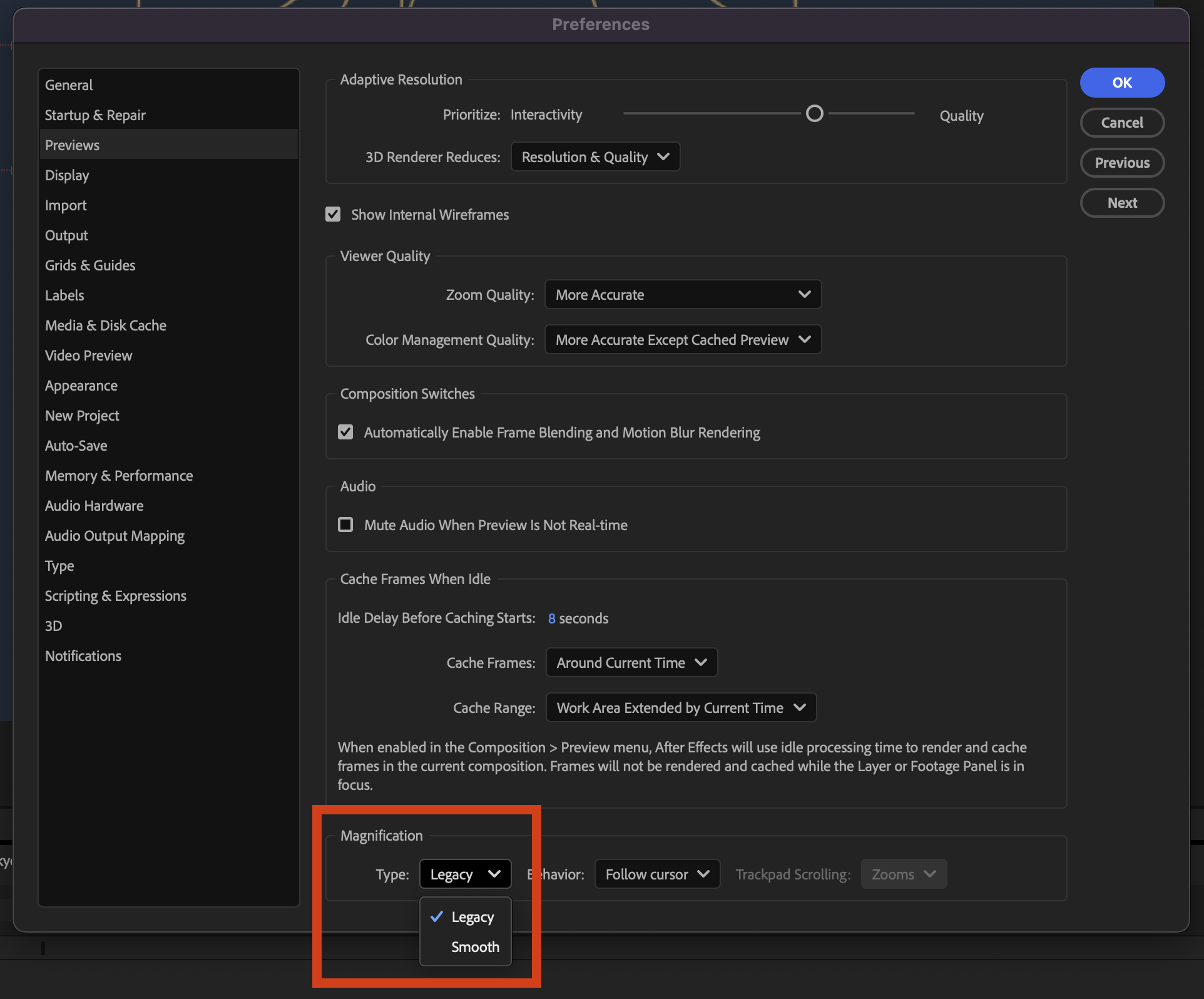
Smooth Zoom
Experience smooth and fluid magnification while scrolling, using pinch-to-zoom, or scrubbing with the Zoom tool in the Composition, Layer, and Footage panels.

Reveal projects in the File System
Instantly reveal your project file's location, saving you time and effort by eliminating the need to search through the system folders manually.
Fixed issues in 25.3
- Selecting Help > Reveal Logging Files more than 24 hours after enabling logging no longer causes After Effects to crash.
- Viewport interactions no longer experience lag on systems with AMD GPUs.
- Cache Before Playback in the Preview panel now functions correctly, ensuring the timeline fully caches before playback begins.
- The view no longer shifts left when resizing the Composition, Footage, or Layer panel with rulers visible.
- The Animation Options name in the Timeline panel now correctly updates in the Properties panel when changed to None.
- Improved selection and interactive performance when working with many Shape layers.
- The Info panel now correctly displays over-range values for colors when hovering over a solid in a 32-bpc composition.
- The Render Quality slider is now responsive when adjusting in Advanced 3D comps that contain many 3D Shape layers.
- The properties of selected layers now continue to be shown in the Properties panel when orbiting or moving the Default camera view.
- The keyboard shortcut for Split New Viewer and Toggle Lock now matches the View > Split with New Locked Viewer menu command.
- The warning when deleting an in-use footage item now correctly refers to the number of instances, rather than the number of compositions.
- Alt-double-clicking the Zoom tool now instantly centers the view without delay.
- After Effects no longer crashes when using Advanced 3D on systems where the Windows user folder name contains Unicode characters.
- Dragging files from the list of files into the thumbnail or summary area now correctly moves them to the top of the hierarchy.
New in Beta
Check out what's new in After Effects Beta.

Support for CICP Metadata
Import and export HDR content with CICP Metadata to ensure accurate color management and consistency across different devices and platforms.

Change anchor point in a more efficient way
Effortlessly adjust the anchor point on 2D layers with Quick Set Anchor using the Properties panel or a keyboard shortcut.

Paste Text and Match Formatting
Paste text from one text layer to another while maintaining the font and style of the destination text layer.

Enable lights to cast shadows
Add multiple shadow-casting Spot, Parallel, and Environment lights to your 3D scene when using the Advanced 3D renderer in a 3D composition

Improved UI language support
Run After Effects in languages different from the OS display language, enter Unicode characters in UI elements, mix multiple language scripts in a single text field, and more.
Here's how you can install the latest version
Open the Creative Cloud desktop application and click the Updates tab on the top left. Find After Effects in the list and click Update.

I don't see the update in my Creative Cloud desktop application. What should I do?
Click Help > Check for Updates from the Creative Cloud desktop application to refresh it.
If you are experiencing any issues, please create a new thread explaining your problem so we can help.


 57
Replies
57
57
Replies
57


Copy link to clipboard
Copied
"Reveal projects in the file system" - let me get this straight, you added a feature to tell me where the current project that I'm in, that I have already FOUND & OPENED, is located?

Copy link to clipboard
Copied
I'm using an older version right now, and I can see the file path at the top above File, Edit, Composition. They have done literally nothing.

Copy link to clipboard
Copied
this update has serious problems running in OSX, when render a keyed footage you can see black frames, bad interpretation, i need continuously reload the footage and clear all cache to solve this, FIX IT ASAP!!!

Copy link to clipboard
Copied
Same here! I'm on M4 Pro 48GB with Sequoia 15.5, previous version was fine but update from last night is driving me crazy, black frames constantly in multiple projects, I have to purge memory for every preview and cross my fingers that it will get all frames. I've tried multiprocessing on/off and hardware GPU acceleration on/off as well, makes no diff.

Copy link to clipboard
Copied
I'm having the same exact issue. This 25.3 update is the first one I've used where there doesn't seem to be a reasonable workaround, and it's unusable. Reloading footage and clearing cache is the only way to resolve it. This seems like a memory leaking issue, but not sure. I love the new features, but I can't use this version. I'm running macOS 15.5, Mac Studio, M2 Ultra, 192 GB of RAM. I hope this gets fixed soon.
Copy link to clipboard
Copied
Copy link to clipboard
Copied
Works better, as in - it's useable? You haven't run into any egrigious bugs like in 25.3?
Copy link to clipboard
Copied
Ok - I've been testing the just released 25.3.1 update, and it seems to have corrected the massive instability of 25.3. I have not encountered any of the issues I was seeing before.

Copy link to clipboard
Copied
So that random black frame wasnt my fault?.......kool 👍

Copy link to clipboard
Copied
Same. 25.3 is broken for M1 Ultras.

Copy link to clipboard
Copied
BREAKING CHANGES!
We use a script that renders file from Premiere Pro. It used to work fine in all version. 25.3 introduced breaking changes, now we get
Error: -1
We have hundreds of complaints so far! Please fix it ASAP. Rendering is core part of Premiere API.
Copy link to clipboard
Copied
We get more users by the hour.
Copy link to clipboard
Copied
Update: Media Encoder (used as fallback) is broken too. Now we get response that
Preset unsupported
It used to work on all previous versions 22, 23, 24 and 25 before 25.3.
Copy link to clipboard
Copied
Major issues running OSX rendering roto brush - frame drop outs, frame skipping, motion blur artefacts. Unusable for now.

Copy link to clipboard
Copied
Pinch to zoom must have destroy my way of zooming. Usually I use CMD+scroll to zoom anywhere now I can't use zoom exept with the magnifier tool. I revert back 25.2.2 sorry Adaube.
Copy link to clipboard
Copied
Also, why add a pinch to zoom function? Who is the mad lad who use after effect with tactil features???
Copy link to clipboard
Copied
Copy link to clipboard
Copied
Alright, Thanks for the heads up. I'll do it when I will be forced to update.

Copy link to clipboard
Copied
Even Legacy setting is messed up. If you select Type:Legacy and Bahavior:Follow cursor (which was default before 25.3), what you get is Centered zoom. But if you select Behavior:Centered, then you get correct Follow cursor behavior 😅

Copy link to clipboard
Copied
This update has made AE unusable, Red footage and Mp4s just flicker no matter what you do or how much you clear the cache. honestly its horrendous, worse version in YEARS! , Sort your basic functionality out before adding in useless updates that no one asked for and upping your prices.

Copy link to clipboard
Copied
I'm on PC and I get random black frames on footage all the time, Purging cache and ram helps, but then they appear at other places. Rotobrush issues aswell, its a real mess. its the worst update release so far. Major issues and actually unusable. I've wasted 2 hours yesterday trying to get a decent flicker free render out...

Copy link to clipboard
Copied
Same as others here, black frames appearing in clips in random places. My work flow is just unuesable, constantly have to try and purge, resetting AE, resetting the computer.
When are we going to get a reply on this? When is the next patch going to be?
Honestely, what is that this team continually breaks the software and we still have to pay a small fortune to use?
Copy link to clipboard
Copied
OSX btw
Copy link to clipboard
Copied
Yet still no response from Adobe, fantastic stuff


Find more inspiration, events, and resources on the new Adobe Community
Explore Now
 AdChoices