



nielsoleschmidt
Participant
March 17, 2020
質問

After Effects error: Can't import as a sequence. Found no matches for the selected file name.
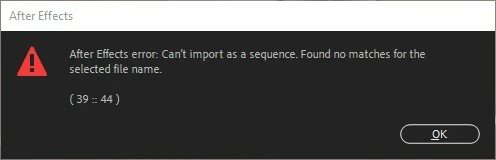
  • March 17, 2020
  • 返信数 9.
  • 16676 ビュー

I get this error when importing an image sequence in to After Effects 2020 (Version 17.0.4 (Build59)). The funny thing is that it works just fine when importing the very same image sequence in the previous version of After Effects (Version 16.1.3 (Build 5)) ... This means I can't use the latest version of After Effects, since I work with image sequences all the time. Have anyone else encountered this problem and/or have a solution or workaround?

返信数 9

Participant
May 11, 2025

I had the same issue as well and i fixed it by just reseting the preference settings. That personally worked for me.


Participant
October 15, 2024

i am using mac to enconter that issue i change folder loaction an then select PNG Sequence in After Effect. then error is fixed.. i thing my folder path location is too long that's why it shows that error.. 

dadiabdul
Participant
September 24, 2024

after struggle for couple hour, you need to save as again your file with with checkbox

mj nooker
Participant
October 11, 2023

Hello! 
Anyone, who has the same problem - try the solution of "Nakarinen" in the post of this thread about long path to filename. Here is the really worked idea.
I had the same problem: I've imported well the sequence by this path:
"C:\_Active_PROJ\Spine man folio\man postprod\(Footage)\comps\20 layers\000-Rendered-proxies\1 colored\_man test 20 4 coloring 3 2 lime tree and plant desaturate 2 w2 lighter\_man test 20 4 coloring 3 2 lime tree and plant desaturate 2 w2 lighter_00000.png".

But when I rendered new proxy, that lying near with the previous one, but in its own new folder, that has the minor updated name (added some symbols more to the path):
"C:\_Active_PROJ\Spine man folio\man postprod\(Footage)\comps\20 layers\000-Rendered-proxies\1 colored\_man test 20 4 coloring 3 2 lime tree and plant desaturate 2 w2 lighter 2 cam acting\_man test 20 4 coloring 3 2 lime tree and plant desaturate 2 w2 lighter 2 cam acting_00000.png". So, this new sequence trigger the same problem that topic-starter described: when exporting seq, both AE 2020, AE 2023 gives to me the described error.

Solution: when I renamed folder of the new (problematic) sequence to the name shorter, that it has (in my case I renamed folder just to "Camera_acting" (not the "_man test 20 4 coloring 3 2 lime tree and plant desaturate 2 w2 lighter 2 cam acting") - hellyeah, it works well! xD

It was Long path, brothers, long path! 


Nakarinen, thank you for the solution.

Participant
July 11, 2023

Anyone find a Windows fix for this?


Still the same issue with the latest version (AE 2023)


Individual files will import perfectly from the network drive, only as a sequence it will fail!

Participant
July 6, 2021

Dragged and dropped whole PNG folder into the AE. It worked for me and a couple of Co-workers.

Participant
April 8, 2022

From a network drive?  Just tried it in the latest AE 2022 and it's still broken.  Please fix this Adobe!

Participant
June 28, 2021

This function is broken all the way back to 17.0.1.  Version 17.0 seems to work correctly, but this must be fixed as it's an essential feature for AE!  Shocked that it's been overlooked for so many versions now!!


Please make this a priority!


Thank You,

Ramy

MarkusEker
Known Participant
June 16, 2021

I have the same issue! Copying files to a local drives is a workaround, but not a good permanent solution. Hoping for more information on a fix!

Inspiring
June 16, 2021

Yep, I had the same solutionm as MarkusEker. If you transfer the sequence to a local drive/desktop/something like that, it should link up fine. It should even work if you then move it BACK to the same place....almost like you're tricking AE into thinking its a new/different sequence.


It's very silly solution, but at least it's a fix...

MarkusEker
Known Participant
June 28, 2021

Is there any solution to this besides the workaround? Is this a windows issue or is it an After Effects issue? Why is it working with older After Effects?

Mylenium
Legend
March 17, 2020

You have not provided any info about the actual file naming, file types, storage locations and so on, so we can't realyl tel lyou anything. Aside from AE being buggy as hell these days something specific could be going on that could be easily fixed like renaming a folder. Impossible to know with no specific info at hand.


Mylenium

nielsoleschmidt
Participant
March 17, 2020

Sorry about that. I will try to fill in the blanks here ... The syntax of the file names in the image sequences I use all look similar to this: 'Speaker04_Handle_00000.jpg'. The error appears no matter the file-type (JPG, PNG, TIFF etc.). The image sequences are all stored on my local SSD harddrive (C:). I am running After Effects in the latest version of Windows 10 (64 bit) on my workstation, which is a DELL Precision / Intel Xeon CPU E5-2687W v4 @ 3.00Ghz. I am not sure if there are any other information that would be relevant to solving this problem, but please let me know if there is. 🙂   

Mylenium
Legend
March 17, 2020

Have you checked your Windows Update status and/ or recently installed other apps? The issue with some file format handlers appears to be related to botched DLLs being installed, so manually re-installing the MSVC 11 DLLs and such may actually fix it.


Mylenium