


Participating Frequently
February 13, 2023
Question

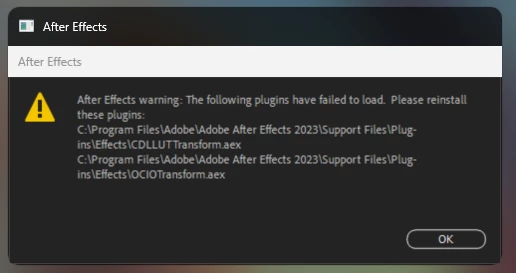
After Effects warning: The following plugins have failed to load. Please reinstall these plugins

  • February 13, 2023
  • 4 replies
  • 2342 views

Hello everyone, after I updated AE to the latest version, I encountered the problem of missing plug-ins when opening AE, but I have tried to reinstall it, but it didn't work out, have you encountered it?

I have also searched the Internet for a solution, but to no avail :<
Thx everyone!

This is the error I get upon starting AE: "
C:\Program Files\Adobe\Adobe After Effects 2023\Support Files\Plug-ins\Effects\CDLLUTransform.aex
C:\Program Files\Adobe\Adobe After Effects 2023\Support Files\Plug-ins\Effects\OCIOTtransform.aex
This topic has been closed for replies.

4 replies

mangho
Participant
July 12, 2023

Any resolution on this anyone? 

DogeeeeAuthor
Participating Frequently
August 14, 2023

No solution, the problem still exists, even if I have updated to the latest version.


Meng Zhiqun
Inspiring
July 6, 2023

Hi. Just wonder has this been solved for you? I'm facing the same issue. Re-installing did not help at all.

DogeeeeAuthor
Participating Frequently
July 6, 2023

No solution, the problem still exists, even if I have updated to the latest version.

Mylenium
Legend
February 13, 2023

The basics from your "My Computer" panel should at least give some idea.


Mylenium

Mylenium
Legend
February 13, 2023

Without any system info we can't realyl tell you much, but since this is the third time I see this issue since last week's update, I suppopse it's just yet another bug. In any case, as a start do as the warning says and reinstall the program with sufficient user privileges.


Mylenium

DogeeeeAuthor
Participating Frequently
February 13, 2023

Thank you in advance for your reply!
I tried to reinstall it with the system administrator, but it still didn't work!

Then I would like to ask if the system information needs my hardware information?