
Exit
  • Global community
    • Language:
      • Deutsch
      • English
      • Español
      • Français
      • Português
  • 日本語コミュニティ
  • 한국 커뮤니티
1

After Effects White Box Crash

Explorer ,
Mar 14, 2018 Mar 14, 2018

I'm working on a complex project, where I've had to duplicate parts of the projects in separate files and then import the other projects back in to the main project to combine them.

Getting a very strange crash when I open some comps in the imported projects. It will just give me this white box and then become totally unresponsive until I quit AE. The white box affects my whole system - it shows when I'm in other applications. It doesn't trigger a crash or error message at all. Sometimes it comes back to life, other times I don't get the crash and can open the comp (not very often). Cleared all caches, didn't do anything. Not using any plugins.

Any idea what might be causing this?
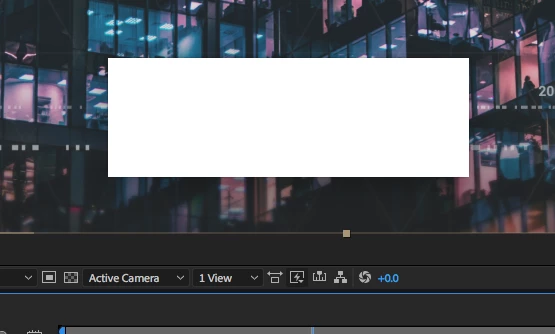
Screen Shot 2018-03-14 at 2.06.07 PM.png

5.0K
Translate
Report
Community guidelines
Be kind and respectful, give credit to the original source of content, and search for duplicates before posting. Learn more
community guidelines
LEGEND ,
Mar 15, 2018 Mar 15, 2018

We can't know. You have not told us anything about your system, your actual project content and so on. Also providing cropped screenshots of the UI is pretty useless. You need to do better.

Mylenium

Translate
Report
Community guidelines
Be kind and respectful, give credit to the original source of content, and search for duplicates before posting. Learn more
community guidelines
New Here ,
Apr 04, 2018 Apr 04, 2018

Hi Estarnol,

I am having the exact same problem. It is like some comps are corrupt and set off a chain reaction. White box appears then the entire Ui flashes and resizes and behaves erratically. I have had to find earlier versions of the AEP where this does not seem to happen and I have lost hours of work. The problem has reoccured at later stages in AEPs I thought were not going to be a problem. I've only experienced this since updating to 2018cc.

iMac (27-inch, Late 2012)

3.4GHz Intel Core i7

32GB 1600MHz DDR3

NVIDIA GeForce GTX 680MX 2GB

Joe

Translate
Report
Community guidelines
Be kind and respectful, give credit to the original source of content, and search for duplicates before posting. Learn more
community guidelines
New Here ,
Apr 09, 2018 Apr 09, 2018

I also have this problem. Since I updated, the white box appears when I try to save (command+S) or when I render(ctrl+Cmd+M). It just stays on the current screen and does not let me know if I've saved or queue'd render. The only way to get the white box off is to toggle between another app and then back to AE.

As a workaround, I reverted back to AE 15.0. (cc2017).  When I updated to AE 15.0.1, that's when all the problems occurred. You can do this by going to the cloud update and instead of clicking on Open or Update, toggle down with the arrow and click on "other versions". Here you can revert back to an older version, but it wiped all my preferences .

Here are my cpu specs:

Screen Shot 2018-04-09 at 11.52.30 AM.png

Translate
Report
Community guidelines
Be kind and respectful, give credit to the original source of content, and search for duplicates before posting. Learn more
community guidelines
Explorer ,
Apr 09, 2018 Apr 09, 2018

The issue went away for me after restarting my computer.

Translate
Report
Community guidelines
Be kind and respectful, give credit to the original source of content, and search for duplicates before posting. Learn more
community guidelines
New Here ,
Apr 09, 2018 Apr 09, 2018

The issue seems to have gone away since I updated my scripts. Also I realised I had one of my scripts in the top level ‘Scripts’ folder and it should have been in the ‘Scripts UI Panels’ folder. Not sure if this was the solution as I also cleared my Cache and preferences.

Translate
Report
Community guidelines
Be kind and respectful, give credit to the original source of content, and search for duplicates before posting. Learn more
community guidelines
Community Beginner ,
Apr 10, 2018 Apr 10, 2018

I'm having the same issue - it's making me crazy!

Screen Shot 2018-04-10 at 12.43.11 PM.png

Process: After Effects [1155]

Path: /Applications/Adobe After Effects CC 2018/Adobe After Effects CC 2018.app/Contents/MacOS/After Effects

Identifier: After Effects

Version: 15.1 (15.1)

Code Type:             X86-64 (Native)

Parent Process: ??? [1]

Responsible: After Effects [1155]

User ID: 501

Date/Time: 2018-04-09 19:20:11.972 -0700

OS Version: Mac OS X 10.13.4 (17E199)

Report Version: 12

Anonymous UUID: BE1ADF6F-4FC1-0BF7-CA0B-F365EB8078C8

Sleep/Wake UUID: 1D2D6849-C417-40B3-A488-62E3B882685D

Time Awake Since Boot: 1200 seconds

Time Since Wake: 29 seconds

System Integrity Protection: enabled

Crashed Thread: 0  Dispatch queue: com.apple.main-thread

Exception Type: EXC_BAD_ACCESS (SIGSEGV)

Exception Codes: EXC_I386_GPFLT

Exception Note: EXC_CORPSE_NOTIFY

Termination Signal: Segmentation fault: 11

Termination Reason: Namespace SIGNAL, Code 0xb

Terminating Process: exc handler [0]

Application Specific Information:

Performing @selector(dispatchMenuSelection:) from sender DVAMacMenuItem 0x60c0000e6300

Thread 0 Crashed:: Dispatch queue: com.apple.main-thread

0 com.adobe.AfterEffectsLib.framework  0x000000010916244a FEE_GetMotionTrackCmdAttrs(int, bool, bool, int, char*, bool*) + 87130

1 com.adobe.AfterEffectsLib.framework  0x0000000108b30581 TimeCodeControl::CurrentFormatToTime(char const*, T_TimeFormatInfo, int, bool, T_Time*, T_Time const*, bool) + 4689

2 com.adobe.dvaui.framework     0x0000000103d47632 dvaui::controls::UI_InteractiveControlView::FinishInteractiveChange() + 114

3 com.adobe.dvaui.framework     0x0000000103d6efb0 dvaui::controls::UI_HotEditControlBaseT<dvaui::controls::UI_NumberEdit>::EditControlChanged(dvaui::controls::UI_InteractiveControlChangedMessage*, bool) + 144

4 com.adobe.dvaui.framework     0x0000000103c75c71 boost::detail::function::void_function_obj_invoker1<dvaui::ui::MessageFunctionAdapter<dvaui::ui::Message, dvaui::controls::UI_InteractiveControlChangedMessage, boost::function1<void, dvaui::controls::UI_InteractiveControlChangedMessage*> >, void, dvaui::ui::Message*>::invoke(boost::detail::function::function_buffer&, dvaui::ui::Message*) + 65

5   com.adobe.dvaui.framework     0x0000000103d47632 dvaui::controls::UI_InteractiveControlView::FinishInteractiveChange() + 114

6 com.adobe.dvaui.framework     0x0000000103eb030b dvaui::controls::UI_TextEdit::TextMessageNotify(dvaui::controls::TextEditAction, dvaui::controls::OS_EditText*) + 299

7 com.adobe.dvaui.framework     0x0000000103d06a0e dvaui::controls::OS_EditText::SendTextEditAction(dvaui::controls::TextEditAction) + 254

8 com.adobe.dvaui.framework     0x0000000103f1e14e dvaui::controls::OS_TextField_MAC::UI_FocusChanged(dvaui::ui::FocusChangeReason) + 398

9 com.adobe.dvaui.framework     0x00000001040c1830 dvaui::ui::UI_Node::UI_GainKeyboardFocus(dvaui::ui::FocusChangeReason) + 384

10 com.adobe.dvaui.framework                 0x00000001040b415d dvaui::ui::UI_NodeManager::ReplaceInAllCachedNodes(dvaui::ui::UI_Node const*, dvaui::ui::UI_Node*, bool) + 333

11 com.adobe.dvaui.framework                 0x00000001040c61b0 dvaui::ui::UI_Container::DeleteChildren() + 144

12 com.adobe.dvaeve.framework              0x0000000106ecce9b dvaeve::UI_EveDialogAdapter::~UI_EveDialogAdapter() + 91

13 com.adobe.dvaeve.framework              0x0000000106eccf7e dvaeve::UI_EveDialogAdapter::~UI_EveDialogAdapter() + 14

14 com.adobe.dvaeve.framework              0x0000000106ee63ee dvaeve::UI_EveViewHolder::~UI_EveViewHolder() + 46

15 com.adobe.dvaeve.framework              0x0000000106ec4594 dvaeve::UI_EveManager::ReleaseEveResources(std::__1::basic_string<unsigned short, std::__1::char_traits<unsigned short>, dvacore::utility::SmallBlockAllocator::STLAllocator<unsigned short> > const&) + 308

16 com.adobe.dvaeve.framework              0x0000000106ebf0dd dvaeve::UI_Eve::~UI_Eve() + 45

17 com.adobe.AfterEffectsLib.framework 0x0000000108c4debe FEE_ImportFiles(std::__1::vector<std::__1::basic_string<unsigned short, std::__1::char_traits<unsigned short>, dvacore::utility::SmallBlockAllocator::STLAllocator<unsigned short> >, std::__1::allocator<std::__1::basic_string<unsigned short, std::__1::char_traits<unsigned short>, dvacore::utility::SmallBlockAllocator::STLAllocator<unsigned short> > > >&, bool, BEE_FolderItem*, bool) + 2830

18 com.adobe.AfterEffectsLib.framework 0x0000000108c5639a CEggApp::DoCommand(int) + 1882

19 com.adobe.AfterEffectsLib.framework 0x0000000108d64464 CDesktopPlus::DispatchMenuClick(EventRecord*) + 420

20  com.adobe.AfterEffectsLib.framework 0x0000000108ae751c GetAECocoaApplication() + 12156

21 com.adobe.dvacore.framework             0x00000001035a593c int dvacore::config::ErrorManager::ExecuteFunction<void>(boost::function0<void>*, void*) + 28

22  MEE.dylib                        0x00000001287819aa egg::dvainit::AE_DVA_ErrorManager::ExecuteFunctionWithTopLevelExceptionHandler(boost::function0<int>) + 922

23 com.adobe.dvacore.framework             0x00000001035a59f3 void dvacore::config::ErrorManager::ExecuteFunctionWithTopLevelExceptionHandler<void>(boost::function0<void>, bool*) + 99

24 com.adobe.AfterEffectsLib.framework 0x0000000108ae700f GetAECocoaApplication() + 10863

25 com.apple.AppKit                       0x00007fff4fea8a43 -[NSApplication(NSResponder) sendAction:to:from:] + 312

26 com.apple.AppKit                       0x00007fff4f93d213 -[NSMenuItem _corePerformAction] + 323

27 com.apple.AppKit                       0x00007fff4f93cf9b -[NSCarbonMenuImpl performActionWithHighlightingForItemAtIndex:] + 114

28 com.apple.AppKit                       0x00007fff4f9c2c7a -[NSMenu performActionForItemAtIndex:] + 133

29 com.adobe.dvaui.framework                 0x000000010418da84 -[DVAMacMenu performActionForItemAtIndex:] + 52

30 com.apple.AppKit                       0x00007fff4f9c2be5 -[NSMenu _internalPerformActionForItemAtIndex:] + 94

31 com.apple.AppKit                       0x00007fff4f9c2a15 -[NSCarbonMenuImpl _carbonCommandProcessEvent:handlerCallRef:] + 106

32 com.apple.AppKit                       0x00007fff4f8892a2 NSSLMMenuEventHandler + 882

33 com.apple.HIToolbox                  0x00007fff51436904 DispatchEventToHandlers(EventTargetRec*, OpaqueEventRef*, HandlerCallRec*) + 1541

34 com.apple.HIToolbox                  0x00007fff51435c4d SendEventToEventTargetInternal(OpaqueEventRef*, OpaqueEventTargetRef*, HandlerCallRec*) + 374

35  com.apple.HIToolbox                  0x00007fff5144af21 SendEventToEventTarget + 39

36 com.apple.HIToolbox                  0x00007fff514943f9 SendHICommandEvent(unsigned int, HICommand const*, unsigned int, unsigned int, unsigned char, void const*, OpaqueEventTargetRef*, OpaqueEventTargetRef*, OpaqueEventRef**) + 411

37 com.apple.HIToolbox                  0x00007fff514bd2ee SendMenuCommandWithContextAndModifiers + 49

38 com.apple.HIToolbox                  0x00007fff514bd2aa SendMenuItemSelectedEvent + 188

39  com.apple.HIToolbox                  0x00007fff514bd184 FinishMenuSelection(SelectionData*, MenuResult*, MenuResult*) + 96

40 com.apple.HIToolbox                  0x00007fff514bdb26 MenuSelectCore(MenuData*, Point, double, unsigned int, OpaqueMenuRef**, unsigned short*) + 559

41  com.apple.HIToolbox                  0x00007fff514bd866 _HandleMenuSelection2 + 472

42 com.apple.AppKit                       0x00007fff4f87aacf _NSHandleCarbonMenuEvent + 244

43 com.apple.AppKit                       0x00007fff4fad4dde _DPSEventHandledByCarbon + 54

44  com.apple.AppKit                       0x00007fff4fea65e2 -[NSApplication(NSEvent) _nextEventMatchingEventMask:untilDate:inMode:dequeue:] + 914

45 com.apple.AppKit                       0x00007fff4f705885 -[NSApplication run] + 764

46 com.adobe.AfterEffectsLib.framework 0x0000000108cbb888 EggMain(bool, bool, bool, bool, bool, bool, unsigned short const*, bool, int) + 1176

47 com.adobe.AfterEffectsLib.framework 0x0000000108cbb42a EggMain(bool, bool, bool, bool, bool, bool, unsigned short const*, bool, int) + 58

48  com.adobe.AfterEffects              0x000000010000398a main + 2554

49  libdyld.dylib                    0x00007fff7a48b015 start + 1

Model: iMac14,2, BootROM IM142.0129.B00, 4 processors, Intel Core i5, 3.4 GHz, 16 GB, SMC 2.15f7

Graphics: NVIDIA GeForce GTX 780M, NVIDIA GeForce GTX 780M, PCIe

Memory Module: BANK 0/DIMM0, 8 GB, DDR3, 1600 MHz, 0x80AD, 0x484D54343147533641465238412D50422020

Memory Module: BANK 1/DIMM0, 8 GB, DDR3, 1600 MHz, 0x80AD, 0x484D54343147533641465238412D50422020

AirPort: spairport_wireless_card_type_airport_extreme (0x14E4, 0x111), Broadcom BCM43xx 1.0 (7.77.37.29.1a7)

Bluetooth: Version 6.0.5f3, 3 services, 27 devices, 1 incoming serial ports

Network Service: Wi-Fi, AirPort, en1

Serial ATA Device: APPLE HDD ST3000DM001, 3 TB

USB Device: USB 3.0 Bus

USB Device: BRCM20702 Hub

USB Device: Bluetooth USB Host Controller

USB Device: FaceTime HD Camera (Built-in)

USB Device: PTK-640

Thunderbolt Bus: iMac, Apple Inc., 23.10

Translate
Report
Community guidelines
Be kind and respectful, give credit to the original source of content, and search for duplicates before posting. Learn more
community guidelines
New Here ,
Apr 10, 2018 Apr 10, 2018

same here...
Sometimes just after opening after effects, other times after importing some jpgs... other time while sending the comp to render queue...

A white box with no info  and have to quit AE

MacPro, High Sierra 10.13.4
AE 15.1.0 (Build 166)

Screenshot 2018-04-10 14.09.33.png

Translate
Report
Community guidelines
Be kind and respectful, give credit to the original source of content, and search for duplicates before posting. Learn more
community guidelines
Community Beginner ,
Apr 10, 2018 Apr 10, 2018

YUP! That's the one!
I ended up rolling back a few versions and it's fine now. At least...for the time being.

Give that a go - might work out for you, too.

Good luck!

Translate
Report
Community guidelines
Be kind and respectful, give credit to the original source of content, and search for duplicates before posting. Learn more
community guidelines
Explorer ,
Apr 10, 2018 Apr 10, 2018

I'm experiencing the same problem since updating to the latest version of AE.  Sucks because it prevents me from saving my project file, so I ended up losing work.

I'm on an iMac Pro, 3.2GHz, 32GB RAM, Radeon Pro Vega 56 8GB

Translate
Report
Community guidelines
Be kind and respectful, give credit to the original source of content, and search for duplicates before posting. Learn more
community guidelines
New Here ,
Apr 17, 2018 Apr 17, 2018

I am having the same issue. This is so unacceptable coming from such a large company like Adobe, you guys should do Q&A before screwing up peoples work flow and deliverables. Not even saving the files to older versions work....

Translate
Report
Community guidelines
Be kind and respectful, give credit to the original source of content, and search for duplicates before posting. Learn more
community guidelines
Community Beginner ,
Apr 24, 2018 Apr 24, 2018

Hi,

I am having the same problem. Using a Macbook Pro running (High Sierra 10.13.4 / 17E199). Double checked on an iMac. Same problem there! I thought it may be related to graphic card on Macbook Pro but as iMac produced same result I can assume it is not related to the Nvidia Card in Macbook Pro.

What I did:

I built a 3D comp in AE 15.1 using the Cinema Renderer. Smooth sailing until I duplicated the final comp to alter the camera. White Box crash. I collected files and opened on an iMac. Same problem. I built the entire project from scratch. New project! Again smooth sailing until I duplicated the comp. White Box crash.

Translate
Report
Community guidelines
Be kind and respectful, give credit to the original source of content, and search for duplicates before posting. Learn more
community guidelines
New Here ,
Apr 24, 2018 Apr 24, 2018

I had this same problem today... and it costed me almost a full days work!! Instead of Adding it to the Render Queue.... Go to: Composition>Add To Adobe Media Encoder Queue.

You get to export the file from the media encoder and it worked like a charm....

Also, I noticed that after I tried sending it to the Render Queue and the white box would come up, it would crash everytime I tried to either load the previous file or do anything. If that happens, reset the preferences for AE by hitting Command+Option+Shift right after you launch AE. That also fixed the crashing issue.

What a ridiculous and enormous issue.... I hope they fix this asap!

Translate
Report
Community guidelines
Be kind and respectful, give credit to the original source of content, and search for duplicates before posting. Learn more
community guidelines
Adobe Employee ,
Apr 25, 2018 Apr 25, 2018

Hi All,

The new After Effects update(15.1.1) is released & fixed issues related to white box crash. Please update & let us know the status.

Release notes: Bugs fixed in April 2018 releases of After Effects (versions 15.1 and 15.1.1)

Thanks,

Vidya

Translate
Report
Community guidelines
Be kind and respectful, give credit to the original source of content, and search for duplicates before posting. Learn more
community guidelines
Community Beginner ,
Apr 29, 2019 Apr 29, 2019

It's back, now a year later.  Version 16.1.1 one Mojave and the white box crash is back. 

Translate
Report
Community guidelines
Be kind and respectful, give credit to the original source of content, and search for duplicates before posting. Learn more
community guidelines
New Here ,
Apr 30, 2019 Apr 30, 2019

Ive been experiencing this on

iMac pro 2017

2.5ghz xeon

128mb 2666Mhz

radeon pro Vega 64 16gb

AE 16.1.1 build 4

white box by open of certain project files

possible work around for Mac: open activity monitor - force quit AErendercore.  Two were running in activity monitor. Project was frozen in background, opened with no issues once I performed force quit.    fingers all cross

Translate
Report
Community guidelines
Be kind and respectful, give credit to the original source of content, and search for duplicates before posting. Learn more
community guidelines
Community Beginner ,
Apr 30, 2019 Apr 30, 2019

Unfortunately for us it is still happening.  Didn't start till we did the last batch of OS updates to the computer.  Even getting Adobe Premier is getting a weird Nvidia Metal warning now.

Translate
Report
Community guidelines
Be kind and respectful, give credit to the original source of content, and search for duplicates before posting. Learn more
community guidelines
Community Beginner ,
Apr 30, 2019 Apr 30, 2019

Update:  This issue only seems to be happening to Macs with Nvidia GPUs.  The file opens file with Radeon GPUs.

Translate
Report
Community guidelines
Be kind and respectful, give credit to the original source of content, and search for duplicates before posting. Learn more
community guidelines
New Here ,
Jul 13, 2020 Jul 13, 2020
LATEST

I'm having this issue with an iMac running osx 10.15.5 and a Radeon Pro 555X 2 GB

Translate
Report
Community guidelines
Be kind and respectful, give credit to the original source of content, and search for duplicates before posting. Learn more
community guidelines