


AFTER EFFECTS WISHLIST


Copy link to clipboard
Copied
What features would you like to see implemented in After Effects? New ideas for plugins? Interface changes? Post 'em here!
Let's keep bug identification to individual posts, as these will probably be addressed more readily. Let's use this thread for specific ideas about ways that AE can be improved and expanded.
These Forums are for users, not Adobe employees, so don't forget to also fill in an Adobe feature request form.
To view the Wish List posts prior to September 2009, look here.


 457
Replies
457
457
Replies
457


Copy link to clipboard
Copied
A feature request form has been filed for this just a few minutes ago, but for redundancy's sake...it would be excellent if the audio panel was able to cache or leave some sort of hash mark where the channels peak during RAM preview or audio-only preview of a timeline. This would help identify out of range audio.

Copy link to clipboard
Copied
I second that.
Copy link to clipboard
Copied
I don't want something added - but rather subtracted from AE. I have an Apple magic mouse which I have a love/hate relationship with since scrolling is so easy- often too easy. When I mouse over the tabs for compositions in my timeline window and accidentally scroll, it scrolls through which tab is open. And it seems to scroll in the opposite direction one would want. Very frustrating and I can't imagine that feature is useful to anyone- even those without magic mice.

Copy link to clipboard
Copied
How the hell do I unsubscribe from these damn emails?
Steve
Website

Copy link to clipboard
Copied
> How the hell do I unsubscribe from these damn emails?
Use the "Stop email notifications" button on the upper-right of this page.

Copy link to clipboard
Copied
I WANT TO KNOW THAT ALSO....
Copy link to clipboard
Copied
Another one recently submitted:
Request: Preference for coloring text of asset in project window to match it's label color.
The above request would make it easier to quickly identify what kind of asset is specifically labeled when scrolling through the project window (without having to show the Label column). It could be accessed via a toggle preference in the Labels subsection of the application's prefs.

Copy link to clipboard
Copied
> Request: Preference for coloring text of asset in project window to match it's label color.
<
"It's" or "its."
If your in their to colorize text, its you're choice, not there's.
bogiesan
Copy link to clipboard
Copied
Thanks Dave, but I can't edit it.

Copy link to clipboard
Copied
 You're sentense made my i's hurt.

Copy link to clipboard
Copied
I would really like to see a better undo-history in AE.
It would be great to see more information in the undo list, because at the moment it consists of state names that are not very meaningfull. For example there might be listed "undo change value" 20 times in a row, and those are all different changes on different layers and properties.
So instead of having "change value" listed 20 times, I would like to see information like "Undo Change Position Layer 2", "Undo Change Rotation Layer 5" etc.
Oh and a history panel would be nice too. Why do almost every other Adobe app have it but not AE?

Copy link to clipboard
Copied
Yes yes please!!
More like the Photoshop history panel??
Please?
• Mark
Copy link to clipboard
Copied
first of all. Thanks for a great program...
I would definetly like better and more precise rendering in 3D space. Often when my comps get complex with a lot of layers in 3D AE cant figure out whats infront and behind and there´s a lot of flickering where some planes shift from being infront and behind of eachother. Or you can see edges of a layer behind trough the one in front. Of course this has to do with the way AE priorities the render order from bottom to top, but it´s not good enough when a camera rotates 360 deegrees in a complex model.
and it would be great with a script for changing comp size that worked for 3d projects. I receantly statrted to make a project in 1080p but changed it to 720p and had to manualy adjust all my camerawork.
More detailed undo history.
And 3D tracking right out of the box
Best regards...


Copy link to clipboard
Copied
"and it would be great with a script for changing comp size that worked for 3d projects. I receantly statrted to make a project in 1080p but changed it to 720p and had to manualy adjust all my camerawork."
Is there a reason you couldn't precomp the 1080p comp into a 720p comp? Since they're the same aspect ratio; I'm assuming that would be an easy workaround.
Copy link to clipboard
Copied
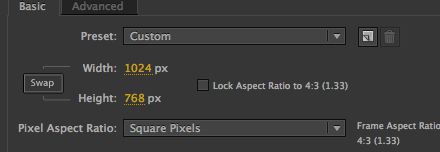
This is a small thing... it would be nice if there was a "swap" button for the Height and Width in Composition Settings.
Copy link to clipboard
Copied
PROPER Align Tool (this one is also for Illustrator, PShop, InDesign)
When you want A to be in alignment with X, X should stay in place.
The procedure would be to select A, then X and click align. Then A should move where X already is.
What happens right now is that A and X are aligned in the middle of their surrounding area.
In Photoshop's older version the align tool was working just like that.
It mattered which layer you selected last, as this would stay in place and all others would be aligned to it.

Copy link to clipboard
Copied
Those alignment tools are available in Illustrator, you just need to use the Alt/Option key then click to choose the anchor object. You'll get a double highlight around the selected object.
That alignment option never existed in Photoshop. It would be a good option for both. Please submit a feature request.

Copy link to clipboard
Copied
I'm putting my top ten features in a blog on my website. Numbers one to five are here: http://www.quarterlightpictures.com/2011/01/10-new-features-after-effects-needs-part-1/ complete with mockups and suggestions for implementation.
1) Per-vertex feathering of masks
2) Flexible processing of masks and effects per-layer
3) Mask grouping (included nested groups) and transforms
4) Layer groups
5) Native deep multichannel integration
Feel free to comment if you like!
Copy link to clipboard
Copied
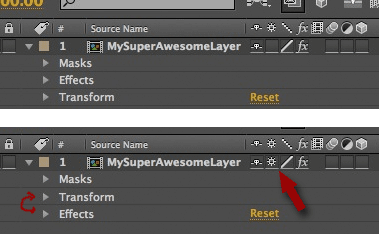
I think it would be just swell if a layers "items" would be re-orderd to the new render order, when that layer is selected to continuously rasterize.

Copy link to clipboard
Copied
1) Some PS filters would be nice. Especially the highpass filter
2) the ability to apply an adjustmentlayer to just ONE other layer (like "Ebenenschnittmaske" in PS (I don`t know the english word  But that`s the name in the german version) )
Copy link to clipboard
Copied
3.: the possibility to work in AE while rendering some files
4.: a setting in the "gradient" effect to get a smooth gradient without stepped colors
5.: setting a keyframe (of the visible effects in the timeline) by just clicking one keyboard-button. (not with opt+shift+effectshortcut)
Copy link to clipboard
Copied
3.: the possibility to work in AE while rendering some files
You can render and export in the background using Adobe Media Encoder, or you can use BG Renderer.
4.: a setting in the "gradient" effect to get a smooth gradient without stepped colors
See this video tutorial.
5.: setting a keyframe (of the visible effects in the timeline) by just clicking one keyboard-button. (not with opt+shift+effectshortcut)
Have you tried auto-keyframe mode?
Copy link to clipboard
Copied
I know the BG renderer, but it would be cool if you don`t need a plugin for such a "small" feature
Thanks for the gradient-tutorial!
Autokeyframe is not the function I meant.
The problem of the autokeyframe function is that you have to go up to the right of the timeline to change settings. If there would be an alternative to the shortcut opt+shift+(property-button) you could stay with your cursor right keyframe-area of the timeline: by adding a new keyframe at all opened propertya and doubleclicking the keyframe. It`s a lot easier to adjust the keyframes when you can stay at the right side of the timeline

Copy link to clipboard
Copied
I'd like to see an easy way to automate creating proxies for footage files. 

Copy link to clipboard
Copied
I just wish after effects behaved like premiere more.
1) Better sound support. I don't want to have to RAM preview just to hear sound.
2) Help lining things up in the timeline, snapping behavior like in premiere.


Find more inspiration, events, and resources on the new Adobe Community
Explore Now
 AdChoices