AMD 5700 xt GPU problems

Copy link to clipboard
Copied


 9
Replies
9
9
Replies
9


Copy link to clipboard
Copied
Switching over to NVidia won't do anything. AE barely even uses hardware acceleration and your fancy 2070 would still have nothing to do. You have a misunderstanding here. Whatever issues you have, have nothing to do with the hardware per se and boil down to configuration and driver errors. Chances are AE is simply having issues with your two heterogenous cards and you may need to disable one of them. Without any specific info we can't make it more concrete than that.
Mylenium

Copy link to clipboard
Copied
I can confirm that 5700XT has some weird issues. I was getting AE not responding in renders randomly. Whatever was in the viewport goes black/white and i need to kill AE in task manager. Projects i was able to render last night were just breaking randomly (at random frames so it was not related to any specific layer/effect, i even checked that) day after during the render.
Sometimes, my display would just act like it was turned off in the middle of render and i had to restart the computer. When it started doing weird stuff in game also (freezing screen but game still going on, not responsive randomly etc) i was sure it has to do something with 5700XT. Also, everyone on my Google video calls had heavily pixelated screens.
Very often on computer boot, my display would go low res (like in safe mode) and i had to turn off the display, turn it on again and it was fine.
I tried different AE versions, changing refresh rate of display from 75Hz to 60Hz, trying different gpu driver versions (20.7.2 and lower), turning off freesync - nothing helped. It was connected with DP cable to my AOC Q3279VWFD8 running 2560x1440 resolution.
This was configuration:
CPU 3700x (stock)
Gigabyte Radeon 5700XT 8Gb (stock)
64Gb DDR4 3000MHz Kingston
Cooler Master 700W PSU
Gigabyte X570 Gaming X
AOC Q3279VWFD8
Adata SU800NS38 512Gb (system disk)
Gigabyte GP-GSM2NE8512GNTD 512Gb (dedicated cache disk)
Patriot Burst 1Tb (projects disk)
Now, i want to clarify that i had NONE of these issues before, on my previous configuration, even with AMD card:
i7-5960x (overclocked)
XFX Vega 64 Liquid Cooled 8Gb
64Gb DDR4 2400MHz Kingston
Corsair RM750x PSU
Asus X99 Deluxe
AOC Q3279VWFD8
Bottom line is, when i replaced 5700XT with nVidia card i had spare (Gigabyte GTX 1070) - all of mentioned issues were gone. Absolutely every one of them. Renders were running fine, games too, video calls were perfect clear (just as they were with Vega 64). So i am positive everything had to do something with 5700XT. I am not saying it is faulty but GPU was the reason of those problems.

Copy link to clipboard
Copied
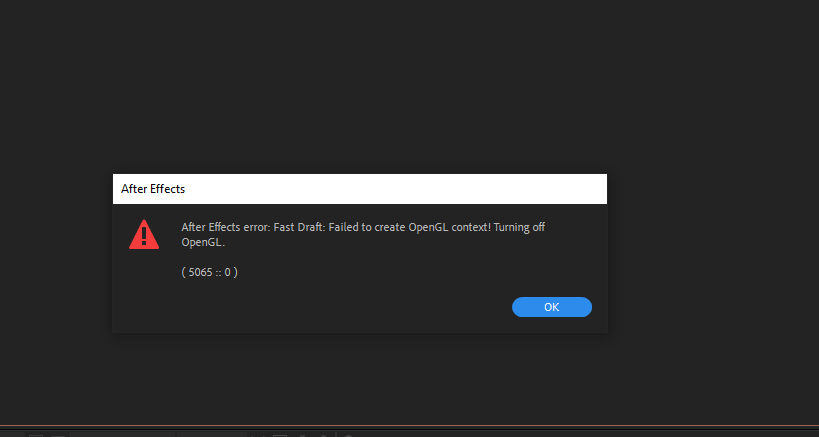
Hey! I am currently suffering from similar problems in After Effects, and I'm wondering if this could be caused by my Radeon RX 5700 XT
Whenever I open a Ae project the Composition panels goes blank, and it does not display anything. Shortly after Ae stops responding and either crashes or I have to forcefully terminate it on Windows task manager...
My PC: Win 10, 32 gb ram, AMD Radeon Rx 5700xt, Ryzen7. System and softwares in 1tb ssd, working aep project files in another 1tb ssd.
So maybe changing the GPU for another one may solve it? Will try it. But would like to know if anyone else has had the same issue.
Copy link to clipboard
Copied
That is exactly happening to me too in AE and nothing i tried (and i tried every possible thing mentioned on internet) didn't solve it.
It will go blank when you are in AE and alt tab to youtube video etc.
Once again, Vega was fine. Navi is a mess. Avoid 5700xt.
Copy link to clipboard
Copied
so far what seems to work is:
open after effects. create a new composition > add a shape layer or any other layer that will display someting on the composition > composition panel works normally.
THEN
you go to file> open project and open the project you need to work.
I've been doing this in the last 3 days and it seems to be the only way for the comp panel to become active and for me to work in any project that I have created before.
weird.
But once I finissh the freelance project I am doing this week I will try to swap my gpu with the one in my bfs computer and see if it makes any difference.
we need to know if this is a problem with Ae , with the GPU or some kind of configuration in my pc.
😞
Copy link to clipboard
Copied
I have ZERO issues in my other computer i run with RTX 2070. Navi is the problem and you can bet on it.
Copy link to clipboard
Copied

Copy link to clipboard
Copied
I know, right 😞

Copy link to clipboard
Copied
I have had this issue for a few months now. Tried a full system reset and updatred all drivers but nothing seems to get the GPU to kick on. I have the 5500XtGPU with a 3900XtCPU and 128Gb ram.
When I run a benchmark I get smooth results. But AMD and AE just do not get along. I think a really bad habit of mine is to have auto-updates. The system was working fine when I got it six months ago, though adobe auto updated and since then, media encoder crashes, after effects is suuuuuper slow, it took me 3 hours to render a 20 minute clip in premiere. Considering i pay 50quid a month for adobe, i would expect some form of technical support but this is about as much as we get. Please if anyone knows some ways of improving the output of the system and making Adobe work a lot better, I would love to hear.


Get ready! An upgraded Adobe Community experience is coming in January.
Learn more
 AdChoices