Copy link to clipboard
Copied
Hello everyone,
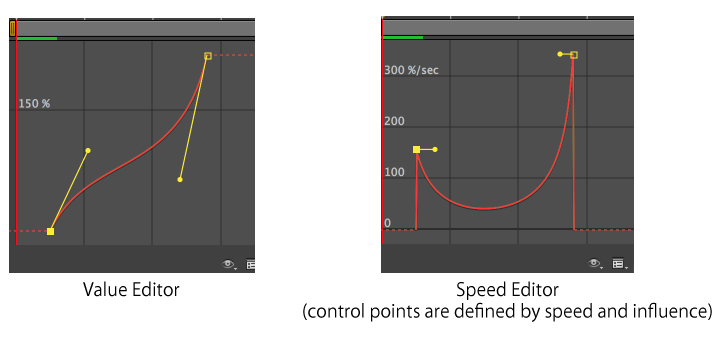
I have a question about the formula for graph conversion between value graph and speed graph on Graph Editor. Especially, when those graphs are Bezier Curves.
On the value graph you can define the Bezier curve by moving the control points oht x and y axises, which position can be gotten as spacial tangent values by the AE SDK. On the other hand, on the speed graph you can define the curve by moving the control points only on x axis and these are defiend by these two values "speed" and "influence". (please refer the defenition of AEGP_KeyframeEase). I guess, the speed graph is differentail of value graph mathematically, and I would like to know how those two bezier curves are converted each other. especially, given two control points on speed graph, how do you get the two control points on value graph?

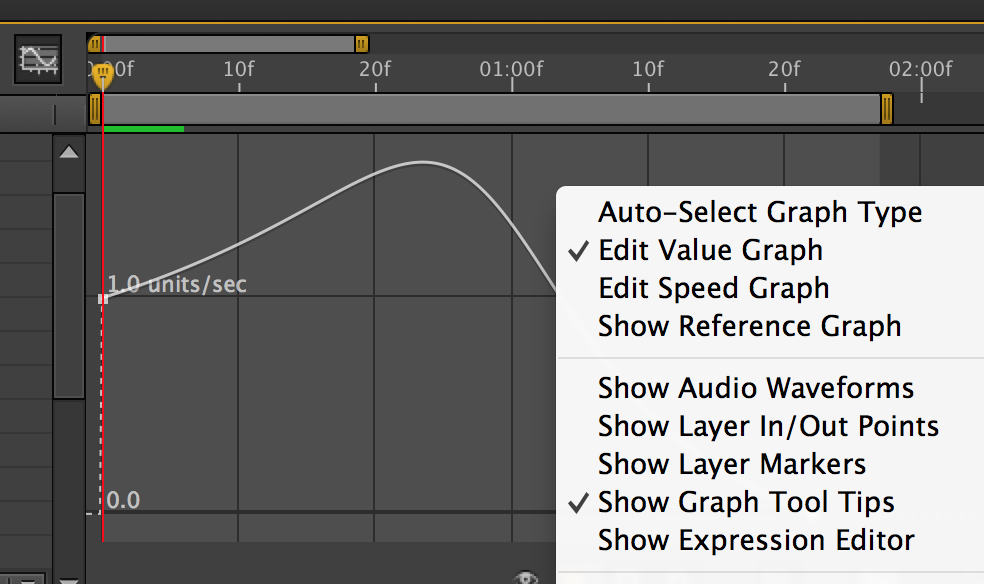
The reason why I am trying to figure out this formula is that there is only Speed Graph for path animation on Graph editor. As you can see below, even if Value Graph is selected the editor shows us Speed graph, which is I guess because the unit of this variation is not a simple unit something like pixel or seconds.

I know it is not a question about the functions of AE, but more like about mathematics. However, I would really appreciate if someone can shed some light on here or refer me some good website that I can research.
Thanks!
I'm really not sure about the mathematics, but I think something like this will work for conversion from speed to value graph.
var key, lastKey; // your keyframe objects
var duration = key.time - lastKey.time;
// only works for onedimensional properties, eg. rotation. maybe you have to use phytagoras for position, anchorpoint
var diff = Math.abs(key.value - lastKey.value);
var averageSpeed = diff / duration;
var bezierIn = {};
bezierIn.x = 1 - ke
...Copy link to clipboard
Copied
I'm really not sure about the mathematics, but I think something like this will work for conversion from speed to value graph.
var key, lastKey; // your keyframe objects
var duration = key.time - lastKey.time;
// only works for onedimensional properties, eg. rotation. maybe you have to use phytagoras for position, anchorpoint
var diff = Math.abs(key.value - lastKey.value);
var averageSpeed = diff / duration;
var bezierIn = {};
bezierIn.x = 1 - key.easeIn.influence / 100;
bezierIn.y = 1 - key.easeIn.speed / averageSpeed * bezierIn.x;
var bezierOut = {};
bezierOut.x = lastKey.easeOut.influence / 100;
bezierOut.y = lastKey.easeOut.speed / averageSpeed * bezierOut.x;
now you should have the relative position (0-1) of the two bezier handels for the value graph.
Message was edited by: ascii husky

Copy link to clipboard
Copied
Hi Ascii,
Thank you very much for the hint! I sincerely appreciate for it. I tried your program and I was finally able to translate the speed graph to value graph.
Just two more things, firstly, the bezlierIn should be like this:
bezierIn.x = 1 - key.easeIn.influence;
bezierIn.y = 1 - key.easeIn.speed / averageSpeed * key.easeIn.influence;
Secondly, for the multidimentional values, the average speed can be got by calculating the diagonal of each dimentions ( as you mentioned ) something as below:
float averageSpeed = sqrt( xAverageSpeed*xAverageSpeed + yAverageSpeed*yAverageSpeed );
Anyways thanks a lot again!
Copy link to clipboard
Copied
Ho, I'm after the formula too, because we need it to export the tangent "values" and not something hard to use like speed and influence 😕
Get ready! An upgraded Adobe Community experience is coming in January.
Learn more