


Participant
April 12, 2017
解決済み

Cinema 4D Lite Saving Rendering

  • April 12, 2017
  • 返信数 5.
  • 16993 ビュー

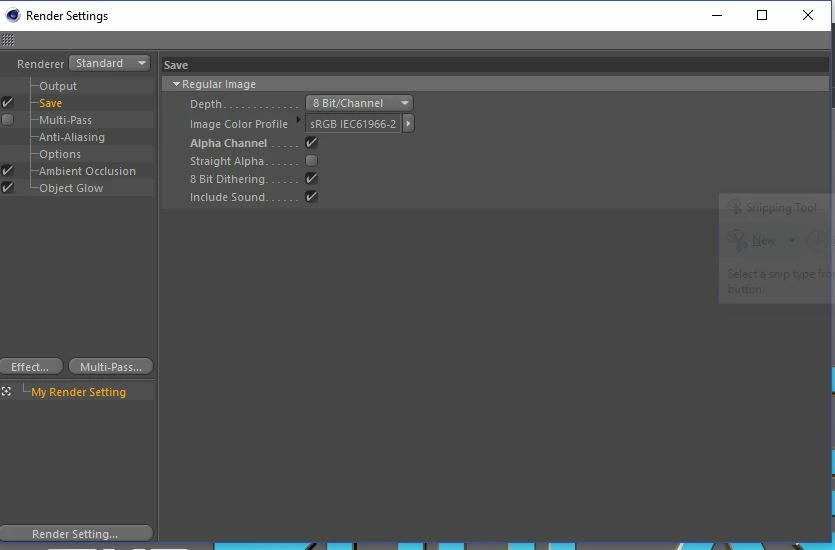
When I try to Render My Cinema 4D Lite file the SAVE option does not give me the option to add a location on where to save the file.  When I try to render anyways I get the "There is no File name specified for the rendering image" message.  Can someone please provide guidance on how to fix this issue?  Below is a screen capture of my Save screen in render settings
    このトピックへの返信は締め切られました。
    解決に役立った回答 Mylenium

    You cannot render directly from C4D Lite. This only works with Cineware from within AE.

    Mylenium

    返信数 5

    PUBG Mobile Lite
    Participant
    September 16, 2023

    Why you can't save the render file location in Cinema 4D Lite

    Cinema 4D Lite does not allow you to save the render file location. This is a limitation of the Lite version. To save your render file, you need to export it to After Effects using Cineware.

    How to render your Cinema 4D Lite file in After Effects

    1. Open your Cinema 4D Lite file in After Effects.
    2. Right-click the Cinema 4D file in the Project panel and select New Comp from Selection.
    3. In the CINEWARE panel, change the Renderer to Standard (Final).
    4. Render your composition.

    How to save your render file from After Effects

    1. Go to File > Export > Add to Render Queue.
    2. In the Render Queue panel, click the Output Module tab.
    3. Select the format you want to export your render file as (e.g., PNG, JPEG, TIFF, or MP4).
    4. Click the Browse button and select the location where you want to save your render file.
    5. Click the Render button.

    Troubleshooting tips

    • If you are getting the "There is no File name specified for the rendering image" message, make sure that you have selected a valid output module in the Render Queue panel.
    • Also, make sure that you have specified a valid location for the render file.
    • If you are still having problems, try restarting After Effects.

    Additional notes

    • You can also use Cineware to export your render file to other Adobe applications, such as Photoshop and Premiere Pro.
    • If you need to render a large number of frames, you can use the Batch Render feature in After Effects.
    • For more information on rendering in After Effects, please see the Adobe After Effects documentation.
    pubgliteapk
    TonyRowlands
    Participant
    November 25, 2018

    Real slick, Rick. Theres a fine quote that sums up your comment.....

    “Don't be in a hurry to condemn because he doesn't do what you do or think as you think or as fast. There was a time when you didn't know what you know today.”

    Malcolm X

    Participant
    March 4, 2018

    Same question brought me here, even after taking time to study

    Here is a method to save from lite, assuming its a creative cloud subscription..

    https://www.3dfordesigners.com/blog/how-to-export-images-and-video-from-cinema-4d-lite-guide

    MERCY2011
    Participant
    May 6, 2018

    thank you for your link really answer the question,?

    sudeshprathapv
    Known Participant
    December 2, 2017

    I created in C4D Lite and Rendered in After Effects CC. But when I rendered, the MoGraph rendered with the GuideLines. How do I render without Guidelines?

    Shhajans
    Participant
    January 22, 2018

    in the time it took you to type this up, you couldve just answered the question.  i have the same question too but when i googled this, the answer i got was someone nagging the poor guy on why he should study more...

    Mylenium
    Mylenium解決!
    Legend
    April 12, 2017

    You cannot render directly from C4D Lite. This only works with Cineware from within AE.

    Mylenium

    Participant
    April 12, 2017

    I am working in AE and when I click on "Edit" and then "Edit Original" this is where I am trying to edit and save My render.  How do I save this then?

    Szalam
    Community Expert
    Community Expert
    April 12, 2017

    You render via After Effects as Mylenium said. You can NOT render from Cinema 4D Lite.