


Copy link to clipboard
Copied
Hello everybody!
Does anybody know, why don't we have a simple Eyedropper in After Effects for Shapes? It is to many actions needed to do to open Eyedropper for shapes. But sometimes you need to change color very often? and you repeat all this actions again and again... Or maby I just don't no some simple way to do this? So if there are no simple way, maby we need to insist on adding Eyedropper Tool? I don't think it is too hard but very usefull


 1 Correct answer


Hi SqBrain,
Sorry to hear of your issues with our Color Picker. You can definitely make a feature request here. Let us know if we can do anything more for you.
Thanks,
Kevin

 6
Replies
6
6
Replies
6


Copy link to clipboard
Copied
Does anybody know, why don't we have a simple Eyedropper in After Effects for Shapes? It is to many actions needed to do to open Eyedropper for shapes. But sometimes you need to change color very often?
this could be useful. you can ask for it here: Feature Request/Bug Report Form
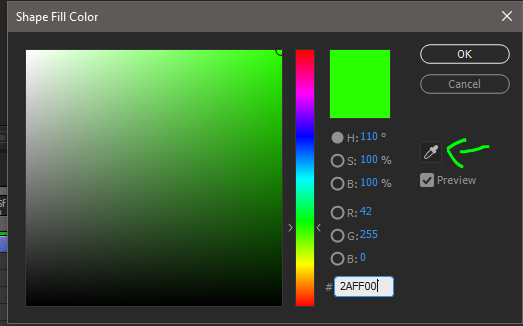
bare in mind you can change the color by simply highlighting the shape layer or group and clicking on the fill color

and there you also have an eyedropper
Copy link to clipboard
Copied
Yes, ofcourse, but it all the same two moves of mouse, first for clicking on fill and second for clicking on eyedropper and you can't assign to it any shortcut. So if you need to change color several times, you need again and again use your mouse. One of the solutions is put on shape Fill and use it eyedropper, but it is very uncomfortably if you have many shapes in one Shape layer with different Fills and Strokes, so it is another discommode that Effect "Fill" affects not only fill of shape, but stroke too. So you see, it's many issues here... But thanks for link you gave me, I will write there
Copy link to clipboard
Copied
I see. In the meantim, There are scripts in Aescripts.com that could make the shape handling and coloring process much smoother.
This one allows to select fills and strokes:
Explode Shape Layers 3 - aescripts + aeplugins - aescripts.com
this one allows you to assign colors easily through linking
Copy link to clipboard
Copied
Yes, I have both of these scripts and I don't see how ESL function "Select all strokes or fills" may be useful in changing several colors. RDC is more useful, but it has anoser limitations. In fact, it links all colors with expressions, which increase time of After Effects work, for the one hand, and you can't use eyedrpopper with it, if you don't want to link colors. So there are a number of colors limitation. Yes, I have full version and there are much more number of colors, but it takes much space. And it is not very handy to change color of RDC itself. So adding Eyedropper Toll makes it's all much, much easy
Copy link to clipboard
Copied
You got my vote. I would submit a feature request and link to this thread. While were at it let's make the new eyedropper tool toggle to the color sampler tool which will make it easier to color match RGB values.
Copy link to clipboard
Copied
Hi SqBrain,
Sorry to hear of your issues with our Color Picker. You can definitely make a feature request here. Let us know if we can do anything more for you.
Thanks,
Kevin


Get ready! An upgraded Adobe Community experience is coming in January.
Learn more
 AdChoices