Exit
  • Global community
    • Language:
      • Deutsch
      • English
      • Español
      • Français
      • Português
  • 日本語コミュニティ
  • 한국 커뮤니티
0

Colour picker

New Here ,
Mar 21, 2019 Mar 21, 2019

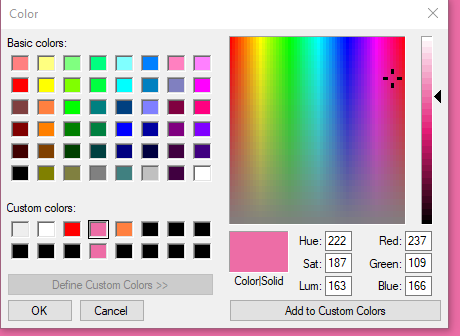
I am having issues with the colour picker it doesn't have HSB code for me to type in.

That is how my colour picker looks like.

  7f0d4ae221b85de04c54fe4b3b2cd91a.png

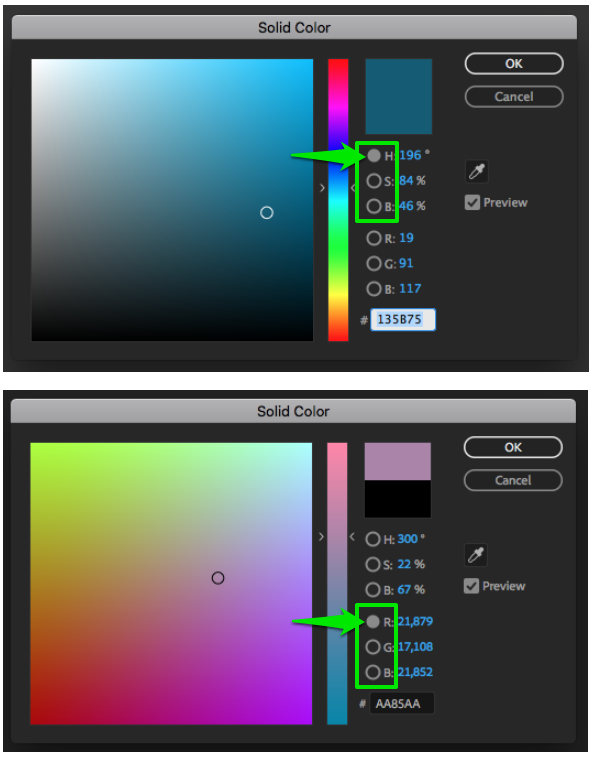
but..... I prefer this colour picker down bellow, how do I change it??

image_20171124154858_1.png

665
Translate
Report
Community guidelines
Be kind and respectful, give credit to the original source of content, and search for duplicates before posting. Learn more
community guidelines

correct answers 1 Correct answer

LEGEND , Mar 21, 2019 Mar 21, 2019

In AE's Preferences > General, you have "use system color picker" selected. Turn it off and you'll get what you want.

Translate
LEGEND ,
Mar 21, 2019 Mar 21, 2019

In AE's Preferences > General, you have "use system color picker" selected. Turn it off and you'll get what you want.

Translate
Report
Community guidelines
Be kind and respectful, give credit to the original source of content, and search for duplicates before posting. Learn more
community guidelines
New Here ,
Mar 21, 2019 Mar 21, 2019

it worked Thank you so much!!

Translate
Report
Community guidelines
Be kind and respectful, give credit to the original source of content, and search for duplicates before posting. Learn more
community guidelines
Community Beginner ,
May 15, 2020 May 15, 2020
LATEST

Thanks your a life saver it's been driving me batty 

Translate
Report
Community guidelines
Be kind and respectful, give credit to the original source of content, and search for duplicates before posting. Learn more
community guidelines