


Create a falloff

Copy link to clipboard
Copied
Hello guys. I know this is probably something simple, but I cannot wrap my head around it.
I have a scene with 4 layers (L1, L2, L3, L4) that are parented each to another and one null layer as a controler. This control null has Slider (Falloff) and Angle Control (ROT).
What I want to create is a sort of falloff effect that work something like this:
- If falloff value is at 0:
- changing ROT 0 - 180:
- L1 rotates from 0 to 180;
- L2 rotates from 0 to 180 once L1 has rotated to 180 value
- L3 rotates from 0 to 180 once L2 has rotated to 180 value
- L4 rotates from 0 to 180 once L3 has rotated to 180 value
- If falloff value is at 100:
- changing ROT 0 - 180:
- L1 rotates from 0 to 180 * 4 (because we have 4 layers and this is 4th layer in a row);
- L2 rotates from 0 to 180 * 3 (because we have 4 layers and this is 3rd layer in a row);
- L3 rotates from 0 to 180 * 2 (because we have 4 layers and this is 2nd layer in a row);
- L4 rotates from 0 to 180
and all those in between values.
I have this expression right now, but it just doesnt seem to work as I want it to.
Any help?
var i = thisLayer.index;
var max = 180;
f = 1 - (thisComp.layer("controller").effect("Falloff")("Slider") / 100);
rot = thisComp.layer("controller").effect("ROT")("Angle")

value = linear (rot, i*f*max, i*f*max + max, 0, max)


 8
Replies
8
8
Replies
8


Copy link to clipboard
Copied
Swap the positions in your linear expression. You have things backwards there.
Mylenium
Copy link to clipboard
Copied
Linear expression seems to be OK in my example.
linear(t, tMin, tMax, value1, Value2), where:
t - rotation value,
tMin - lowest rotation value i * f * max
tMax - maximum rotation value i * f *max + max
Value1 - 0;
Value2 - max rotation allowed


Copy link to clipboard
Copied
why is value2=180?
for falloff = 100 you say you want to have L1 rotates from 0 to 180 * 4 which is > 180
Maybe you try to split up the issue in 3 separate linear constructs?
var case1 = linear(here goes what I want to have for falloff == 0);
var case2 = linear(here goes what I want to have for falloff == 100);
var result = linear(falloff, 0,100, case1, case2);
Copy link to clipboard
Copied
This is probably the case where having the project file at hand is the way to go.
Mathias, not really sure how to use your suggestion here.
Copy link to clipboard
Copied
I think this is implementing exactly your specification. If this is not what you want, you need to explain more precisely what you want:
var i = thisLayer.index;
var max = 180;
var numElements = 4;
falloff = thisComp.layer("controller").effect("Falloff")("Slider");
rot = thisComp.layer("controller").effect("ROT")("Angle")


// when falloff = 0 split the total range [0,max] such that Li starts rotating when Li-1 finished rotating
var maxPerElement = max/numElements;
var myRangeStart = (i-1)* maxPerElement;
var myRangeEnd = myRangeStart + maxPerElement;
var fallOff0Result = linear(rot,myRangeStart,myRangeEnd,0,max);

// when falloff = 100 Li rotates from 0 to 180 * i
var fallOff100Result = linear(rot,0,max,0,max*i);

// blend between the two extreme cases for falloff
linear (falloff,0,100, fallOff0Result, fallOff100Result)
Copy link to clipboard
Copied
Thank you Mathias Moehl for your answer, it's really good one, but unfortunately that's not exactly what I need.
I did a mistake in first post about what I need. Apparently I do not want to change rotation value - only falloff value and falloff position.
However, as I am not able to do this in AE, I went to C4D and recreated scenario that I need. Mind taking a look?
Also here's a picture that illustrates what I am after. Here's a bigger one Dropbox - falloff.png
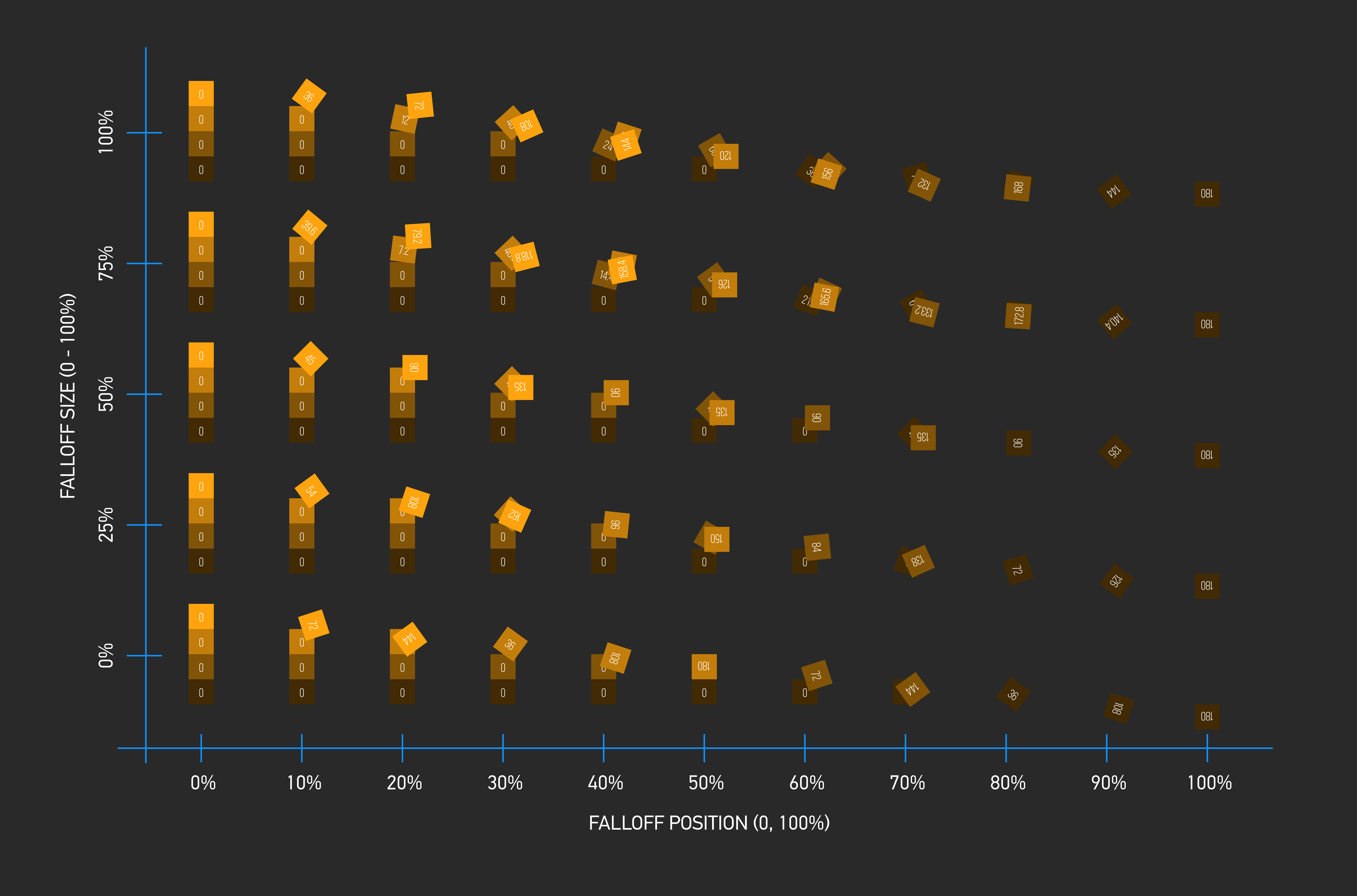
Still, really grateful for your reply Mathias.
Copy link to clipboard
Copied
I didn't look at the C4D file, but from the picture I guess you want something like this?
var i = thisLayer.index;
var max = 180;
var numElements = 4;
falloff = thisComp.layer("controller").effect("Falloff")("Slider");
rot = thisComp.layer("controller").effect("ROT")("Angle")

// when falloff = 0 split the total range [0,max] such that Li starts rotating when Li-1 finished rotating
// when falloff = 100 the ranges start at the same time as for falloff = 0 but all of them last until the end (i.e. they overlap)
var maxPerElement = max/numElements;
var myRangeStart = (i-1)* maxPerElement;
var myRangeEndForFalloff0 = myRangeStart + maxPerElement;
var myRangeEndForFalloff100 = max;
var myRangeEnd = linear(falloff,0,100,myRangeEndForFalloff0, myRangeEndForFalloff100);
linear(rot,myRangeStart,myRangeEnd,0,max);
Copy link to clipboard
Copied
This is really close to what I need. But still not exact.
Will have to pick my brains some more then:)
Thanks Mathias Moehl your script gives me a good start at it. Cheers.


Get ready! An upgraded Adobe Community experience is coming in January.
Learn more
 AdChoices
