
Participant
February 2, 2017
Answered

current time indicator...2 questions.

  • February 2, 2017
  • 1 reply
  • 665 views

Hi i have 2 questions that I hope are down to my stupidity and newness.

1 when i preview by pressing the space bar the preview is fine but the when the real time indicator gets to the right of the screen it just keeps going and i can't see it anymore...i would have thought or hope that the time line would scroll along so that i could see the layers at the actual point that the preview is at

2. when i use RAM preview, the real time indicator just doesn't move at all...preview is fine but its impossible to see the layers and time line that matches the current part of the preview.

After effects CC 12.1.0.168

OS 10.12.2

thanks for your help
    This topic has been closed for replies.
    Correct answer Roei Tzoref
    OS 10.12.2

    you are using Sierra which is not supported for your Ae version. the only fully supported version for Sierra is CC2017 aka 14.x. this could or could not be related to your problem. just bare that in mind.

    After effects CC 12.1.0.168

    you should update your software to 12.2.1 to make sure you are with the least buggy version.

    about your preview questions.

    pressing the space bar the preview is fine but the when the real time indicator gets to the right of the screen it just keeps going and i can't see it anymore...i would have thought or hope that the time line would scroll along so that i could see the layers at the actual point that the preview is at

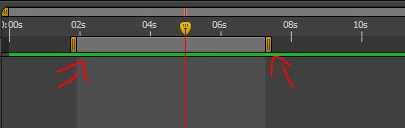
    in CC 12.x your spacebar and Numpad 0 preview will play to the entire work area. by default the work area is set to the duration of your composition but you can change that. you can drag the handles on the edges

    or use the shortcuts B and N

    you can also use the handy "From Current Time" checkbox

    this will preview your composition from where your CTI is.

    it appears you are very new to the software. Ae is not intuitive. you should spend a good amount of time here first: After Effects tutorials

    if you want to explore a feature, just type the name in the search filed the upper right corner of your Ae interface and press Enter. here's what you get when you type "Preview": Search results

    1 reply

    Roei Tzoref
    Roei TzorefCorrect answer
    Legend
    February 2, 2017
    OS 10.12.2

    you are using Sierra which is not supported for your Ae version. the only fully supported version for Sierra is CC2017 aka 14.x. this could or could not be related to your problem. just bare that in mind.

    After effects CC 12.1.0.168

    you should update your software to 12.2.1 to make sure you are with the least buggy version.

    about your preview questions.

    pressing the space bar the preview is fine but the when the real time indicator gets to the right of the screen it just keeps going and i can't see it anymore...i would have thought or hope that the time line would scroll along so that i could see the layers at the actual point that the preview is at

    in CC 12.x your spacebar and Numpad 0 preview will play to the entire work area. by default the work area is set to the duration of your composition but you can change that. you can drag the handles on the edges

    or use the shortcuts B and N

    you can also use the handy "From Current Time" checkbox

    this will preview your composition from where your CTI is.

    it appears you are very new to the software. Ae is not intuitive. you should spend a good amount of time here first: After Effects tutorials

    if you want to explore a feature, just type the name in the search filed the upper right corner of your Ae interface and press Enter. here's what you get when you type "Preview": Search results