Exit
  • Global community
    • Language:
      • Deutsch
      • English
      • Español
      • Français
      • Português
  • 日本語コミュニティ
  • 한국 커뮤니티
0

Delete After Effects previous version's settings file

New Here ,
Apr 18, 2021 Apr 18, 2021

Hi all, I just installed After Effects on my work laptop (macbook) and it asked if I wanted to migrate previous version's settings but I didn't want to and didn't do it. I know it's not important but is there a way I can delete the file for this previous settings? Just to have a clean After Effects without older files/settings that I don't need. Thanks in advance!

TOPICS
How to , User interface or workspaces
253
Translate
Report
Community guidelines
Be kind and respectful, give credit to the original source of content, and search for duplicates before posting. Learn more
community guidelines
LEGEND ,
Apr 18, 2021 Apr 18, 2021

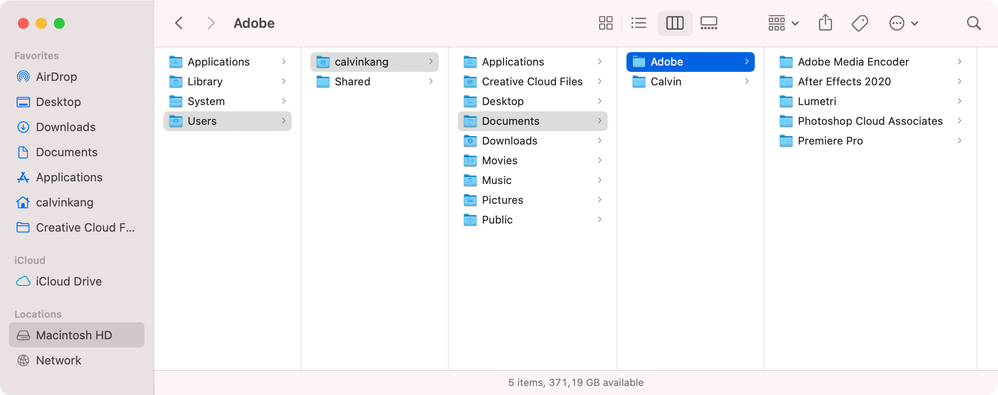
Just have a look at your User/Calvin/Adobe folder and manually delete the files no longer relevant.


Mylenium

Translate
Report
Community guidelines
Be kind and respectful, give credit to the original source of content, and search for duplicates before posting. Learn more
community guidelines
New Here ,
Apr 18, 2021 Apr 18, 2021
LATEST

Hi Mylenium, thanks for your fast reply! I'm not really familiar with this, did you mean this 'Adobe' folder? So I assume it's safe to delete all these subfolders? Thanks.Screen Shot 2021-04-18 at 5.27.43 PM.png

Translate
Report
Community guidelines
Be kind and respectful, give credit to the original source of content, and search for duplicates before posting. Learn more
community guidelines