Exit
  • Global community
    • Language:
      • Deutsch
      • English
      • Español
      • Français
      • Português
  • 日本語コミュニティ
  • 한국 커뮤니티
0

DropDownList Items width bug?

Mentor ,
Oct 20, 2016 Oct 20, 2016

Hello Community.

I've stumbled over a strange behavior with DropDownLists that could be a bug with AFX. Maybe somebody can confirm or - even better - knows a solution.

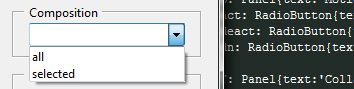
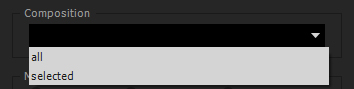
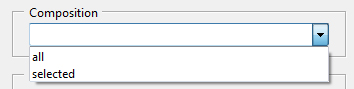
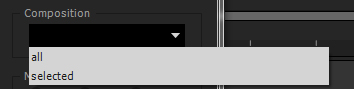
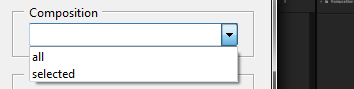
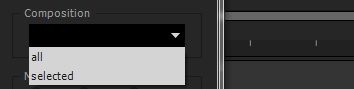
I have a plugin with a fluid interface . By fluid I mean: alignment:['fill','fill'], alignChildren:['fill','fill']. I've put a DropDownList into this and it change its size as intended. I can drag the window or panel to make it wider and the list gets wider too. However, when I narrow the window or panel again, the size of the items in the list stays at their previous width.

It's not happening when I run the script with ExtendScript Toolkit CC, only in AFX.

The relevant code:

group{orientation:'column', alignment:['fill','fill'], alignChildren:['fill','fill'],\

                        panelComp: Panel{text:'Composition', orientation:'row', alignment:['fill','top'], alignChildren:['fill','fill'],\

                            compList: DropDownList{properties:{items:['all', 'selected']}},\

                        },\

Screenshots:

1. normal size:
afx1.jpgest1.jpg

2. wider:

afx2.jpgest2.jpg

3. back to normal size:

afx3.jpgest3.jpg

Thank you!

Martin

TOPICS
Scripting
1.1K
Translate
Report
Community guidelines
Be kind and respectful, give credit to the original source of content, and search for duplicates before posting. Learn more
community guidelines

correct answers 1 Correct answer

Advocate , Oct 20, 2016 Oct 20, 2016

Martin, yes this is a bug. I've run into this as well. Also did a post here awhile back, but can't seem to find it at the moment. It'a very annoying and I never really found a solution to fix it unfortunately.

Translate
Advocate ,
Oct 20, 2016 Oct 20, 2016

Martin, yes this is a bug. I've run into this as well. Also did a post here awhile back, but can't seem to find it at the moment. It'a very annoying and I never really found a solution to fix it unfortunately.

Translate
Report
Community guidelines
Be kind and respectful, give credit to the original source of content, and search for duplicates before posting. Learn more
community guidelines
Advocate ,
Oct 21, 2016 Oct 21, 2016
Translate
Report
Community guidelines
Be kind and respectful, give credit to the original source of content, and search for duplicates before posting. Learn more
community guidelines
Mentor ,
Oct 21, 2016 Oct 21, 2016

Thank you guys.

I've fixed to size of the dropdownlist to avoid oversize. It's not perfect, but a workaround.

"One of our software engineers is looking into this bug" - Adobe, 10.06.2015

This engineer must have a very deep look into the code...

Translate
Report
Community guidelines
Be kind and respectful, give credit to the original source of content, and search for duplicates before posting. Learn more
community guidelines
Mentor ,
Oct 24, 2016 Oct 24, 2016
LATEST

Setting the itemSize to the size of the Dropdown (with correction faktor) did the trick:

myPanel.onResizing = myPanel.onResize = function(){

                mainPanel.panelComp.compList.itemSize = [mainPanel.panelComp.compList.size[0]-27,mainPanel.panelComp.compList.size[1]];

};   

Translate
Report
Community guidelines
Be kind and respectful, give credit to the original source of content, and search for duplicates before posting. Learn more
community guidelines