


- Home
- After Effects
- Discussions
- Re: Expressions (Linear) doesn't work in Media Enc...
- Re: Expressions (Linear) doesn't work in Media Enc...

Copy link to clipboard
Copied
Hello,
I have a problem with some expressions that doesn't render when I render the composition in Adobe Media Encoder.
For example, I use the linear expression to move a solid from a side of the comp to the other.
Rendering it in After Effects works fine, but rendring it in AME doesn't produce any movement.
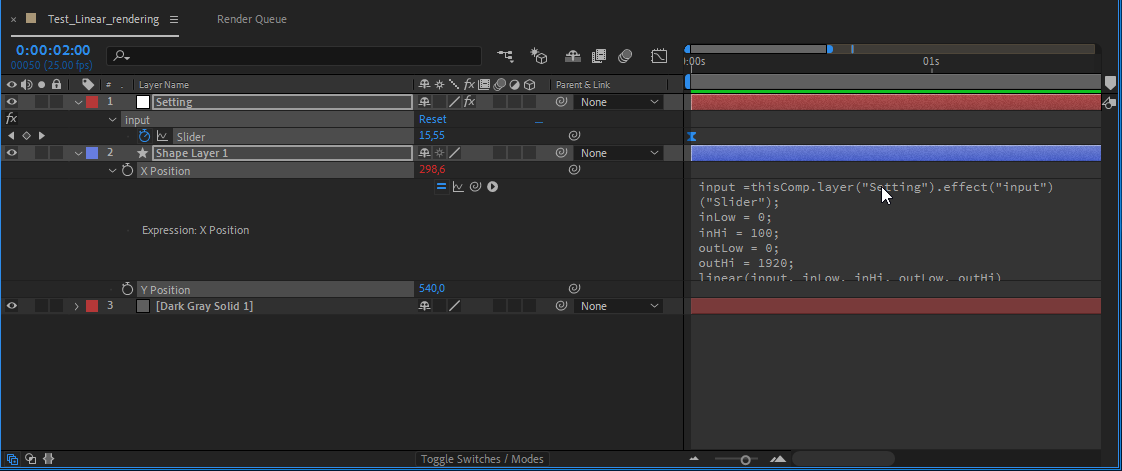
And the render => Expressions (Linear) doesn't work in Media Encoder - YouTube
- I tested with the expression engine "Legacy" and "Javascript" - same problem
- I have AE in english and Media Encoder in english
- I'm on CC 2019 AE v16.0.0 (build235)
I don't konw how to upload the AE file but it's ready for you.
Could someone help me ?


 1 Correct answer
It seems that an update just solved my problem. I'm now on after effects v.16.0.1 (build48).
Great !

 6
Replies
6
6
Replies
6


Copy link to clipboard
Copied
This is a workaround, not a solution, but:
- Right-click the property ("X Position")
- Press "Convert Expression to Keyframes"
This will convert your linear to keys, which shouldn't have any issue rendering.
Unsure what the actual problem is, but this will let you render in the meantime!
Copy link to clipboard
Copied
Thanks Zlovatt for your workaround, I didn't think about that !
It's helpful for a composition with few expressions but in my case, I have a composition with more than fourty expressions and we will use it as a template... Actually, I've just isolated one expression to show the problem here.
Copy link to clipboard
Copied
This is a commercial solution, but Easy Bake was made to bake expressions in bulk. (In the interest of transparency, I co-developed this and have a vested interest in its success )

Copy link to clipboard
Copied
Have you tried precompingit before rendering? Does the nested comp render correctly in AE? Make sure to clear your cache before rendering too, see if that makes any difference?
Copy link to clipboard
Copied
Thanks Zlovatt. Would be sad to have to pay to do something now that used to work before ... But for other function, Easy bake looks really great !
Angie_Taylor, I already tried to precomp or flush the cache. My animation works well inside After effects, it's only when I send it to AME.
Adobe... No answer about this ? No bugfix ?
Correct answer by
vtgaming1
AUTHOR
Copy link to clipboard
Copied
It seems that an update just solved my problem. I'm now on after effects v.16.0.1 (build48).
Great !


Get ready! An upgraded Adobe Community experience is coming in January.
Learn more
 AdChoices