
Inspiring
April 15, 2021
Answered

ExtendScript changes text area line count; now will not center text

  • April 15, 2021
  • 1 reply
  • 1168 views

Thanks in advance for your help with this:

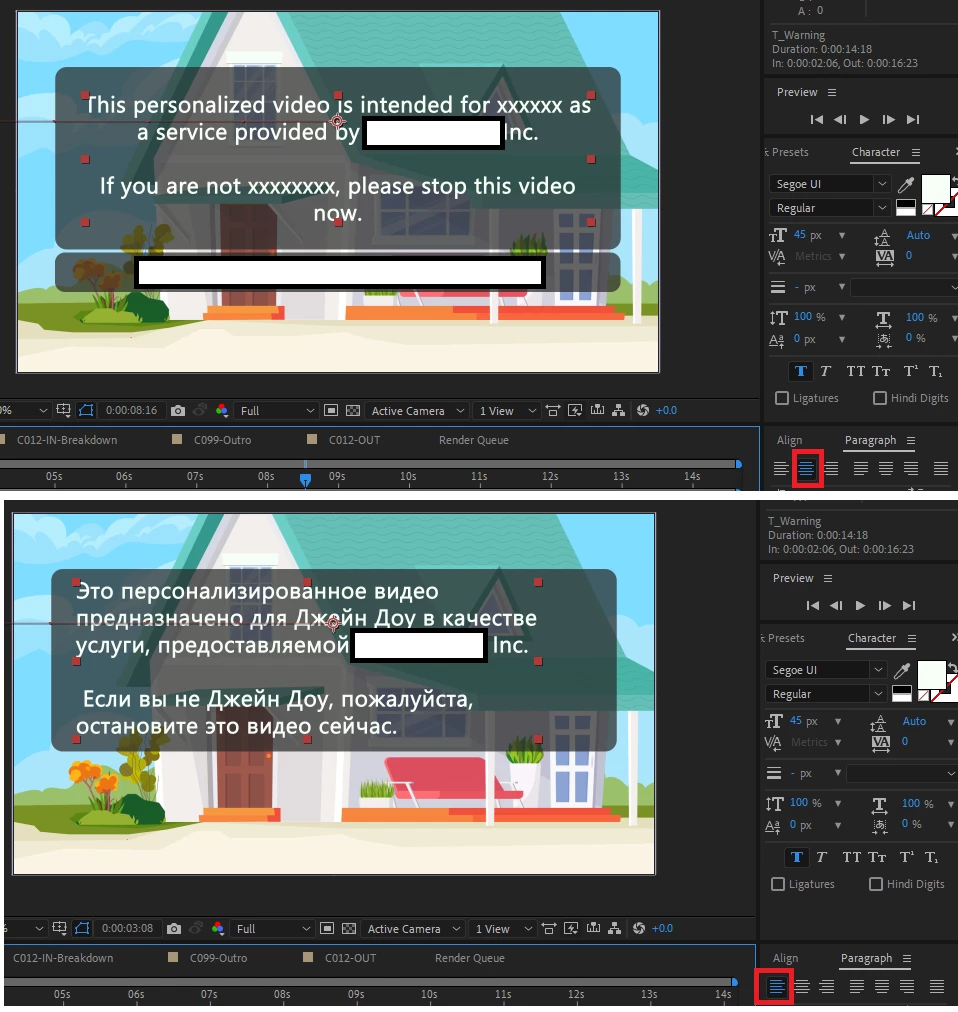
I have a comp with a Text Area with 5 lines of English placeholder text in the project. The text layer is centered over a shape layer.


When my ExtendScript replaces the 5 English lines with its Russian translation, which is 6 lines, the Text Area grows horizontally … at the bottom; now the text is no longer horizontally centered over the shape.


To fix this centering issue, I have the following script for the “Anchor Point”: 

s=sourceRectAtTime();[0,s.top+s.height/2]+value; 

Works beautifully as you can see. BUT: the paragraph alignment, which was set to “Center Text” somehow gets changed to “Left Align Text” (red rectangle)!

Even if I force alignment after changing the text with :


textDocument.justification = ParagraphJustification.CENTER_JUSTIFY;


Makes no difference, the text remains left justified.

Abbreviated code:


for (var gg = 1; gg <= numLayers; gg++) {
    if (app.project.item(y).layer(gg).property("Source Text") !== null) { 
   
        replaceText =  (4 lines of text from a JSON file)

        app.project.item(y).layer(gg).property("Source Text").setValue(replaceText); // replaceText with the 4 lines

        textProp = app.project.item(y).layer(gg).property("Source Text");
        textDocument = textProp.value;    
 
        textDocument.justification = ParagraphJustification.CENTER_JUSTIFY;     //   Force Center Justify 
    }
}


This topic has been closed for replies.
Correct answer Paul Tuersley

Yes I've used that same solution of breaking up the steps myself. As I wrote it untested I was a bit worried you might run into some issue. AE scripting has plenty of quirks/bugs you have to find workarounds for. Glad you got it figured out.

I wrote it that way to show you the alternate way to set the text string but you can probably simplify it to this:

textProp.setValue(replaceText);

textDocument = textProp.value;    
textDocument.justification = ParagraphJustification.CENTER_JUSTIFY; 
textProp.setValue(textDocument);


1 reply

Inspiring
April 15, 2021

The problem is that your script isn't actually setting the justification. When you read the 'value' of the TextDocument object, think of it like making it separate copy rather than a live link. So once you've made changes to that copy you need to set it back onto the SourceText property. SourceText is kinda odd in that you can either set its value using just a string to change the text or a textDoc object to change everything.


for (var gg = 1; gg <= numLayers; gg++) {
    if (app.project.item(y).layer(gg).property("Source Text") !== null) { 
   
        replaceText =  (4 lines of text from a JSON file);

        textProp = app.project.item(y).layer(gg).property("Source Text");
        textDocument = textProp.value;    
 
        textDocument.text = replaceText;
        textDocument.justification = ParagraphJustification.CENTER_JUSTIFY;     //   Force Center Justify 
		
        textProp.setValue(textDocument);
    }
}
Inspiring
April 15, 2021

Thank you for your quick response Paul, it’s much appreciated! 

I tried your suggestion, but with no success.  Even if I replaced the text with the exact same text.

I removed the expression that re-centers the Anchor Point, in case this was somehow causing a problem – ya never know – but that did not fix the issue.

But I noticed something: while the script was running, I could briefly see the Russian text nicely center justified … and then suddenly, it became left justified. Hmmm.

I modified the script to apply the two changes in two steps instead of one, like in the snippet and now it works!

textDocument = textProp.value;    
textDocument.text = replaceText;		
textProp.setValue(textDocument);

textDocument = textProp.value;    
textDocument.justification = ParagraphJustification.CENTER_JUSTIFY; 
textProp.setValue(textDocument);


Paul TuersleyCorrect answer
Inspiring
April 15, 2021

Yes I've used that same solution of breaking up the steps myself. As I wrote it untested I was a bit worried you might run into some issue. AE scripting has plenty of quirks/bugs you have to find workarounds for. Glad you got it figured out.

I wrote it that way to show you the alternate way to set the text string but you can probably simplify it to this:

textProp.setValue(replaceText);

textDocument = textProp.value;    
textDocument.justification = ParagraphJustification.CENTER_JUSTIFY; 
textProp.setValue(textDocument);