


- Home
- After Effects
- Discussions
- Re: get value of layer controller in aftereffects
- Re: get value of layer controller in aftereffects
get value of layer controller in aftereffects

Copy link to clipboard
Copied
Hi,
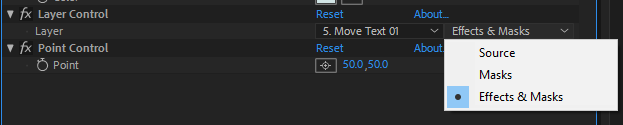
i need to get value of layer controller with script, since aftereffects 2018 layer controller has 2 drop downs, first drop down shows all layers, second drop down shows [effect, mask, effect & mask]. i could get value of first dropdown, but couldnt get value of second dropdown...
is it possible to read second dropdown value?
Best Regards
Daniel


 7
Replies
7
7
Replies
7



Copy link to clipboard
Copied
From everything I've seen, setting or getting the value of that dropdown is not yet script-accessible (as of AE 16.0, Oct 2018).

Copy link to clipboard
Copied
Can you provide an example of getting and setting the 1st dropdown's 'value'? The example I was following doesn't seem to work anymore since they introduced that second dropdown.
I can access it via expressions; I need to do it via a script I'm creating... I am trying to get a layer's layer control 'value', and then read the position from that layer. I am also trying to create another null with another layer control, which is set to the other selected layer control value. So I need to get and set.
Thanks a bunch!
-Dave
Copy link to clipboard
Copied
This is broken out into a bunch of steps so it's easier to see, and note that there aren't checks to ensure that the index that you're setting or getting is valid-- just here to show a few possibilities!
(function () {
var comp = app.project.activeItem;
var layer = comp.selectedLayers[0];
var effects = layer.property("ADBE Effect Parade");
var layerControl = effects.property("ADBE Layer Control");
var layerDropdown = layerControl.property("ADBE Layer Control-0001");
// This value is the index in your current comp of the dropdown's target
var dropdownLayerIndex = layerDropdown.value;
// This is how you'd get the layer specified by the dropdown
var dropdownSelectedLayer = comp.layer(dropdownLayerIndex);
// To set the value of the dropdown, you can do this--
// where the value passed in is a number from 0 ("none"), to comp.numLayers
layerDropdown.setValue(0);
})();
Copy link to clipboard
Copied
Woh! Thanks a bunch! I've been trying to figure this out for a few days now... Finally got it working thanks to your code.
I found an error, in case someone else is looking for this in the future. On line 3 & 5, "layer" should be named something else, like "myLayer". By calling it "layer", it creates a conflict on line 13, where you are searching for a layer's index in the comp, not in
app.project.activeItem.app.project.activeItem.selectedLayers[0];
Thanks again!!! Great explanation/commenting btw!
-Dave

Copy link to clipboard
Copied
Hi Zack,
I don't suppose you've discovered a way to set the second dropdown since this post?
I'm applying the Compound Arithmetic effect via a script. It's fairly straight forward to set the 'Second Source' layer selection using the effect property index, but I'm stumped as to how I can change the second dropdown from 'Source' to either 'Masks' or 'Effects & Masks'.
eg. This works ok:
layer("ADBE Effect Parade")("ADBE Compound Arithmetic").property(1).setValue(index of target layer)
However, property(2) refers to the next line item in the effect (Operator in this case).
Tried property(1).property(1) to no avail 
Copy link to clipboard
Copied
There isn't a way, short of potentially setting up the effect with the right dropdown, saving it as a preset ffx, and applying that. Maybe.
Copy link to clipboard
Copied
I hadn't thought of using an effect preset – that just might work, thanks!
Meanwhile, I've posted a feature request that Adobe make this dropdown accessible to the ExtendScript API. You can add your +1 here: https://adobe-video.uservoice.com/forums/911311-after-effects/suggestions/38377264-source-masks-effe...


Get ready! An upgraded Adobe Community experience is coming in January.
Learn more
 AdChoices