

Gotta Dance
Inspiring
August 27, 2023
解決済み

Getting a 3D Reflection across multiple objects?

  • August 27, 2023
  • 返信数 2.
  • 1420 ビュー

Hi everybody,


I have a situation where I have a gallery of images and I want a light to wash over them. I want the elements to have a bit of shine and/or reflection, kind of like a faux HDRI or something. 


How do people go about adding light response/reflection to objects in AE? Please see attached image and note I'm NOT talking about floor reflection. I'm talking about that sleek iPhone-like reflection. 


Thanks for reading.
このトピックへの返信は締め切られました。
解決に役立った回答 ShiveringCactus

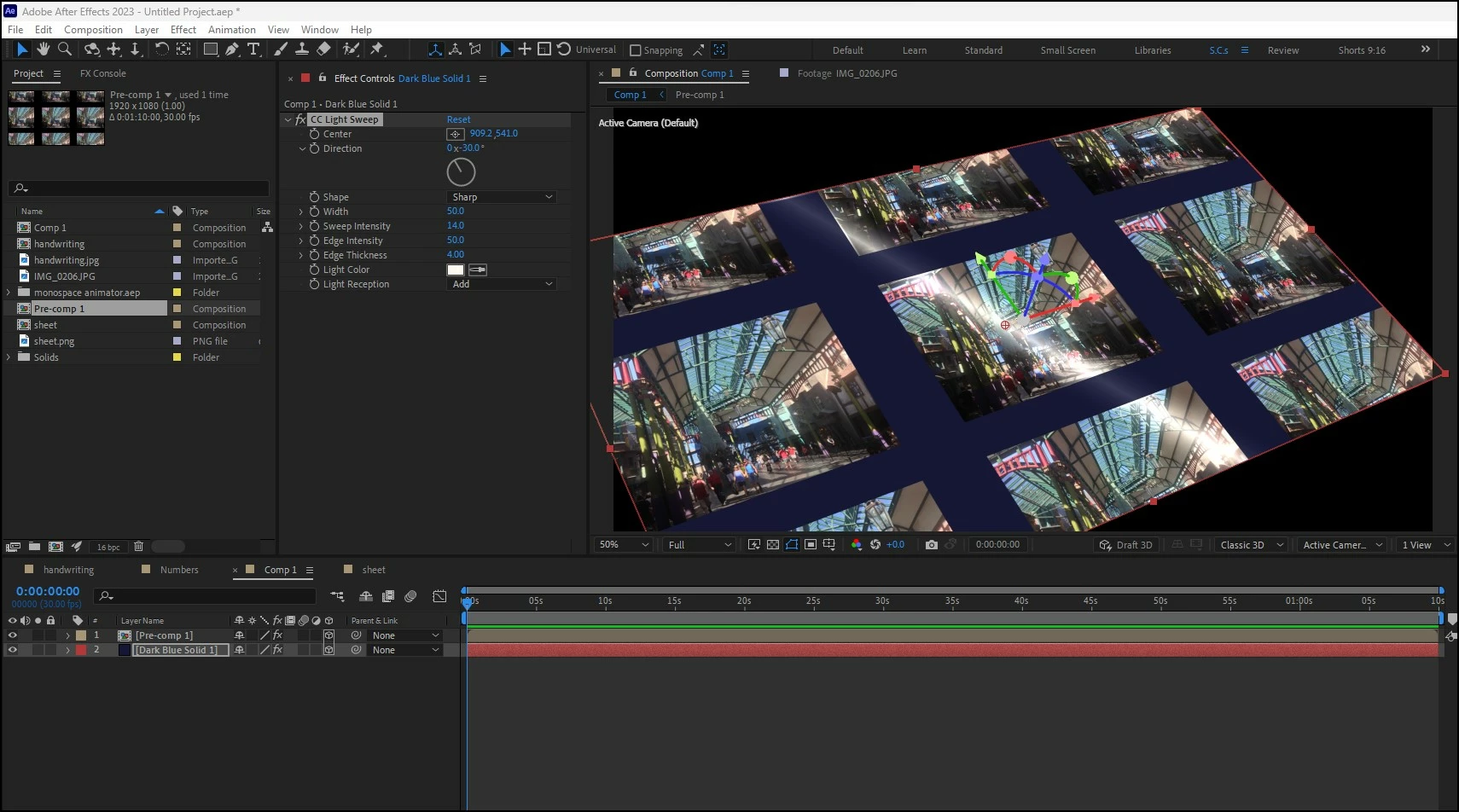
Is this the sort of thing you're after:

I precomped the images, so they are separate from the framing background.  Then applied CC Light Sweep to both layers, but changed the settings, especially the intensity, so that the blue frame has a different texture.


返信数 2

Mylenium
Legend
August 28, 2023

Freesnel does nothing for flat surfaces. It would look like a simpole gradient overlay. To make your screens more "tangible" they will need to look liek physical objects, which means they need thickness or a frame. Even a paer photo has a thin edge that catches light, you know. and of course one might want to add irregularities within the photos themselves like a slight curvature illusion with some subtle gradient effect. In your case you could also add a light from behind and above to mimic sun glare just like you could add tiniest variation to the tilt and positioning to the images to make them look less like a repeat but rather a human has laid them out.


Mylenium

Gotta Dance
Gotta Dance作成者
Inspiring
August 28, 2023

Paper catches light but altogether there's glossy vs. matte. I'm trying to get more of the former. The thing is I can't just fake it like a phone because I have a sheet of them. The timing would be suspect. Thickness of the objects might help a strech to as well as some off-screen kick light just to add some dimension. Im going to have to play around with it tomorrow. Thanks a bunch for the suggestions 🙂

ShiveringCactus
Community Expert
Community Expert
August 28, 2023

Is this the sort of thing you're after:

I precomped the images, so they are separate from the framing background.  Then applied CC Light Sweep to both layers, but changed the settings, especially the intensity, so that the blue frame has a different texture.


Mylenium
Legend
August 27, 2023

I would build a huge pre-comp and animate the "light sources" within it while assigning the pre-comp as a static environment map. That's the most art-directable approach.


Mylenium 

Gotta Dance
Gotta Dance作成者
Inspiring
August 27, 2023

Okay, so like make your own HDRI more-a-less makes sense. Maybe it's fresnel that I'm after, because the light will illuminate the objects, but the objects won't reflect a 'shiny surface'. I want them to feel more tangible like actual screens, not just floating images.