
Exit
  • Global community
    • Language:
      • Deutsch
      • English
      • Español
      • Français
      • Português
  • 日本語コミュニティ
  • 한국 커뮤니티
0

GREY BOX

New Here ,
Jun 12, 2018 Jun 12, 2018

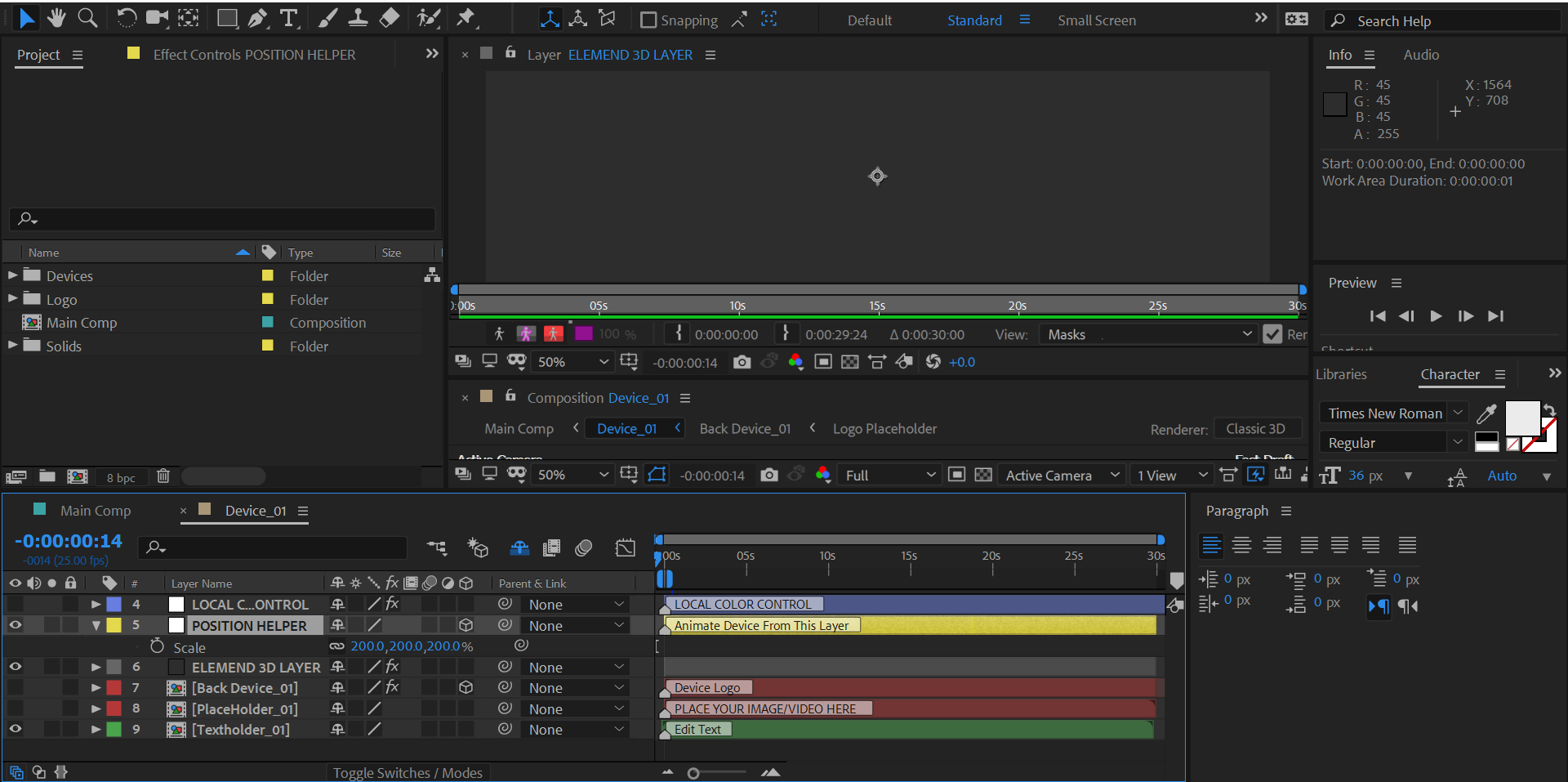
hello i am new to after effects and i downloaded a template and i am following a tutorial on how to to edit this project but in my case there is a grey box instead of objects shown in the tutorial as you can see in images any help please?22.PNG11.PNG
1.8K
Translate
Report
Community guidelines
Be kind and respectful, give credit to the original source of content, and search for duplicates before posting. Learn more
community guidelines

correct answers 1 Correct answer

Community Expert , Jun 13, 2018 Jun 13, 2018

Post 4: I think Dave is pointing out that you appear to be using a template that requires the plugin "Element 3D" from videocopilot. It is not part of After Effects. You must buy the plugin for the template to work.

Translate
People's Champ ,
Jun 12, 2018 Jun 12, 2018

You're looking at the Layer window, not the Composition window. 

Go to View and select Composition: (your current composition name)

Translate
Report
Community guidelines
Be kind and respectful, give credit to the original source of content, and search for duplicates before posting. Learn more
community guidelines
Valorous Hero ,
Jun 12, 2018 Jun 12, 2018

An alternative to Andrew's solution, you can select the Timeline and hit the \ key. The \ key allows you to invoke the complementary panel of the Timeline/Comp Panels; depending on which is currently active. 

Very Advanced After Effects Training | Adaptive & Responsive Toolkits | Intelligent Design Assets (IDAs) | MoGraph Design System DEV
Translate
Report
Community guidelines
Be kind and respectful, give credit to the original source of content, and search for duplicates before posting. Learn more
community guidelines
New Here ,
Jun 13, 2018 Jun 13, 2018

the window is changing to a grey box also there is nothing iis viewed what can i do

Translate
Report
Community guidelines
Be kind and respectful, give credit to the original source of content, and search for duplicates before posting. Learn more
community guidelines
LEGEND ,
Jun 13, 2018 Jun 13, 2018

Obvious question - have you bought Element 3D? It's not part of After Effects.

Translate
Report
Community guidelines
Be kind and respectful, give credit to the original source of content, and search for duplicates before posting. Learn more
community guidelines
New Here ,
Jun 13, 2018 Jun 13, 2018

I dont know bro the laptop is not for me as you can see this what is showing to me when i press \ where i must see a 3d obect which is the deviceCapture.PNG

Translate
Report
Community guidelines
Be kind and respectful, give credit to the original source of content, and search for duplicates before posting. Learn more
community guidelines
Community Expert ,
Jun 13, 2018 Jun 13, 2018

Post 4: I think Dave is pointing out that you appear to be using a template that requires the plugin "Element 3D" from videocopilot. It is not part of After Effects. You must buy the plugin for the template to work.

Translate
Report
Community guidelines
Be kind and respectful, give credit to the original source of content, and search for duplicates before posting. Learn more
community guidelines
New Here ,
Jun 13, 2018 Jun 13, 2018

Any One Can Help Me please ???????

Translate
Report
Community guidelines
Be kind and respectful, give credit to the original source of content, and search for duplicates before posting. Learn more
community guidelines
New Here ,
Jun 13, 2018 Jun 13, 2018
LATEST

now i understand thank you guys

Translate
Report
Community guidelines
Be kind and respectful, give credit to the original source of content, and search for duplicates before posting. Learn more
community guidelines
