


Inspiring
January 18, 2020
Answered

How do I export DNxHR 444 UHD w/ alpha?

  • January 18, 2020
  • 1 reply
  • 5377 views

I'm trying to render a sequence with an alpha channel to DNxHR 444 UHD but I can't get it to render with the alpha channel.  There is no alpha channel option when I export in AME but I believe DNxHR 444 supports alpha channels.  I can export ProRes 444 UHD with alpha channels - the option appears in the export setting.


So... ???


Thanks,


rgames
This topic has been closed for replies.
Correct answer Rick Gerard

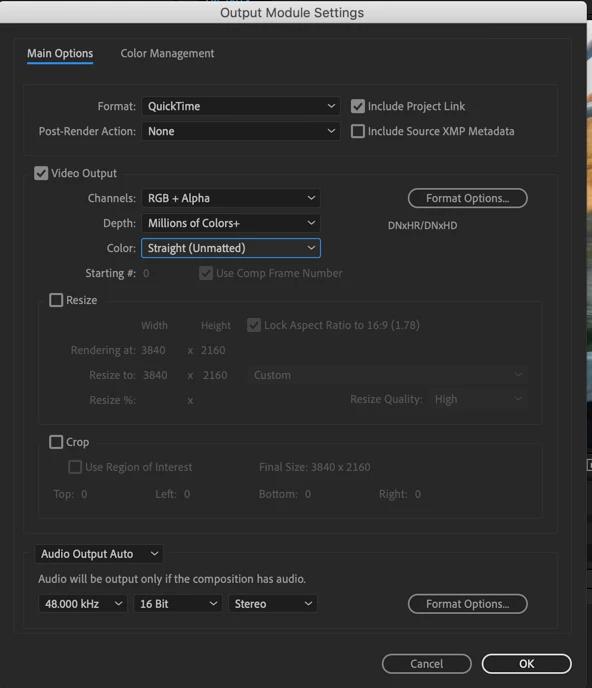
Use the Render Cue / Output Module. You have access to all the options there:

The AME does not have access to the same options or the ability to change any of the Alpha Channel settings and there is no way to load up a DNxHR preset with Alpha. Even rendering ProRez, there is no option in the AME to change the alpha from Pre-multiplied (in my opinion not the best choice) to Straight, the default for all compositing apps and NLE's. The AME is not a good choice for your workflow.


If you need to speed up renders I suggest you look into RenderGarden | Mekajiki. It typically cuts my render time by more than 75%.

1 reply

Rick GerardCommunity ExpertCorrect answer
Community Expert
January 18, 2020

Use the Render Cue / Output Module. You have access to all the options there:

The AME does not have access to the same options or the ability to change any of the Alpha Channel settings and there is no way to load up a DNxHR preset with Alpha. Even rendering ProRez, there is no option in the AME to change the alpha from Pre-multiplied (in my opinion not the best choice) to Straight, the default for all compositing apps and NLE's. The AME is not a good choice for your workflow.


If you need to speed up renders I suggest you look into RenderGarden | Mekajiki. It typically cuts my render time by more than 75%.

Inspiring
January 18, 2020

OK good info - thanks!