
Question
How do I make ScriptUI generated by https://scriptui.joonas.me dockable in After Effects?
I love the ScriptUI Builder at https://scriptui.joonas.me but how do I make the code it generates dockable in After Effects? I've made this simple GUI as an example… (screenshot from the website) 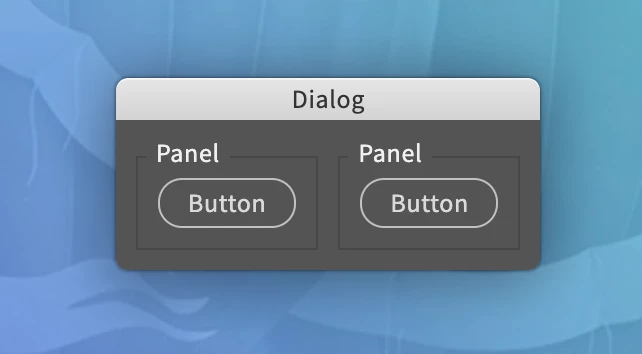
And the website generated the following code which i pasted into my 'Playground.jsx' which is inside of ScriptUI folder…
/*
Code for Import https://scriptui.joonas.me — (Triple click to select):
{"activeId":0,"items":{"item-0":{"id":0,"type":"Dialog","parentId":false,"style":{"enabled":true,"varName":null,"windowType":"Palette","creationProps":{"su1PanelCoordinates":false,"maximizeButton":false,"minimizeButton":false,"independent":false,"closeButton":false,"borderless":false,"resizeable":false},"text":"Dialog","preferredSize":[0,0],"margins":10,"orientation":"row","spacing":10,"alignChildren":["center","top"]}},"item-1":{"id":1,"type":"Panel","parentId":0,"style":{"enabled":true,"varName":null,"creationProps":{"borderStyle":"etched","su1PanelCoordinates":false},"text":"Panel","preferredSize":[0,0],"margins":10,"orientation":"row","spacing":10,"alignChildren":["left","top"],"alignment":null}},"item-3":{"id":3,"type":"Button","parentId":1,"style":{"enabled":true,"varName":null,"text":"Button","justify":"center","preferredSize":[0,0],"alignment":null,"helpTip":null}},"item-4":{"id":4,"type":"Panel","parentId":0,"style":{"enabled":true,"varName":null,"creationProps":{"borderStyle":"etched","su1PanelCoordinates":false},"text":"Panel","preferredSize":[0,0],"margins":10,"orientation":"row","spacing":10,"alignChildren":["left","top"],"alignment":null}},"item-6":{"id":6,"type":"Button","parentId":4,"style":{"enabled":true,"varName":null,"text":"Button","justify":"center","preferredSize":[0,0],"alignment":null,"helpTip":null}}},"order":[0,1,3,4,6],"settings":{"importJSON":true,"indentSize":false,"cepExport":false,"includeCSSJS":true,"showDialog":true,"functionWrapper":false,"itemReferenceList":"None"}}
*/

// PALETTE
// =======
var palette = new Window("palette", undefined, undefined, {closeButton: false});
    palette.text = "Dialog";
    palette.orientation = "row";
    palette.alignChildren = ["center","top"];
    palette.spacing = 10;
    palette.margins = 10;

// PANEL1
// ======
var panel1 = palette.add("panel", undefined, undefined, {name: "panel1"});
    panel1.text = "Panel";
    panel1.orientation = "row";
    panel1.alignChildren = ["left","top"];
    panel1.spacing = 10;
    panel1.margins = 10;

var button1 = panel1.add("button", undefined, undefined, {name: "button1"});
    button1.text = "Button";

// PANEL2
// ======
var panel2 = palette.add("panel", undefined, undefined, {name: "panel2"});
    panel2.text = "Panel";
    panel2.orientation = "row";
    panel2.alignChildren = ["left","top"];
    panel2.spacing = 10;
    panel2.margins = 10;

var button2 = panel2.add("button", undefined, undefined, {name: "button2"});
    button2.text = "Button";

palette.show();
When I open it in AE, it's not possible to be docked…
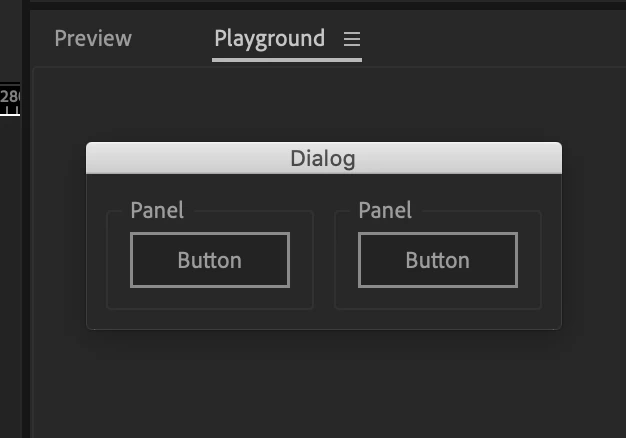
In the Export settings of scriptui.joonas.me (bottom right corner of export window) there's an option to turn off 'Show Dialog' and an option to turn on Function Wrapper. The code with the Function Wrapper turned on is pasted below, but currently this makes it not even appear at all…
var palette = (function () {

  /*
  Code for Import https://scriptui.joonas.me — (Triple click to select):
  {"activeId":0,"items":{"item-0":{"id":0,"type":"Dialog","parentId":false,"style":{"enabled":true,"varName":null,"windowType":"Palette","creationProps":{"su1PanelCoordinates":false,"maximizeButton":false,"minimizeButton":false,"independent":false,"closeButton":false,"borderless":false,"resizeable":false},"text":"Dialog","preferredSize":[0,0],"margins":10,"orientation":"row","spacing":10,"alignChildren":["center","top"]}},"item-1":{"id":1,"type":"Panel","parentId":0,"style":{"enabled":true,"varName":null,"creationProps":{"borderStyle":"etched","su1PanelCoordinates":false},"text":"Panel","preferredSize":[0,0],"margins":10,"orientation":"row","spacing":10,"alignChildren":["left","top"],"alignment":null}},"item-3":{"id":3,"type":"Button","parentId":1,"style":{"enabled":true,"varName":null,"text":"Button","justify":"center","preferredSize":[0,0],"alignment":null,"helpTip":null}},"item-4":{"id":4,"type":"Panel","parentId":0,"style":{"enabled":true,"varName":null,"creationProps":{"borderStyle":"etched","su1PanelCoordinates":false},"text":"Panel","preferredSize":[0,0],"margins":10,"orientation":"row","spacing":10,"alignChildren":["left","top"],"alignment":null}},"item-6":{"id":6,"type":"Button","parentId":4,"style":{"enabled":true,"varName":null,"text":"Button","justify":"center","preferredSize":[0,0],"alignment":null,"helpTip":null}}},"order":[0,1,3,4,6],"settings":{"importJSON":true,"indentSize":false,"cepExport":false,"includeCSSJS":true,"showDialog":false,"functionWrapper":true,"itemReferenceList":"None"}}
  */

  // PALETTE
  // =======
  var palette = new Window("palette", undefined, undefined, {closeButton: false});
      palette.text = "Dialog";
      palette.orientation = "row";
      palette.alignChildren = ["center","top"];
      palette.spacing = 10;
      palette.margins = 10;

  // PANEL1
  // ======
  var panel1 = palette.add("panel", undefined, undefined, {name: "panel1"});
      panel1.text = "Panel";
      panel1.orientation = "row";
      panel1.alignChildren = ["left","top"];
      panel1.spacing = 10;
      panel1.margins = 10;

  var button1 = panel1.add("button", undefined, undefined, {name: "button1"});
      button1.text = "Button";

  // PANEL2
  // ======
  var panel2 = palette.add("panel", undefined, undefined, {name: "panel2"});
      panel2.text = "Panel";
      panel2.orientation = "row";
      panel2.alignChildren = ["left","top"];
      panel2.spacing = 10;
      panel2.margins = 10;

  var button2 = panel2.add("button", undefined, undefined, {name: "button2"});
      button2.text = "Button";

  return palette;

}());
Any help would be appreciated!


 AdChoices