Copy link to clipboard
Copied
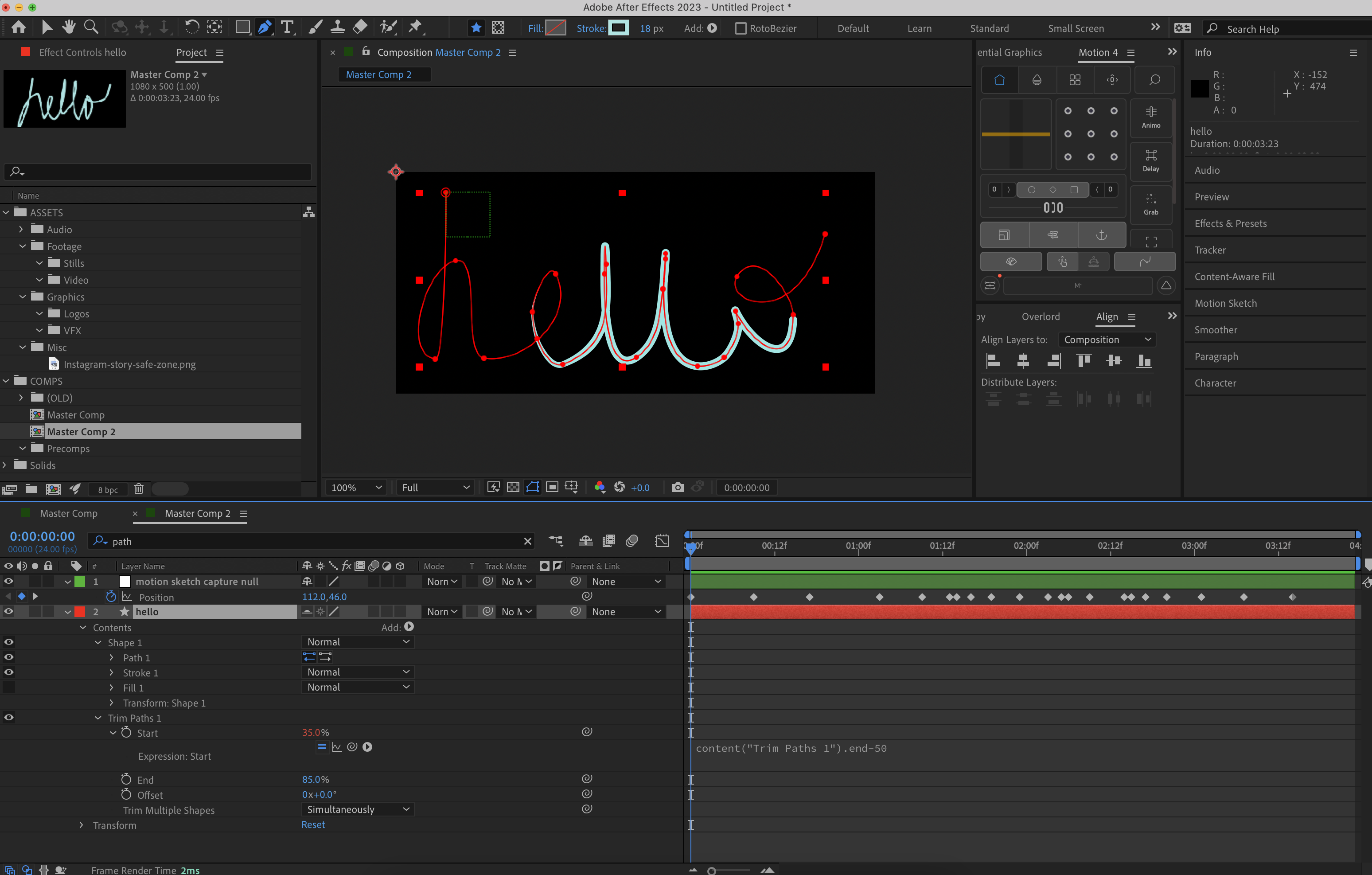
I want to draw word "Hello" using motion sketch, and have the word reveal at the speed that I captured it at. I am able to link the position path to the shape layer so that the path says "hello" but is it possible to get it to animate in at the speed I captured it?
Cheers in advance, and let me know if there is any more information you need!
Rosie
By far, the easiest way to handle that kind of a complex path reveal is to set a bunch of keyframes for the end value, convert them all to bezier handles, open up the graph editor and set it to edit the speed graph, then just start dragging keyframes back and forth to get the speed changes you want. It only takes a few minutes.
The expression to follow the speed of a motion sketch path requires that you use thisComp.layer("Motion Sketch).position. speed and figure out how to change the fast a
...Copy link to clipboard
Copied
This is a lot easier to do if you use the Paint Workspace, create a solid layer, then choose a brush set Write On for the Duration option. You get a perfect match to the way the word is written on.
I often use this technique to simulate handwriting by using the Paint layer as a Track Matte for some text I trace over with a tablet pen.
There's a complex expression that can follow the timing of a Write On motion path and turn that into a 0 to 100% animation for the Start and End of Trim Paths, but you can also just copy the brush path and paste it to a shape layer, then use Write On as a track matte for the Shape Layer Path. Combine that with Trim Paths to fix crossing-line problems with a few keyframes, and you've got it in a few minutes. I don't have time to fiddle with the expression so I can post an example. Maybe Dan Ebberts will jump in.

Copy link to clipboard
Copied
Hey Rick, Thanks so much for replying so quickly!
If you are able to post an example of the expression that would be incredible.
id not heard of Write-on so I have had a play around with that. thanks!
A few issues I have for what I am specifically looking for;
I wanted it to be trim paths because I need the path to taper along with the animation. (see Ex1).
I also want to be able to create much more complex paths (not just words), where the animated line will cross over potentially hundreds of times. so using track matte won't be an option for me. (See Ex2).
Thanks again, I have learnt so much this morning from your comment! But yes if you, or anyone else in the community had any time to explain or just post the expression so i can try figure it out. that would be amazing.
Thanks,
Rosie
Copy link to clipboard
Copied
By far, the easiest way to handle that kind of a complex path reveal is to set a bunch of keyframes for the end value, convert them all to bezier handles, open up the graph editor and set it to edit the speed graph, then just start dragging keyframes back and forth to get the speed changes you want. It only takes a few minutes.
The expression to follow the speed of a motion sketch path requires that you use thisComp.layer("Motion Sketch).position. speed and figure out how to change the fast and slow values to a cumulative value that changes from 0 to 100 for the end property of Trim Paths. It might take me a couple of days of fiddling and of searching the Javascript websites to figure out how to make those calculations. I'm not even sure that it can be done. Setting some keyframes at what you want to be the fastest and slowest sections of the draw on, then just sliding the keyframes left to speed up or right to slow down, would get the job done in a few minutes.
Copy link to clipboard
Copied
Thanks Rick, I really appreciate taking the time to answer!
I will copy the position path into the shape path layer, and then as you say, manually keyframe the trimpath as it lines up with the position of my motion sketch capture null.
At least that gets the job done!
Thanks,
Get ready! An upgraded Adobe Community experience is coming in January.
Learn more