Known Participant
February 10, 2017
Answered

How to freeze the frame at the end of a layer and hold for the rest of the composition?

  • February 10, 2017
  • 2 replies
  • 110646 views

Hey all,

This is one of those questions I USED to know the answer to... but I'm coming back to AE after having basically not used it for several years, so I don't remember how this worked, and for some weird reason, I can't find the answer. I have a piece of footage that is shorter than the entire composition. I want to freeze the last frame and hold it there until the composition reaches its end point. I do not want to change the timing of anything in the footage/layer itself-- just freeze and hold the last frame. It really seems like "freeze frame" SHOULD do this, but it just shows a frozen frame (converted the avi file to a still image in this instance, I think.) I need a frozen still of the *last* frame that will last for the duration of the entire comp. Please help me remember how this is done!! Thanks for all help and advice.

Correct answer Roei Tzoref

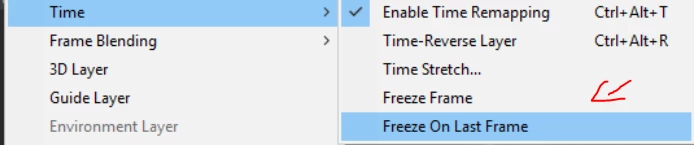
in addition to what Dave suggested, as of CC2017 you also have the freeze on last frame feature

2 replies

Roei Tzoref
Roei TzorefCorrect answer
Legend
February 10, 2017

in addition to what Dave suggested, as of CC2017 you also have the freeze on last frame feature

Participant
November 26, 2021

Wow, so much easier!

Dave_LaRonde
Inspiring
February 10, 2017

Time Remapping to the rescue!  Here's What you do:

  • Highlight the layer in question.  Go to Layer>Time>Enable Time Remapping.  The keyboard shortcut is Ctl-Alt-t (Win) or Cmd-Opt-t (Mac).
  • You'll see two keyframes, one at the head of the clip and one at the tail.  Go to the tail.  Go to the frame BEFORE the ending keyframe.  Make another keyframe.
  • Delete the final keyframe and pull the clip's out point as far as you want.  Everything beyond the new final keyframe is a freeze frame.

Very handy.

RealAniseAuthor
Known Participant
February 11, 2017

Thanks!