Exit
  • Global community
    • Language:
      • Deutsch
      • English
      • Español
      • Français
      • Português
  • 日本語コミュニティ
  • 한국 커뮤니티
0

How to transform to enclose rectangular object in scene?

New Here ,
May 25, 2018 May 25, 2018

I have a handheld video which contains a TV (not straight-on, and not filling the video frame), and I'm trying to produce from that a stabilised video of just the TV screen itself, as a rectangle which fills the whole video.

Note : I am just beginning with After Effects, so apologies if I'm missing something really simple!

The only way I've found to do this so far is to apply a corner pin effect, manually dragging the corners out until the TV screen fills the canvas and is aligned correctly.  I then add keyframes throughout the video to update the transform as the handheld camera moves.  However, this is very manually intensive, and I feel like I'm probably missing a much better way to do it.

Here's a simple example, note that in the bottom screenshot where I've applied the corner pin transform, the top/bottom right pins are way off the screen because the transform is so severe.  The corner pins haven't been placed very accurately here, so the fit around the screen is a bit off.

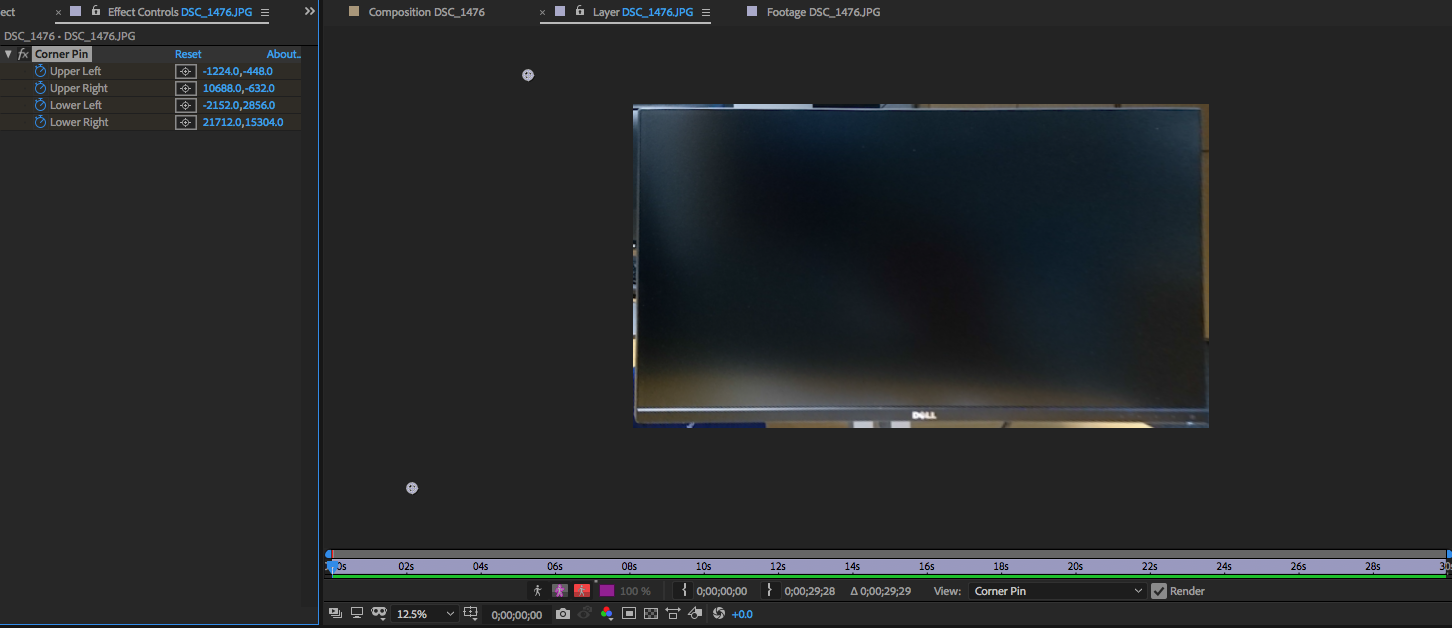
Is there some way I can use the tracking tools to do this instead?  I've tried using the perspective corner pin tracker to track the 4 corners of the TV as the camera moves, and that creates a pretty good 4-corner track.  But I can't find any way to transform my video so that it fits into the 4 corners of the tracked object.  All the tutorials I can find on this are about how to insert different video content onto the stabilised TV screen, and that's not what I'm trying to do.

Any help would be greatly appreciated.

642
Translate
Report
Community guidelines
Be kind and respectful, give credit to the original source of content, and search for duplicates before posting. Learn more
community guidelines

correct answers 1 Correct answer

Community Expert , May 25, 2018 May 25, 2018

This is how I would do a moving camera shot. I think it gives you the best results:

This is a tutorial I worked up for someone a while ago. I use it all the time for these kinds of shots. You end up with very easy to handle compositing options and it requires no 3rd party effects.

Translate
LEGEND ,
May 25, 2018 May 25, 2018

But I can't find any way to transform my video so that it fits into the 4 corners of the tracked object.

That's what the Corner Pin effect does already. Simply apply the tracking data to your target layer and AE will do the rest. You might want to re-read/ re-watch a tutorial.

Mylenium

Translate
Report
Community guidelines
Be kind and respectful, give credit to the original source of content, and search for duplicates before posting. Learn more
community guidelines
Advisor ,
May 25, 2018 May 25, 2018

If I understand correctly what you are wanting to do is "reverse corner pin". There are a few commercial plugins that would give you a solution based on your tracking points - "Red Giant Corner Pin" - with it's to / from option should work - you could probably download a trial copy. It's also quite possible to do with some after effects expression coding - but that does need some learning - so wouldn't be a realistic solution for you as a new user.

Translate
Report
Community guidelines
Be kind and respectful, give credit to the original source of content, and search for duplicates before posting. Learn more
community guidelines
New Here ,
May 25, 2018 May 25, 2018

Excellent, thanks for the pointer, I will look into reverse corner pinning.

Translate
Report
Community guidelines
Be kind and respectful, give credit to the original source of content, and search for duplicates before posting. Learn more
community guidelines
Community Expert ,
May 25, 2018 May 25, 2018

This is how I would do a moving camera shot. I think it gives you the best results:

This is a tutorial I worked up for someone a while ago. I use it all the time for these kinds of shots. You end up with very easy to handle compositing options and it requires no 3rd party effects.

Translate
Report
Community guidelines
Be kind and respectful, give credit to the original source of content, and search for duplicates before posting. Learn more
community guidelines
New Here ,
May 25, 2018 May 25, 2018
LATEST

Thanks Rick; that worked like a charm!  Just what I was looking for.

Translate
Report
Community guidelines
Be kind and respectful, give credit to the original source of content, and search for duplicates before posting. Learn more
community guidelines

