
Participant
August 18, 2021
Question

I need help trying to get the paint bucket tool to work right

  • August 18, 2021
  • 2 replies
  • 370 views

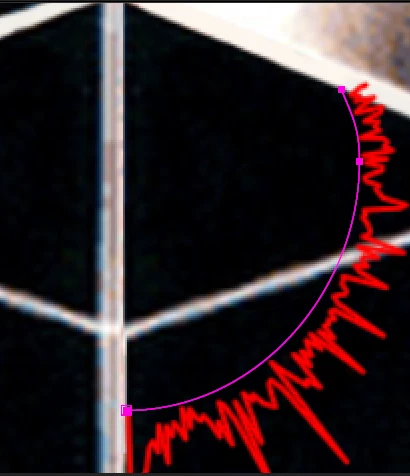
I am trying to have a red paint bucket fill between my red audio spectrum, and the two bold white lines the ends of the spectrum are touching. Every time I use it however, it just fills the whole screen. What dumb mistake am I making?
This topic has been closed for replies.

2 replies

Community Expert
August 18, 2021

The Audio Spectrum line could be combined with a second mask to create a matte for the layer. Just using fill on a closed path is not going to include the space between the line Audio Spectrum is generating and the mask path. 


You will need to close the path Audio Spectrum uses, adjust the settings to get the look you want, add Paint Bucket, then add another layer on top to act as a track matte to give you the hard lines you need.

The biggest trick is adjusting the settings in Audio Spectrum.

Participant
August 18, 2021

Would that result in only some of the full range of the spectrum being showed since the other is cut off? I was trying to make it so all of the spectrum is covered in that line.

Community Expert
August 19, 2021

You have to make adjustments to the effect to get as close as you can to the look you want. Nobody is going to be able to tell if the waveform is accurate. You can always equalize the audio in Audition to isolate frequencies and then use the modified file to drive the effect and use the normal file for the audio in the comp. Almost all visual effects involve some sort of compromise. 


I don't know any way to get a straight line for a portion of Audio Spectrum without doing some serious equalization cutting off some of the frequency range.

Mylenium
Legend
August 18, 2021

Your area is not closed, that's why it won't work. The mask path doesn't count (unless you care to apply an additional stroke to it). The Fill effect strictly operates on a contiguous pixel area and I already said what needs to be fixed. Ideally you'd do so by pre-composing everything before applying the fill in the parent comp.


Mylenium

Participant
August 21, 2021

If I added an additional stroke would the audio spectrum go around that too or stay on the line it is on