


- Home
- After Effects
- Discussions
- Re: Layer Styles-Stroke Glitch With Moving Animati...
- Re: Layer Styles-Stroke Glitch With Moving Animati...

Copy link to clipboard
Copied
I made my animation in Toon Boom Harmony Essentials. I'm now editing in After Effects.


 1 Correct answer

we need more information. show us screenshots, details about your setup, Ae version, what exactly is the issues.
Layer styles are notorious for animation purposes due to render order. they render last, this means for example motion blur is rendered before and not after causing nasty artifacts, scaling the layer above 100% will look bad since you are stroking soft pixels and more...

 6
Replies
6
6
Replies
6

Copy link to clipboard
Copied
we need more information. show us screenshots, details about your setup, Ae version, what exactly is the issues.
Layer styles are notorious for animation purposes due to render order. they render last, this means for example motion blur is rendered before and not after causing nasty artifacts, scaling the layer above 100% will look bad since you are stroking soft pixels and more...
Copy link to clipboard
Copied
Yes, sorry. I meant to add a lot more but I accidentally posted before it was finished haha. It will be up pronto.
Copy link to clipboard
Copied
!THIS IS THE ACTUAL POST!
I made my animation in Toon Boom Harmony Essentials. I'm now editing in After Effects. I'm trying to add an outline to my animation for some pop, but alas, I've encountered some odd things. I've linked a video to what is happening, you can clearly see the glitching after 0:25. This glitch has happened to me before with different projects when adding certain color effects, but I've always found my way around it. Is there another way I can get this white outline around my character without the glitching? Thanks.
Copy link to clipboard
Copied
I see. it could be something with your edges that causes this behavior.
try another way for creating strokes: add the fill effect to the layer with the desired color for the stroke, followed by a minimax effect with maximum alpha and color operation, followed by cc composite. see where that gets you:
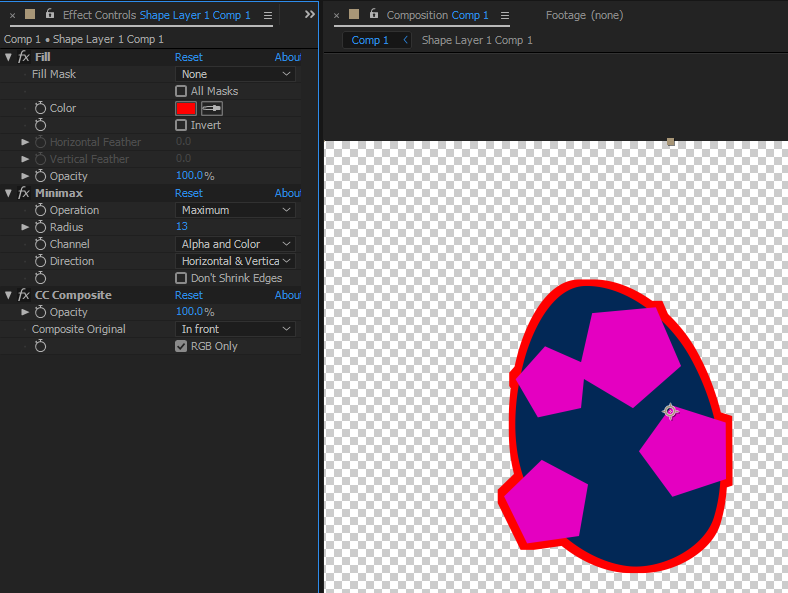
or try the vegas effect. I have typed UU so you can see all the modified properties in the timeline:

Copy link to clipboard
Copied
Yes! Thank you! That works fine! Look how happy she is now haha!

Copy link to clipboard
Copied
she looks very happy! glad you got it sorted.


Get ready! An upgraded Adobe Community experience is coming in January.
Learn more
 AdChoices