Exit
  • Global community
    • Language:
      • Deutsch
      • English
      • Español
      • Français
      • Português
  • 日本語コミュニティ
  • 한국 커뮤니티
0

Mask Bezier Handle Not visible

New Here ,
Oct 21, 2021 Oct 21, 2021

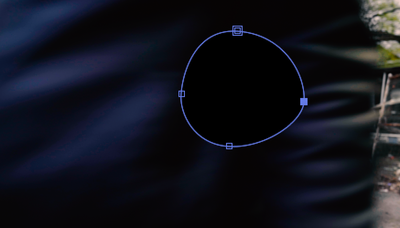
I am trying to mask something in After Effects but the bezier handles that are usually there are not present. Can anyone tell me how to turn them on? I clicked and draged like I usully do but that did not help.

Screen Shot 2021-10-21 at 22.07.48.png

TOPICS
How to
5.8K
Translate
Report
Community guidelines
Be kind and respectful, give credit to the original source of content, and search for duplicates before posting. Learn more
community guidelines

correct answers 1 Correct answer

Community Expert , Oct 21, 2021 Oct 21, 2021

You might have Rotobezier turned on. Check the Layer/Mask and Path Shape menu. You can turn it off there and get the handles back.

Translate
Community Expert ,
Oct 21, 2021 Oct 21, 2021

You might have Rotobezier turned on. Check the Layer/Mask and Path Shape menu. You can turn it off there and get the handles back.

Translate
Report
Community guidelines
Be kind and respectful, give credit to the original source of content, and search for duplicates before posting. Learn more
community guidelines
New Here ,
Nov 11, 2022 Nov 11, 2022
LATEST

Thank you! The lack of visible handles made my mission impossible!

Translate
Report
Community guidelines
Be kind and respectful, give credit to the original source of content, and search for duplicates before posting. Learn more
community guidelines
Community Expert ,
Oct 22, 2021 Oct 22, 2021

Try Shift+click on one of the anchor points.


Adobe Community Expert
Adobe Certified Professional
Translate
Report
Community guidelines
Be kind and respectful, give credit to the original source of content, and search for duplicates before posting. Learn more
community guidelines