Exit
  • Global community
    • Language:
      • Deutsch
      • English
      • Español
      • Français
      • Português
  • 日本語コミュニティ
  • 한국 커뮤니티
1

Multiple Comps video

New Here ,
Nov 27, 2018 Nov 27, 2018

I'm new with AE and I couldnt find anything about this online so Its probably something thats easy and im just not understanding.  I'm doing a project that I made multiple comps for.  I was under the impression that you could get the comps to play 1 after another in a single video file yet i cant figure this out.  How do you actually accomplish this?

2.6K
Translate
Report
Community guidelines
Be kind and respectful, give credit to the original source of content, and search for duplicates before posting. Learn more
community guidelines

correct answers 1 Correct answer

Community Expert , Nov 27, 2018 Nov 27, 2018

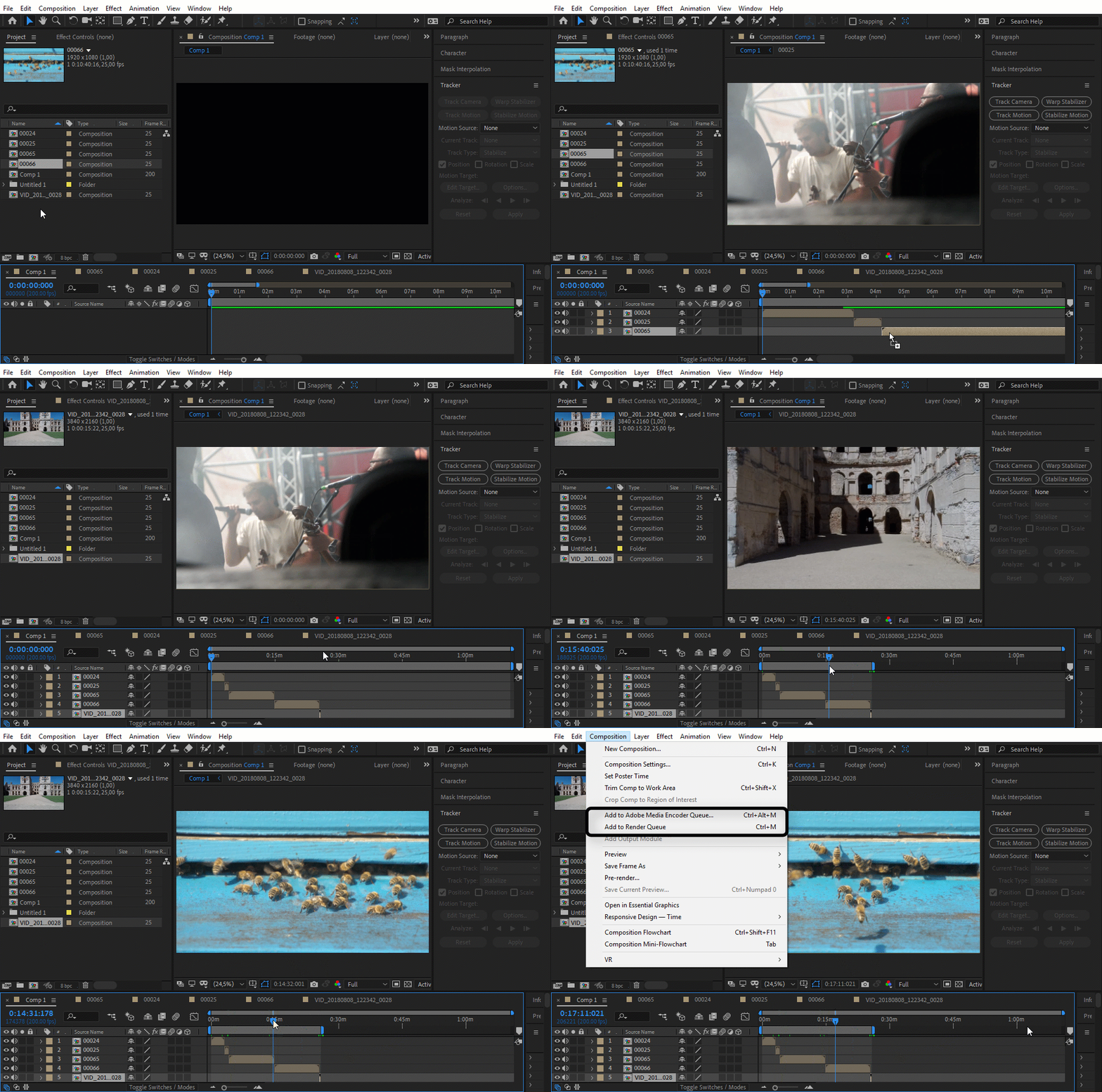
You can also select a bunch of compositions in the Project Panel then press Alt/Option + \ or select File>New Composition From Selection, or right-click or drag all comps to the Create New Comp icon at the bottom of the Project panel. You will be given the option to create one comp from all selected comps or footage. If the comps have different dimensions you can choose one of them to be the master. You can also choose to overlap and create a transition between comps.

CScreenshot_2018-11-27 23.03.40_7O88gB.png

One more important thing t

...
Translate
LEGEND ,
Nov 27, 2018 Nov 27, 2018

Easy!  Open up Premiere Pro, import your AE animations, put them in the desired order and export.  Nothin' to it.

Translate
Report
Community guidelines
Be kind and respectful, give credit to the original source of content, and search for duplicates before posting. Learn more
community guidelines
Guide ,
Nov 27, 2018 Nov 27, 2018

Just make one main/final composition and just put all of your compositions one after another on AE timeline and export. Here quick example:

clips.gif

Translate
Report
Community guidelines
Be kind and respectful, give credit to the original source of content, and search for duplicates before posting. Learn more
community guidelines
Community Expert ,
Nov 27, 2018 Nov 27, 2018

You can also select a bunch of compositions in the Project Panel then press Alt/Option + \ or select File>New Composition From Selection, or right-click or drag all comps to the Create New Comp icon at the bottom of the Project panel. You will be given the option to create one comp from all selected comps or footage. If the comps have different dimensions you can choose one of them to be the master. You can also choose to overlap and create a transition between comps.

CScreenshot_2018-11-27 23.03.40_7O88gB.png

One more important thing to remember when using this efficient technique. If you hold down the Ctrl/Cmnd key while you select you can arrange the comps in any order you like. This is what happened when I selected layer 4, 1, 2, 3 and set overlap to 15 frames and cross dissolve between layers.

Screenshot_2018-11-27 23.04.43_J2Qazn.png

I use this technique fairly often. It's a lot faster way to create a comp from multiple sources than the suggestion that imeilfx posted. I use this technique fairly often when I'm doing dynamic text animations or similar motion graphics sequences. It is important to remember After Effects is not an editing app and trying to cut sequences into a story can get incredibly cumbersome very quickly, but your workflow of creating a comp for each shot and then assembling them into a sequence is a pretty good idea more often than not.

If your comps are really complex then I would suggest rendering them to a suitable digital intermediate (DI) using a visually lossless format. These formats are often called Mezzanine Formats. The Render Cue / Output Manager is the best and fastest rendering tool for that kind of work. All of my complex projects are finalized in Premiere Pro, the audio is polished in Audition, and AE is used for effects and graphics that I cannot create directly in Premiere Pro.

I hope this helps.

Translate
Report
Community guidelines
Be kind and respectful, give credit to the original source of content, and search for duplicates before posting. Learn more
community guidelines
Guide ,
Nov 27, 2018 Nov 27, 2018

You are wight - technique of selecting bunch of comps is much faster - especially when you have them by the number of by alphabet in project panel but the reason why I did not suggested that because I figured that brandonp2662 is not sure in what order he wish to put them and he is not familiar with any comp nesting and puting comps int comps. Of course he can reorder them as he wish in either method.

Besides that - now he have two ways to do that without using separate program for rendering several comps into one.

Translate
Report
Community guidelines
Be kind and respectful, give credit to the original source of content, and search for duplicates before posting. Learn more
community guidelines
New Here ,
Nov 28, 2018 Nov 28, 2018
LATEST

Thank you all!  That helps allot!

Translate
Report
Community guidelines
Be kind and respectful, give credit to the original source of content, and search for duplicates before posting. Learn more
community guidelines