Exit
  • Global community
    • Language:
      • Deutsch
      • English
      • Español
      • Français
      • Português
  • 日本語コミュニティ
  • 한국 커뮤니티
0

Ram Preview Issue - Please Help

New Here ,
Mar 01, 2019 Mar 01, 2019

Hi all

So recently After Effects has stopped rendering for preview my entire work area. As you can see in the attached image, the last 1.5 seconds of this particular work area has not been rendered.

And not only has it not been rendered, but when I hit play it totally skips over this part of my composition.

Someone please tell me how to fix this.

Thanks in advance for any and all help and advice.

Screen Shot 2019-02-28 at 20.56.32.png

429
Translate
Report
Community guidelines
Be kind and respectful, give credit to the original source of content, and search for duplicates before posting. Learn more
community guidelines
Community Expert ,
Mar 01, 2019 Mar 01, 2019

After Effects is limited by how much RAM you have in your system. If you change your work area to start later, it should be able to preview the ending part.

Translate
Report
Community guidelines
Be kind and respectful, give credit to the original source of content, and search for duplicates before posting. Learn more
community guidelines
New Here ,
Mar 01, 2019 Mar 01, 2019

Thanks for the response Szalam.

Is there anything I can do to better use the ram I have? Maybe I am wasting it somewhere else?

Translate
Report
Community guidelines
Be kind and respectful, give credit to the original source of content, and search for duplicates before posting. Learn more
community guidelines
Community Expert ,
Mar 01, 2019 Mar 01, 2019

To preview motion do a pencil test. What is a pencil test? Turn off all effects, motion blur, set the Magnification ratio to 50% and Comp resolution to Auto or set resolution to half, skip one frame if necessary, and make sure the motion is good. That's a pencil test. (look it up - a standard way to check animation since people have been animating). This will let you preview the animation.

Then do the "ink and paint" test. Turn on everything, all effects, motion blur, set the comp magnification ratio 100% or even 200% if you have an HD display, then check a few of your hero frames. That's what animators used to do. They would ink and paint a few cells and send them to the director for approval.

Now it's time to render. If the project takes more than a few seconds a frame to render it is a very good idea to render an image sequence. You can easily convert the image sequence to a video and add sound, and if you need to change 20 frames in the middle of the comp you can just fix those 20 frames. It's a huge time saver.

When the project has rendered, start a new project. If you use Render Garden (look it up) or the Adobe Media Encoder, you won't have to stop working on projects while you render. When the render is done, check the whole shot or sequence in a Media Player at full resolution. That's how you work efficiently. Running ram previews on complex comps with everything turned on is almost always a real time waster. After just a few projects you will learn how to know if you have the animation right with a pencil test and you'll know if the look is right with just a few frames that have been inked and painted.

Translate
Report
Community guidelines
Be kind and respectful, give credit to the original source of content, and search for duplicates before posting. Learn more
community guidelines
Valorous Hero ,
Mar 01, 2019 Mar 01, 2019

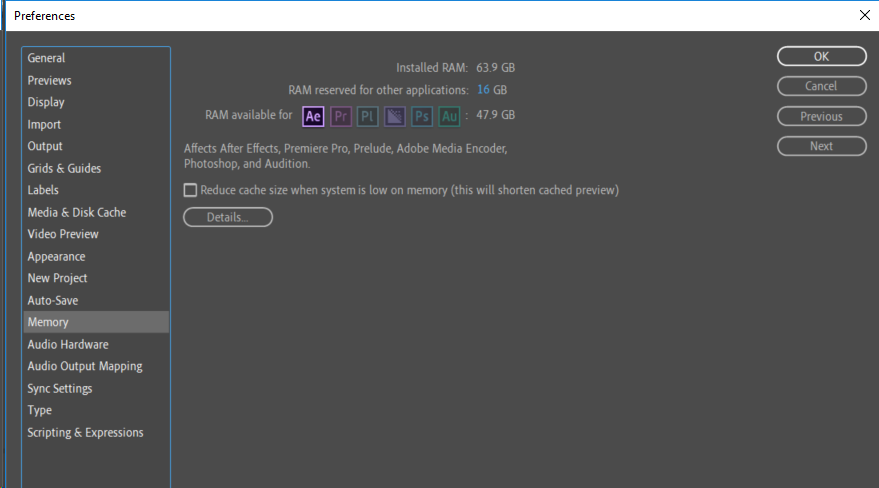
How much RAM AE can access is determined by the following setting in AE's Pref's -

The other pertinent point of interest is the need to set aside sufficient RAM for your OS and other apps that you may run concurrent to AE.

On filling in more frames into RAM, during a Preview in AE, look at reducing the Comp's Rez (set aside shortcuts to quickly switch between different rez - I have three shortcuts; one each for Full Rez, 1/2 Rez and 1/3 Rez.

Another option is to lower the Comp's Magnification - yours is currently set to 100%.

Very Advanced After Effects Training | Adaptive & Responsive Toolkits | Intelligent Design Assets (IDAs) | MoGraph Design System DEV
Translate
Report
Community guidelines
Be kind and respectful, give credit to the original source of content, and search for duplicates before posting. Learn more
community guidelines
Mar 08, 2019 Mar 08, 2019
LATEST

Hi nathanj,

Roland has made a great point here. Don't allocate all the RAM to After Effects. Make sure you are leaving a sufficient amount of RAM for the OS and other apps.

Did you follow these suggestions? Are you able to preview the entire comp now?

Let us know.

Rameez

Translate
Report
Community guidelines
Be kind and respectful, give credit to the original source of content, and search for duplicates before posting. Learn more
community guidelines