


Ray-tracing on the GPU requires CUDA version 4.0 warning

Copy link to clipboard
Copied
Hello,
I've been using AE CS6 on Mac OS 10.7.4 upon release and updated to 11.0.1 when it was released as well, so for a while, but just today I started to get this warning-
"Ray-tracing on the GPU requires CUDA version 4.0 or later. Ray-tracing will use the CPU until you install the latest supported CUDA driver."
I am running a supported Quadro 4000 with the latest CUDA driver, 4.2.7, and about the only thing I know of that I have installed recently was the update for SpeedGrade today. Any idea why I'm now getting the warning?


 17
Replies
17
17
Replies
17


Copy link to clipboard
Copied
Can we get a little more system info?
Are you using more than one GPU?
Copy link to clipboard
Copied
Hi Kevin, thanks for responding. Here's a rundown of the system info, some of it may be redundant-
Computer Hardware-
MacPro4,1
Dual Quad Core
2.93 Ghz
12 GB ram
Quadro 4000- CUDA driver version 4.2.7
Blackmagic Intensity Pro
OSX 10.7.4
The error, which reads-
"Ray-tracing on the GPU requires CUDA version 4.0 or later. Ray-tracing will use the CPU until you install the latest supported CUDA driver
For more information see: http://www.adobe.com/go/aeraytracedgpu
Show warning- once per session/never again"
happens on startup. I went to http://www.adobe.com/go/aeraytracedgpu and didn't find anything that was relevant to this issue. Today was the first day it happened, so AE has started up error free before, and the only change I can think of was the update for SpeedGrade. Aside from CS6 applications, which are all updated according to the Adobe Application Manager, other software I run is- FCPX, Compressor, Lightwave and rarely FCP 7. I have some Red Giant trial plug ins, and FXFactory installed, but no 3rd party codecs. In the AE projects I use XDCAM EX footage, with Ai, tiff and jpeg files, almost exclusively. I assume it uses OpenGL features, I haven't done anything in particular that I know of about that, and Render Multiple Frames is deactivated.
I am only using one video card, which has been installed the whole time.
Thanks for any help
Dave
Copy link to clipboard
Copied
Not sure what happened, I didn't even reboot, but I'm not getting the warning anymore. I did shut down all my open CS6 apps to install a font then restarted them and it didn't throw the warning. Obviously I could have worked this one through on my own.

Copy link to clipboard
Copied
I've been getting the same error when using the "replace with After Effects Comp" option in premiere. When I open After Effects on its own, I don't get the error.

Copy link to clipboard
Copied
I get the same error these days. its affecting my program quite a bit too. adobe is really not on top of things right now. too many bugs.

Copy link to clipboard
Copied
Not sure if this discussion solved this issue but I found this:
http://www.nvidia.com/object/mac-driver-archive.html
I followed the prompts and updated the CUDA driver for my retina macbook. Seemed to do the trick as I don't get that pop-up error anymore.

Copy link to clipboard
Copied
no

Copy link to clipboard
Copied
Remove the old cuda-driver (/System/Library/Extensions/CUDA.kext), then install your new cudadriver. Shut down and restart you Mac and run repair of the permissions. The pop-up error didn`t return in my case... Hope this is of any use

Copy link to clipboard
Copied
this tip is solved my problem, thx for suggestions...

Copy link to clipboard
Copied
Is there any plan to test this feature for AMD cards, which are factory-standard on all Mac Pros? Why would they introduce a feature and then only make it compatible with a few third-party GPUs? Shouldn't it be the other way around? The majority of users get the feature and the people with out of date or non-standard equipment are the ones with the compliance issues?


Copy link to clipboard
Copied
CUDA cannot be used for AMD cards because they are not paid by Nvidia. CUDA is a strictly Nvidia future. Also, it is been announced that there will be no further development of the existing Ray-trace rendering engine.

Copy link to clipboard
Copied
Parrotface wrote:
Is there any plan to test this feature for AMD cards, which are factory-standard on all Mac Pros? Why would they introduce a feature and then only make it compatible with a few third-party GPUs? Shouldn't it be the other way around? The majority of users get the feature and the people with out of date or non-standard equipment are the ones with the compliance issues?
The ray-traced renderer was created with NVIDIA technology. The fact that it works on computers with out NVIDIA cards is actually pretty cool - it is just very slow. The Adobe team seems to agree with you that the ray-traced renderer is not a good option because they now consider it obsolete. "Dead" was a word I believe I saw them call it on Twitter.
Ever since AE version 12, we have had a much more powerful way to do 3d in AE. It also renders faster too.
One can hope that this new way of doing 3d is only a taste of what is to come in the future with AE.
Copy link to clipboard
Copied
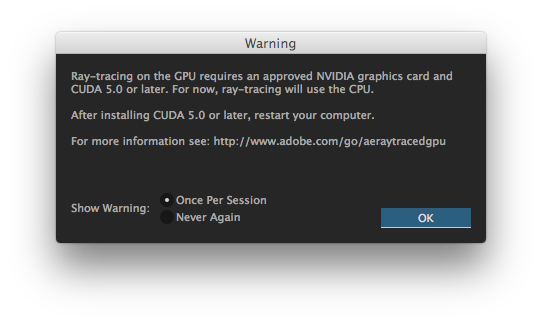
I am getting this message except for CUDA 5.0 on After Effects CC. My MacBook Pro is as follows:
MacBook Pro (Retina, 15-inch, Mid 2015)
2.5 GHz Intel Core i7
16 GB 1600 MHz DDR3
AMD Radeon R9 M370X 2048 MB
The integrated graphics is Intel Iris Pro with a gig and a half of VRAM. Do I need to install the NVIDIA CUDA driver here?:

Copy link to clipboard
Copied
No. Do not install CUDA software on a computer without CUDA hardware.
Copy link to clipboard
Copied
As Todd says, don't do it (unless you upgrade your GPU to an appropriate card). Instead, simply check the box to never again show that message.

Copy link to clipboard
Copied
McKHam escribió:
I am getting this message except for CUDA 5.0 on After Effects CC. My MacBook Pro is as follows:
MacBook Pro (Retina, 15-inch, Mid 2015)
2.5 GHz Intel Core i7
16 GB 1600 MHz DDR3
AMD Radeon R9 M370X 2048 MB
The integrated graphics is Intel Iris Pro with a gig and a half of VRAM. Do I need to install the NVIDIA CUDA driver here?:
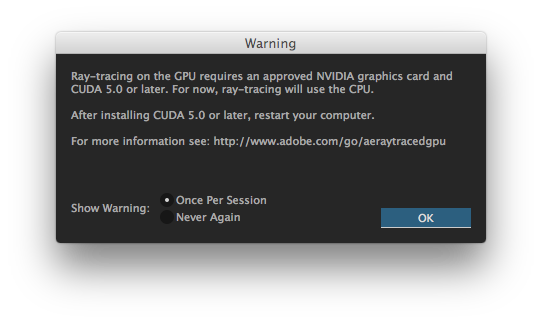
I got the same problem but with a Nvidia GeForce GTX 285 and CUDA driver 7.0.64 installed
I looked in graphic card that allows Ray-tracing by GPU and the GTX 285 is on the list so should work.
I did what ch hermann-foto-design said to erase the existing extension, reinstall and repair permissions, but the problem is not solved. Don´t know where the problem is coming.
Thanks for any help you can provide
Cheers
[personal information (email address) removed by moderator - "ch hermann" shouldn't have his email address as his name and will be contacted about that...]
Copy link to clipboard
Copied
axeleraw wrote:
I got the same problem but with a Nvidia GeForce GTX 285 and CUDA driver 7.0.64 installed
What OS do you have?
What exact version of AE do you have?


 AdChoices