



Copy link to clipboard
Copied
Hi all !
I can put a lot of graphics, animation, and all things works fine. But when i put some expressions, it makes the preview and renderer slower. And if I rig a character, this is just very slooooooooow (but very very).
Some people say this is the AE scripting engine is very old and never refresh, with an old way to treat javascript request.
Do you know if it's true ? Can you refresh the scripting engine for the next update or CC 2018 ?? 
Kind regards and thanks to the team ! Great job 


 1 Correct answer


Expressions that slow down the animation process usually contain recursive math. This is not a scripting problem, it's a problem with the way the expression is written. Without seeing the exact expression that you are dealing with it's very hard to say if this is the cause of the slow down.
You could also be running into cache / expression errors. We can't know without workflow details and seeing your expression.
Check out this thread and see if that helps: Duik expressions slowing down AE CC - MoGraph Central - ::: mograph :::
...
 6
Replies
6
6
Replies
6

Copy link to clipboard
Copied
Expressions that slow down the animation process usually contain recursive math. This is not a scripting problem, it's a problem with the way the expression is written. Without seeing the exact expression that you are dealing with it's very hard to say if this is the cause of the slow down.
You could also be running into cache / expression errors. We can't know without workflow details and seeing your expression.
Check out this thread and see if that helps: Duik expressions slowing down AE CC - MoGraph Central - ::: mograph :::


Copy link to clipboard
Copied
Hi LS3T,
Did Rick's response help you out?
Thanks,
Kevin
Copy link to clipboard
Copied
Yes, i disabled cache, and it's better. I'm using Rubberhose and/or Duik and Joystick 'n sliders for animating characters. So with 2 characters in a same scene, it's very slow.
Without the cache it's faster, so when i have simple expressions, for bouncing or other stuff, i active the cache, and when i make people i disenabled that.
One thing will be cool on the next upgrade will be to not have to do that between different project !
Thanks for the response.

Copy link to clipboard
Copied
I was having this same issue as well after I created a facial rig. After Effects was having an issue rendering out the face as I moved the origin.
I created a separate composition and moved the joystick into the parent composition and now it moves in real-time.
I'm not sure why this solves the problem- maybe it has something to do with the fact that it's not altering my shapes in the same composition as the joystick itself.

Copy link to clipboard
Copied
Hi all, I wond in this conversation because I'm having the same issue of LS3T by using Rubberhose and Joystick 'n Sliders. Ae is unusable beacause of is slowness.
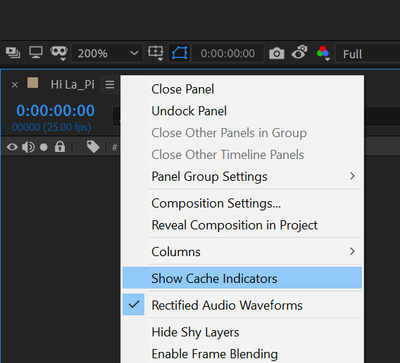
I'd like to try to disable the Cache Indicators as you suggested but.. I'm a little embarrassed to ask, I do not undersand what is the timeline panel menu where I can do that. Can someone maybe post a screenshot or help me to find where to uncheck the cache indicators? Thanks a lot
I'm using AeCC2018

Copy link to clipboard
Copied


Get ready! An upgraded Adobe Community experience is coming in January.
Learn more
 AdChoices