



TheYates
Known Participant
February 9, 2020
質問

Sync expression

  • February 9, 2020
  • 返信数 2.
  • 807 ビュー

Hello, 

I want this sync type animation. When words comes in as it is said.

I want one exactly like in the video below.


I have this text layer and the voice-over synced with markers. 

P.S the expression is wrong and doesn't sync well.
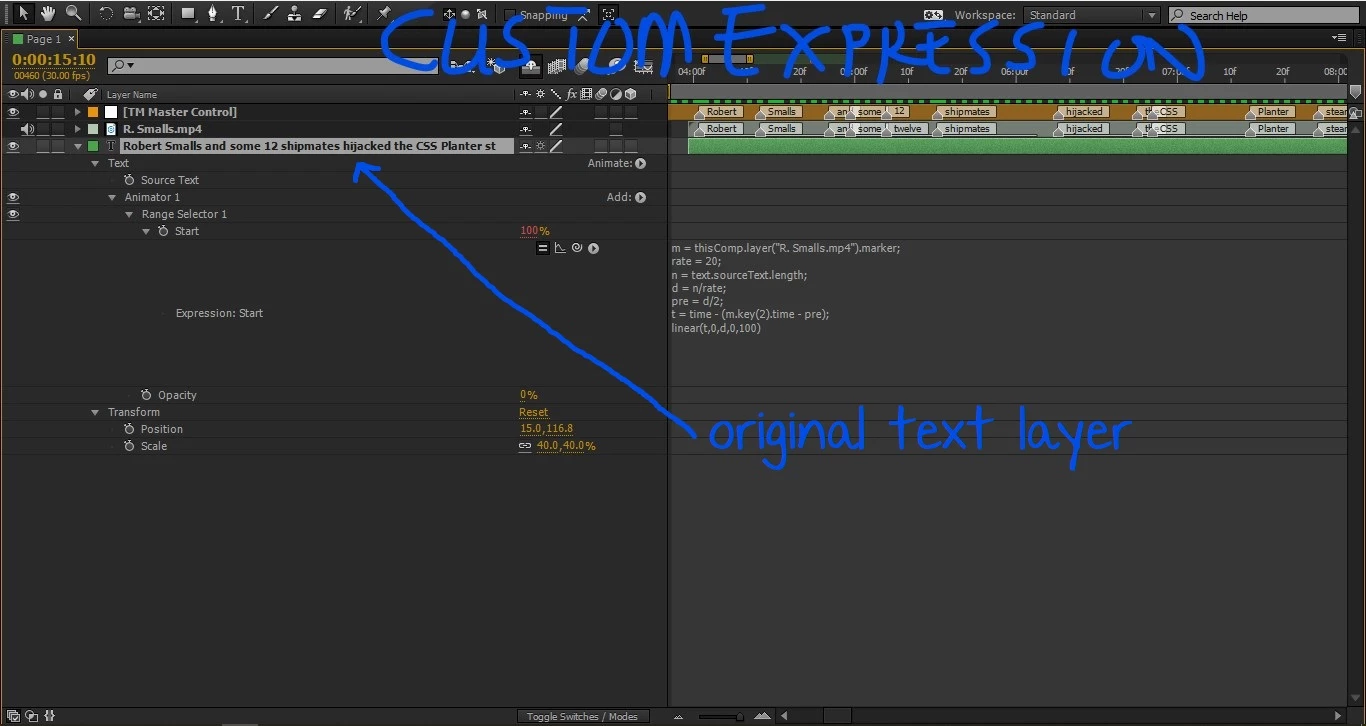


How would I go about achieve the perfect sync or how you'd go about it in your own way?


Thanks

Cheers!!

このトピックへの返信は締め切られました。

返信数 2

Community Expert
February 9, 2020

Your expression does not make any sense at all after line 5. Line 6 of your expression is only pulling in the time of the second marker. It is useless for setting the timing of the animation. 


This is how to return the time of the nearest marker on the layer defined as "m" which is one layer above the current layer.


m = thisComp.layer(index - 1).marker;
m.nearestKey(time).time


I don't have time to fix the expression for you. Most of it doesn't make much sense. You may be able to find some help at http://motionscript.com  (Dan Ebberts) or even with a search of the net. If you didn't write the expression yourself it probably came from an enthusiast that doesn't understand the process. The only thing your expression will do is start advancing the range selector based on the second marker on layer "m."


Even when you get the markers to advance the range selector properly you are going to have to slide the markers around in the timeline a bit to get things to perfectly match up. 


There used to be a feature in Premiere Pro that would analyze speech using Audition and generate an audio track with markers that had each word added to the description. You could just add that audio track to AE and use a simple expression to reveal each word as it was spoken. Unfortunately, Speach analysis is gone now, and it is probably because it just was not used enough. 

TheYates
TheYates作成者
Known Participant
February 9, 2020

Thanks for replying

Please help me out here... I know the expression I have the snapshot is wrong and I have been bugging Dan Ebberts with this for over 2 months now.


I bugged him a little bit more and he gave me this expression to try.


The expression above works, very well but it animates in with word and I wanted characters. (sort of typewritter effect)

I want the words animate in like the in-built typewritter effect in After Effects or like the one in the Mean Tweet video below.


Thank you.

Cheers

Community Expert
February 9, 2020

I don't have time to go through the project right now but changing from words to characters is an option in the Animator>Range Selector>Advanced options of the Animator that has been added to the text layer.

There are options for units based on index or percentage, as well as Based On (shown), Mode, and so on. To get an expression to accurately type on a word as it is spoken you would need to count the total number of characters in each word and type them on using the index or letter-number for each word, or you would have to figure out what percentage each word was of the entire line of text, which would be incredibly difficult. 


You may be able to simplify the task by pulling the next line of text by reading the description value of the marker. You would not enter text in the text layer, you would use the text from the marker and add that to the text layer source text. That might be simpler. 


The easiest, though not automated way to do what you want to do, would be to add a new marker for each word and simply drag each marker along the timeline to set the timing for the start of each word.  The first thing I would do would be to just change the Based On selection in the Animator to Words and start sliding around the markers. I'm guessing that it would take me a couple of hours playing around with a version of Dan's expression to get things to work properly in an automated way. I looked at the thread on Creative Cow and none of the expressions Dan posted are going to count words and fade them up by character. There is a definite disadvantage to not posting a screenshot with all of the modified properties of the layer giving you problems revealed. The expression you want, as indicated by Dan, is going to get very complicated if you want to wipe on each letter. 


Mylenium
Legend
February 9, 2020

Such animation rarely ever looks correct when perfectly timed to the actual spoken words. You need to give the audience time to actually read the words. And the revealing is all about the phonetics and perception of the audio, not the letters. Even short acronyms can sound long due to filler vowels (try saying anything with lots of Ss quickly just for fun for instance) whereas sometimes long words can have silent consonants and such. All that being the case, it's usually the most efficient to just animate such stuff by hand, which in case of AE's text animators should be simple enough.


Mylenium