Exit
  • Global community
    • Language:
      • Deutsch
      • English
      • Español
      • Français
      • Português
  • 日本語コミュニティ
  • 한국 커뮤니티
0

Text not showing

New Here ,
Mar 29, 2018 Mar 29, 2018

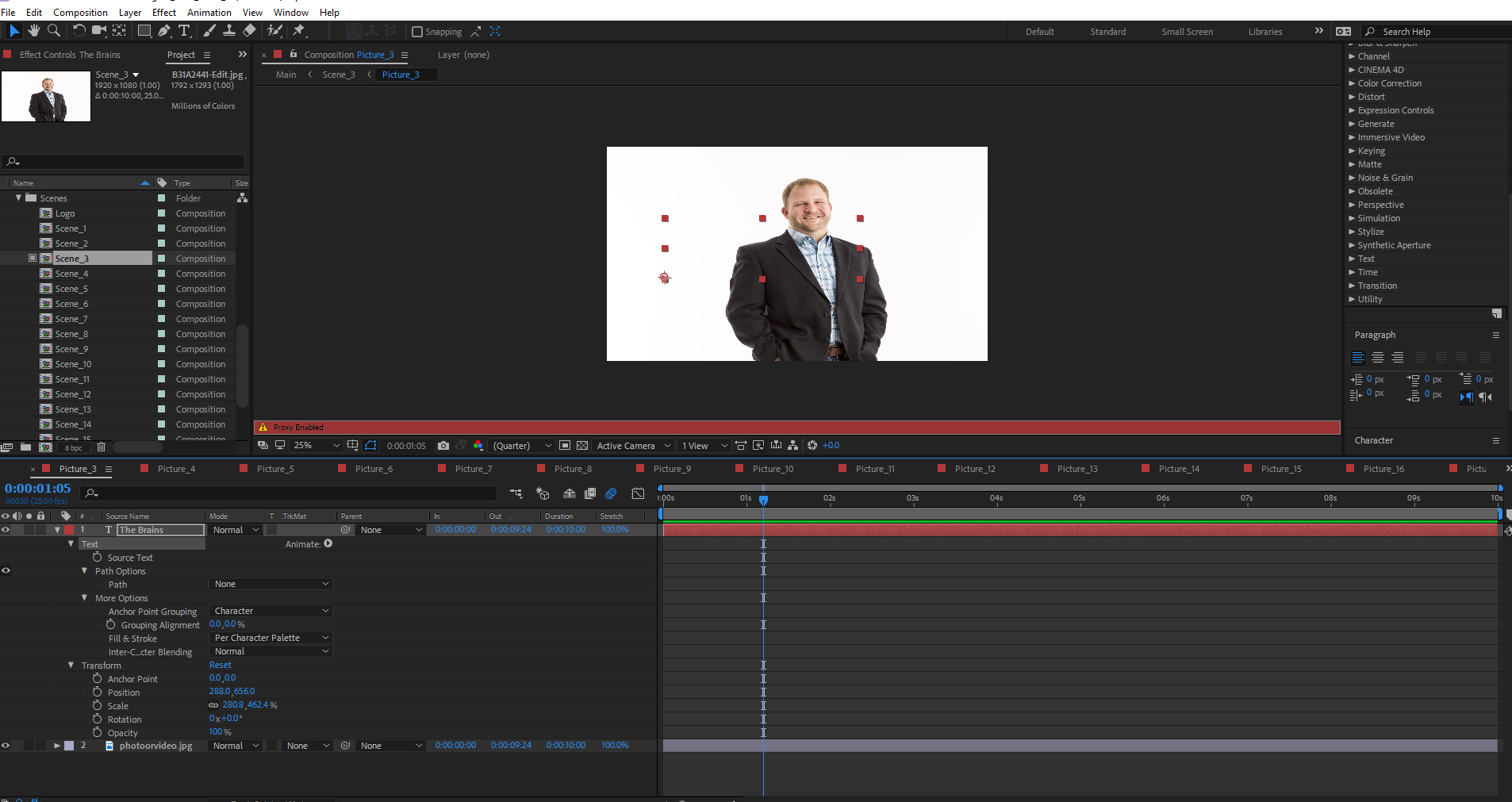
I have made all the changes I can think of, but I can't get the text to show.Capture.PNG

22.6K
Translate
Report
Community guidelines
Be kind and respectful, give credit to the original source of content, and search for duplicates before posting. Learn more
community guidelines
Valorous Hero ,
Mar 29, 2018 Mar 29, 2018

What you've shown seems to look OK. What you've not shown are the Transform properties and Switches Column in the Timeline - check that these are in order. And, do you have one or more Text Animator Groups in your Text Layer?

Very Advanced After Effects Training | Adaptive & Responsive Toolkits | Intelligent Design Assets (IDAs) | MoGraph Design System DEV
Translate
Report
Community guidelines
Be kind and respectful, give credit to the original source of content, and search for duplicates before posting. Learn more
community guidelines
New Here ,
Mar 29, 2018 Mar 29, 2018

No text animationsCapture.PNG

Translate
Report
Community guidelines
Be kind and respectful, give credit to the original source of content, and search for duplicates before posting. Learn more
community guidelines
Community Expert ,
Mar 29, 2018 Mar 29, 2018

If you create a new text layer, does it show up?
If you copy/paste this text layer into a new comp, does it show up?
Do you have any blending modes set on this layer?
Is it a really thin font that might just be disappearing at 1/4 resolution?

Translate
Report
Community guidelines
Be kind and respectful, give credit to the original source of content, and search for duplicates before posting. Learn more
community guidelines
New Here ,
Mar 29, 2018 Mar 29, 2018

If I create a new text layer it does not show up.

If I copy and past it still doesn't show up

There are no blending modes set

The font is set to normal

Even if I move to another comp it still has the same issue.

Translate
Report
Community guidelines
Be kind and respectful, give credit to the original source of content, and search for duplicates before posting. Learn more
community guidelines
Community Expert ,
Mar 29, 2018 Mar 29, 2018

Start a totally new project. New comp. Make a text layer.
Anything?

Translate
Report
Community guidelines
Be kind and respectful, give credit to the original source of content, and search for duplicates before posting. Learn more
community guidelines
New Here ,
Jan 15, 2023 Jan 15, 2023
LATEST

I suspect your scale is over, so the text not visible, try put your transform scale on 100%

Translate
Report
Community guidelines
Be kind and respectful, give credit to the original source of content, and search for duplicates before posting. Learn more
community guidelines
Community Expert ,
Mar 29, 2018 Mar 29, 2018

Show us all Layer Properties please. Character panel too.


Byron.
Translate
Report
Community guidelines
Be kind and respectful, give credit to the original source of content, and search for duplicates before posting. Learn more
community guidelines
Adobe Employee ,
Apr 24, 2018 Apr 24, 2018

Hi JTW,

Did you ever get this issue solved? Did our experts help you solve it? Let us know.

Thanks,
Kevin

Kevin Monahan - Sr. Community & Engagement Strategist – Pro Video and Audio
Translate
Report
Community guidelines
Be kind and respectful, give credit to the original source of content, and search for duplicates before posting. Learn more
community guidelines
New Here ,
Jun 20, 2019 Jun 20, 2019

nope, still haven't solved till now. help pls. thank you very much

Translate
Report
Community guidelines
Be kind and respectful, give credit to the original source of content, and search for duplicates before posting. Learn more
community guidelines
Valorous Hero ,
Jun 22, 2019 Jun 22, 2019

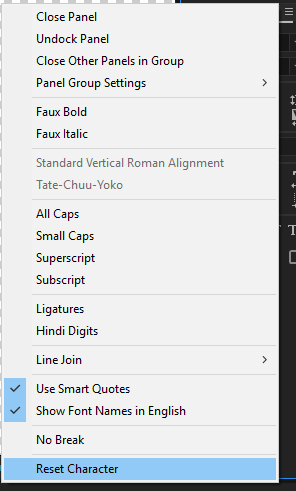
Use the reset option in the Character Panel's menu - see image below.
Very Advanced After Effects Training | Adaptive & Responsive Toolkits | Intelligent Design Assets (IDAs) | MoGraph Design System DEV
Translate
Report
Community guidelines
Be kind and respectful, give credit to the original source of content, and search for duplicates before posting. Learn more
community guidelines
LEGEND ,
Jun 20, 2019 Jun 20, 2019

Without being able to see the Character pane, I'd say you need to re-set it.

Translate
Report
Community guidelines
Be kind and respectful, give credit to the original source of content, and search for duplicates before posting. Learn more
community guidelines
Community Expert ,
Jun 20, 2019 Jun 20, 2019
  1. Select the text layer
  2. Press the U key twice
  3. Check modified properties
  4. Check the Character Panel

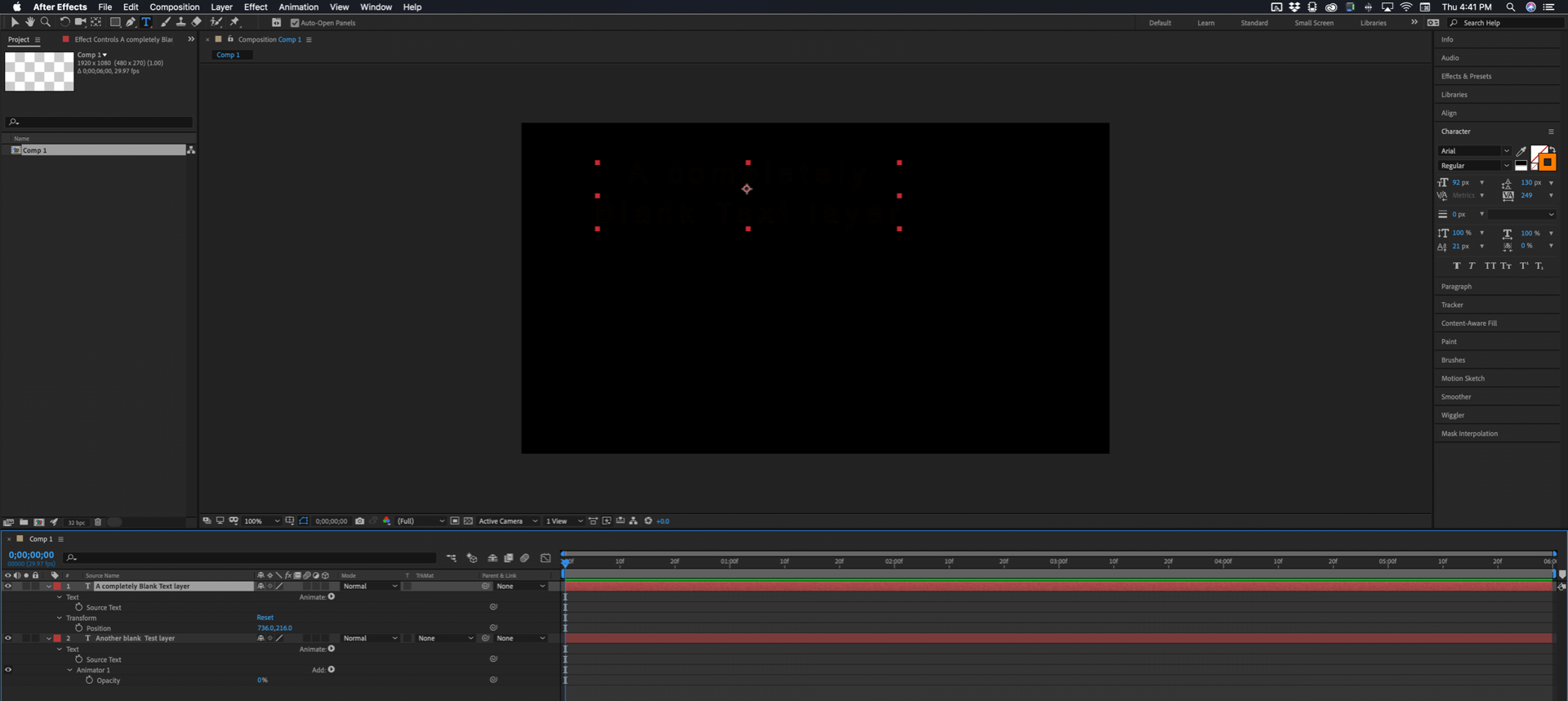
You would get that result if you had added a text animator and set the opacity to 0. You would also get that result of you turned off the fill color in the Character Panel.
Screenshot_2019-06-20 16.40.58_CK7FS5.png

Top selected text layer has no fill and the stroke is set to zero. The bottom text layer has a text animator for opacity.

This is not a bug, this is user error.

Translate
Report
Community guidelines
Be kind and respectful, give credit to the original source of content, and search for duplicates before posting. Learn more
community guidelines
New Here ,
Oct 12, 2021 Oct 12, 2021

Didn't work, pretty sure bug and not user error

Translate
Report
Community guidelines
Be kind and respectful, give credit to the original source of content, and search for duplicates before posting. Learn more
community guidelines