


Text style changing after export

Copy link to clipboard
Copied
I am running AE CC 2018, Version 15.0.0 on an Alienware Aurora R6, i7-7700K CPU @ 4.20GHz with 32 gb of ram, running Windows 10. 64 bit.
I have a large AE file that I am trying to export into a JPEG sequence (render farm) with 8 other computers of the exact same specs. The render process itself starts with no errors, no missing fonts, and all the computers are connected over a network server. All the computers have the latest version of AE installed, as well as the same fonts synced though typekit.
However, the exported JPEG sequence is not consistent with the live preview of the project in AE. In every few frames of the export, the fonts we used change in weight, swap styles with other fonts we used in other parts of the video, or change to a random serif font that we did not use in the project at all. Examples attached below.
This is the third time we have tried to export this project, and the same error has come up the last two times.
 Correct font
 Incorrect font


 12
Replies
12
12
Replies
12


Copy link to clipboard
Copied
The only time I ever get weird errors like that is when my cache is full. But I've never had happen on an export render, only in preview.
So maybe it is something as simple as cleaning your caches?


Copy link to clipboard
Copied
You have not got the exact same fonts installed on all of your render nodes. It could have the same name but be from a different manufacturer or it could be corrupted. If clearing the cache does not do it make sure that your fonts are correct. If you still can't solve the problem convert the fonts to shape layers in AE.
Copy link to clipboard
Copied
They are all Typekit fonts, synced with adobe with all styles installed, so we know they are correct.
Thanks for the suggestion to convert the fonts to shape layers, it may be an option but we will have to go back and make edits on the text later, so we are trying to avoid that.
Copy link to clipboard
Copied
If it were me I would only re-render the frames that are bad. It's pretty easy to do with an image sequence. Just render them on a machine that works.
Copy link to clipboard
Copied
The frames that come out "bad" change during each export, and there are 78,111 frames. How would you go about exporting only the ones that are bad, when over half are, but there is no particular order or pattern to the error.
Unfortunately, we have no idea which of the 9 machines "work". They are all identical machines running the same versions of AE. We did a test on a separate group of machines and had the same error.
Copy link to clipboard
Copied
Just set up the render cue normally. In render settings select the frame number that is bad for the duration, duplicate the render and choose the next frame number. I also always have my comps set to frames instead of timecode before I send them to the render cue. It just makes life simpler.
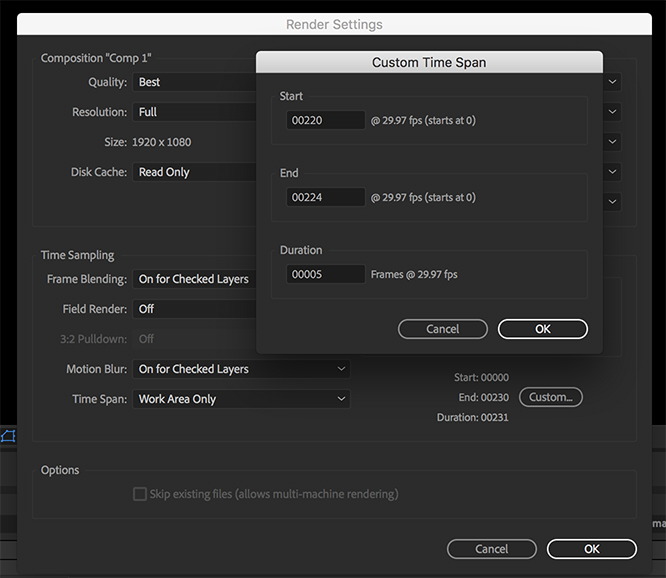
I always render image sequences for any project that is going to take more than about 15 minutes to render so if anything happens I can go back and pick up where it left off or replace the 4 frames (yes I got that from a client recently) that they wanted a little more Glow applied to.


Copy link to clipboard
Copied
Hi Christiana Rivers,
Did you ever solve this issue? If so, let us know how. If not, tell us if you still need assistance.
Thanks,
Kevin
Copy link to clipboard
Copied
Thank you for following up. No, we were never able to solve this issue. We had to export it a totally different (and longer) way. Any tips or suggestions would be appreciated for future projects.
Since there were over 78 thousand frames, and over half had the error, in no apparent pattern, we were unable to solve the problem with any of the commenters suggestions.
Copy link to clipboard
Copied
Sorry for this negative experience, ChristianaRivers. I would suggest that you point the developers to this thread by filing a bug here. If anyone else can offer feedback, please do so.
Thanks,
Kevin

Copy link to clipboard
Copied
Take note that converting a Text Layer to Shapes/Masks means you lose any Text Animation Operators you may have applied to the Text Layer. I suggest you commit to a short render test and this do not use a Typekit font. If the problem is solved in this manner then you should send in a Bug Report.
Copy link to clipboard
Copied
Reading through this thread again I'm wondering: In order for typekit fonts to be available you have to be connected to the adobe cloud, correct? So maybe some of your render nodes for some reason do not have those typekit fonts available? Maybe they are not connected to the cloud or lose connectivity momentarily during rendering and so the typekit font is not available for that frame? This would also account for the "random" (in quotes because there's really no such thing) switching of fonts.

Copy link to clipboard
Copied
I've encountered the same problem. I've used media encoder to render the same AEP file. Now the error has been resolved. But when using after effects's inbuilt render, I'm still encountering the same problem.


Get ready! An upgraded Adobe Community experience is coming in January.
Learn more
 AdChoices