
Exit
  • Global community
    • Language:
      • Deutsch
      • English
      • Español
      • Français
      • Português
  • 日本語コミュニティ
  • 한국 커뮤니티
0

Time remap multiple keyframe between markers

New Here ,
Jul 01, 2013 Jul 01, 2013

Hello to all!

First of all, just want to apologize for my basic English. I will try to explain as clearly as I can.

I have a complex animation layer, which is precompose in another comp which I want to run this animation with markers. If the animation is comprised of two key frames is no problem. You can control the animation of a number of ways, such as using valueAtTime() or linear() ease() function.But when more than two keyframes need to allocate between the two markers is not so easy problem to solve. I tried to change a little Dan Ebberts'(by the way, thanks to him for all!) expression, but still did not work.

n = 0;

m = thisComp.marker;

if (m.numKeys > 0){

  n = m.nearestKey(time).index;

  if (m.key(n).time > time) n--;

}

if (n==1){

mStart = m.key(n).time

mDelta = ((m.key(n+1).time - mStart)/numKeys)

for(i = 1; i <= numKeys-1; i++){

  kVal1 = valueAtTime(key(i).time)

  kVal2 = valueAtTime(key(i+1).time)

  linear(time, mStart+(mDelta*i), mStart+(mDelta*(i+1)), kVal1, kVal2);

   }

}else{0

}

Image for illustration
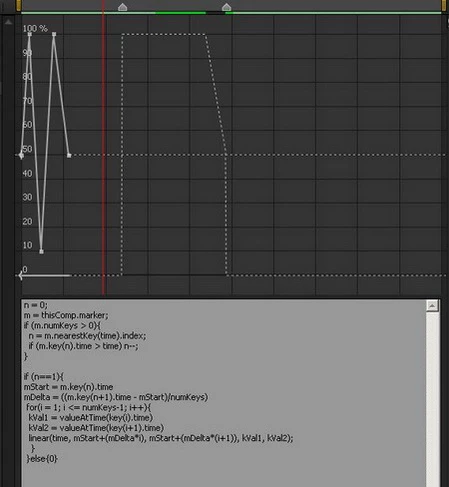
expFaill.jpg

If anyone can find a desire to understand problemme guide me in the right direction. Thanks in advance.

TOPICS
Expressions
1.9K
Translate
Report
Community guidelines
Be kind and respectful, give credit to the original source of content, and search for duplicates before posting. Learn more
community guidelines

correct answers 1 Correct answer

Community Expert , Jul 01, 2013 Jul 01, 2013

I think you just need to remap the time, so this should be close:

m = thisComp.marker;

if (m.numKeys > 1 && numKeys > 1){

  t1m = m.key(1).time;

  t2m = m.key(2).time;

  t1k = key(1).time;

  t2k = key(numKeys).time;

  t = linear(time,t1m,t2m,t1k,t2k);

  valueAtTime(t)

}else{

  value

}

Dan

Translate
LEGEND ,
Jul 01, 2013 Jul 01, 2013

Well, frankly: Why bother? Simply split the layer and keyframe it manually. Your screenshot doesn'tr show anything that would rationally explain why expressions should even be necessary.

Mylenium

Translate
Report
Community guidelines
Be kind and respectful, give credit to the original source of content, and search for duplicates before posting. Learn more
community guidelines
New Here ,
Jul 01, 2013 Jul 01, 2013

Hi Mylenium!

The reason due to which I am forced to use an expression that I do not the final product, and that sort of designer to create operational schedules for local TV. I'm trying to achieve this level of automation in which not even a dedicated AfterEffect person can easily assemble ready to release a product.

the picture above was just for clarity, here's this from the live project

expFaill(in detail).JPG

Translate
Report
Community guidelines
Be kind and respectful, give credit to the original source of content, and search for duplicates before posting. Learn more
community guidelines
Community Expert ,
Jul 01, 2013 Jul 01, 2013

I think you just need to remap the time, so this should be close:

m = thisComp.marker;

if (m.numKeys > 1 && numKeys > 1){

  t1m = m.key(1).time;

  t2m = m.key(2).time;

  t1k = key(1).time;

  t2k = key(numKeys).time;

  t = linear(time,t1m,t2m,t1k,t2k);

  valueAtTime(t)

}else{

  value

}

Dan

Translate
Report
Community guidelines
Be kind and respectful, give credit to the original source of content, and search for duplicates before posting. Learn more
community guidelines
New Here ,
Jul 01, 2013 Jul 01, 2013
LATEST

Hi Dan! I am very glad that you have responded. It looks like everything is working just fine. I'm like extremely under complicated the task itself))) As always beautiful and elegant code! Thank you again!

expDun.JPG

Translate
Report
Community guidelines
Be kind and respectful, give credit to the original source of content, and search for duplicates before posting. Learn more
community guidelines